Corta el costo y la latencia de LLM autoalojado con el agente de caché de clave-valor distribuido skill
Cut self-hosted LLM cost and latency with the distributed KV caching agent skill
Ravi Yadav
Los clientes cada vez más autoalojan grandes modelos de lenguaje (LLM) en GPUs para controlar el costo, la precisión y la latencia. Sin embargo, el autoalojamiento a menudo significa pagar por el trabajo redundante de la GPU porque las pequeñas cachés aisladas en cada servidor no pueden contener ni compartir el contexto creciente que los agentes de inteligencia artificial y las aplicaciones de chat reenvían. Considere un asistente de inteligencia artificial legal que puede acumular cientos de miles de tokens de historia de casos en cada conversación. Cuando un abogado regresa a un hilo después del almuerzo, las respuestas del LLM pueden tardar minutos. El servidor GPU que recibe la solicitud no tiene esa historia en su memoria. Así, el GPU recalcula los estados de atención de clave-valor (KV) para todos esos tokens, un paso llamado prefill, antes de escribir una palabra. El mismo patrón ralentiza a los agentes de codificación reanudados, asistentes de inteligencia artificial agente y asistentes de preguntas y respuestas de documentos. La caché de KV distribuida con Amazon ElastiCache puede reducir los costos de inferencia de LLM autoalojados hasta un 40% y el tiempo hasta el primer token (TTFT) hasta un 80%. La caché de KV distribuida extiende las cachés locales de la GPU con un nivel compartido junto a su flota de GPU, por lo que cualquier servidor puede reutilizar el estado de KV durante días a través de sesiones, cambios de enrutamiento y fallas del servidor. “Announcing distributed KV caching for self-hosted LLMs with Amazon ElastiCache” profundiza en los detalles técnicos y las pruebas de rendimiento.
Esta publicación detalla la habilidad de caché de KV distribuida en la Agent Toolkit for AWS. Con esta habilidad, puede evaluar y configurar la caché de KV distribuida desde dentro de su agente de codificación en unos pocos prompts. La habilidad guía al agente a través de la comprobación de si su carga de trabajo se beneficia de la caché de KV distribuida, la configuración de un clúster de caché para una carga de trabajo de prueba o producción y la solución de problemas de la caché de inferencia de LLM. La habilidad funciona con Kiro, Claude Code, OpenAI Codex y otros agentes de codificación que admiten habilidades de agente. Pasamos por cómo funciona la habilidad con cuatro conversaciones: diagnosticar un token lento, dimensionar y precio de la caché, configurarla y solucionar una transferencia fallida.
¿Por qué una habilidad para la caché de KV y qué puede hacer?
Los beneficios para su carga de trabajo dependen de características como los modelos LLM utilizados, los patrones de tráfico de usuarios y las opciones de enrutamiento de solicitudes, y pueden ser complejos de estimar. Creamos la herramienta KVTrace para obtener estimaciones cercanas a los beneficios para su carga de trabajo, desde su propio modelo y tráfico antes de implementar cualquier infraestructura, sin cargo adicional. La habilidad simplifica esta evaluación y la configuración, y guía a su agente de codificación a través de las siguientes mejores prácticas antes de cambiar nada:
Una verificación de ajuste antes de cualquier gasto. El agente lee su flota de GPU con una llamada de solo lectura describe-instances y cuenta las interfaces de Elastic Fabric Adapter (EFA). Solo solicita lo que no puede ver: motor, modelo, tamaño de paralelismo de tensor (TP), tipo de datos KV, precio del servidor y con qué frecuencia se repiten las solicitudes. Se detiene y explica cuando algo no encaja.
Números de su carga de trabajo. Para solicitudes cortas, cargar el estado KV puede tomar más tiempo que volver a calcularlo. Por encima de una cierta longitud de solicitud (el punto de corte), la lectura gana. Ese punto de corte y con qué frecuencia se repiten sus solicitudes deciden si la caché vale su precio. El agente estima los ahorros de su propio tráfico con KVTrace, sin cargo adicional, y se detiene si no cubren el costo de la caché. Cada número indica de dónde proviene.
Administrar la configuración en servidores de inferencia con la pila que ya ejecuta. El agente agrega el conector LMCache a su motor vLLM o SGLang existente, incluidos los trabajadores vLLM bajo frameworks de servicio como llm-d y Ray Serve. Mantiene su enrutamiento y la configuración del motor, y establece los servidores en su flota de inferencia en un mecanismo de ID KV (hash y semilla) y un tipo de datos KV explícito. La configuración coincidente evita las discrepancias de claves, donde cada servidor escribe el estado KV que los demás no pueden encontrar.
Implementa las mejores prácticas. Antes del tráfico de producción, el agente vacía los niveles locales y verifica que dos ejecuciones cargadas en caché produzcan la misma salida, porque una discrepancia en la disposición puede producir contadores de aciertos saludables y respuestas incorrectas. La habilidad guía al agente para buscar una aprobación explícita para operaciones de alto impacto, como crear, cambiar o eliminar recursos.
Requisitos previos
Estos flujos, desde la estimación de beneficios hasta la configuración, requieren lo siguiente:
Un agente de codificación que admita habilidades de agente, como Kiro o Claude Code.
Instancias de GPU que admitan la escritura de EFA RDMA, como p5.
LMCache 0.5.8rc1 o posterior y vLLM 0.11.1 o posterior (SGLang 0.5.13 o posterior).
ElastiCache para Valkey 9.1 o posterior, en nodos cache.i8ge.48xlarge (si se configura la caché).
Flujo 1: ¿Puede ayudar la caché de KV distribuida?
Le dimos al agente la siguiente solicitud: “Mi flota de vLLM sirve a un asistente legal con contextos de 64K tokens en instancias p5. Las conversaciones de retorno tardan 13 segundos para el primer token porque la GPU recomputa la historia de conversación completa en cada turno. ¿Cómo puedo solucionar esto?”
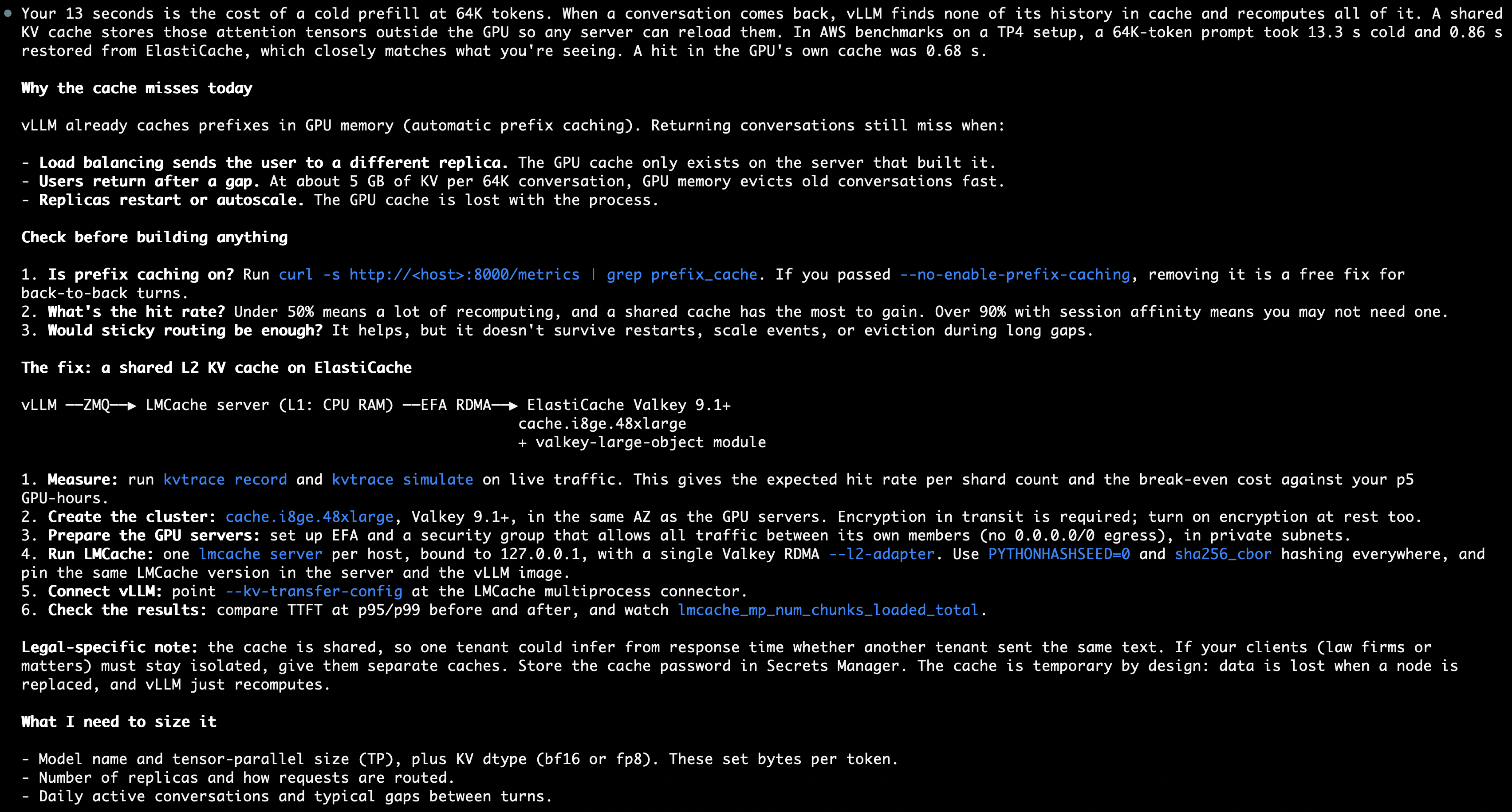
El agente coincide con la solicitud y la habilidad, y en Kiro, solicita aprobación antes de cargarla. La respuesta identifica que la latencia se debió a la precarga en frío, y tres cosas en la respuesta son importantes para una implementación real. Primero, busca soluciones que no requieren nueva infraestructura. Si desactivó la caché de prefijo, volver a activarla puede acelerar las vueltas consecutivas. Si la tasa de aciertos de la caché de prefijo de la GPU ya está por encima del 90% con afinidad de sesión, es posible que no necesite una caché KV compartida. Segundo, identifica las restricciones específicas del asistente de inteligencia artificial legal. Una caché KV compartida puede permitir que un inquilino sepa por los tiempos de respuesta si otro inquilino envió el mismo texto. Los casos que deben permanecer aislados obtienen cachés separadas, y los inquilinos que comparten una caché agregan su propio ID al hash KV. Tercero, no adivina el tamaño. Solicita el modelo y el tamaño de TP, el tipo de datos de KV, la cuenta de réplicas y enrutamiento, y cuánto tiempo esperan los usuarios entre turnos.
Figura 1: El diagnóstico y la arquitectura propuesta para el asistente legal
Flujo 2: Estimación de ahorros
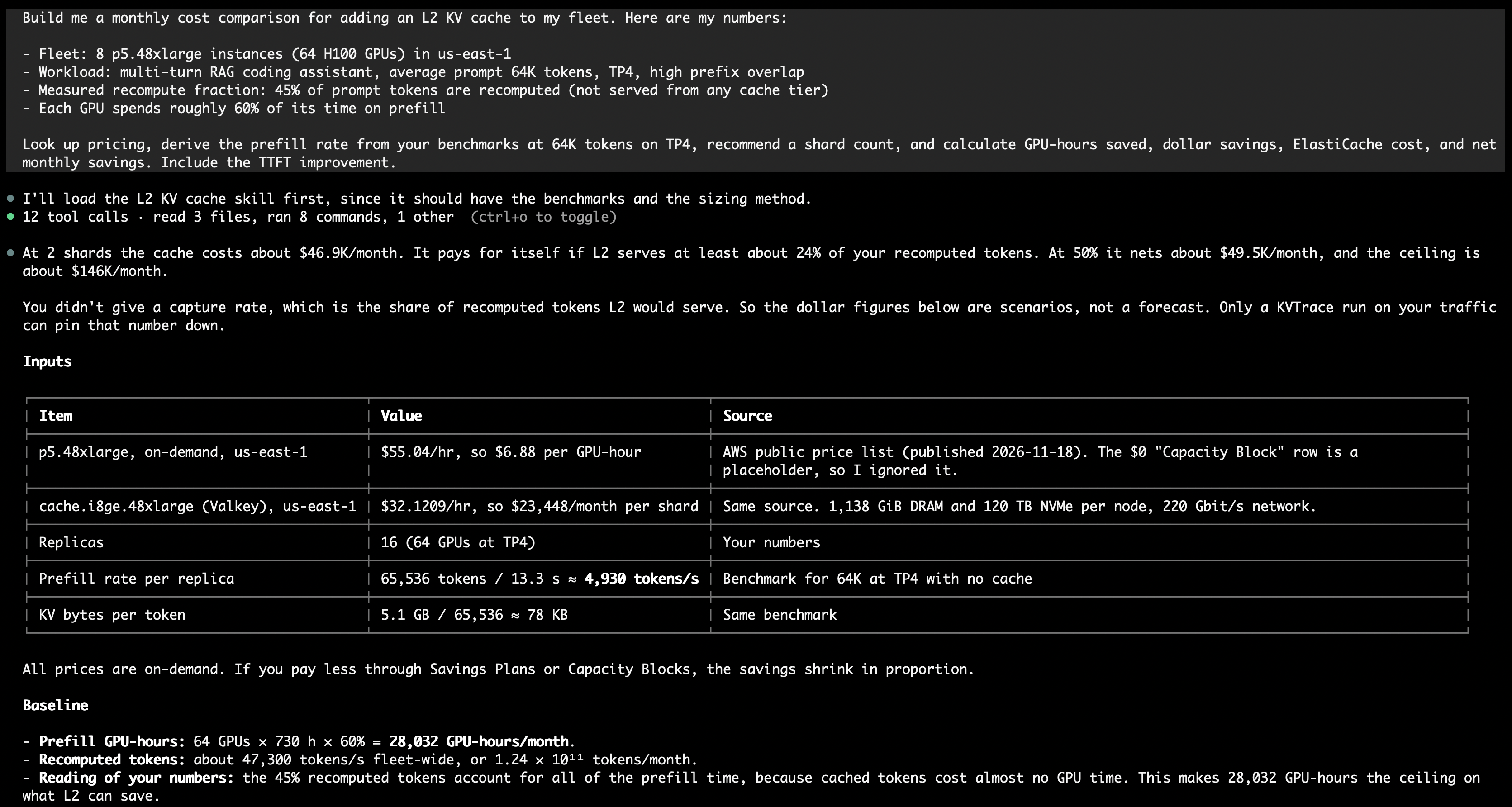
Para dimensionar los ahorros, le dimos al agente un ejemplo de flota de 8 instancias p5 que sirven solicitudes de 64,000 tokens para un asistente de generación aumentada de recuperación (RAG) de varias vueltas. El agente buscó los precios de los nodos de GPU y caché, y derivó la tasa de precarga y el tamaño de KV a partir de benchmarks. Finalmente, el agente recomendó dos nodos de caché i8ge.48xlarge para caché KV distribuida. La siguiente figura muestra el resumen del agente y las entradas que utilizó.
Figura 2: Resumen y entradas del agente. Buscó ambos precios en la lista de precios de AWS y explica cómo llegó a la cifra de recomputación
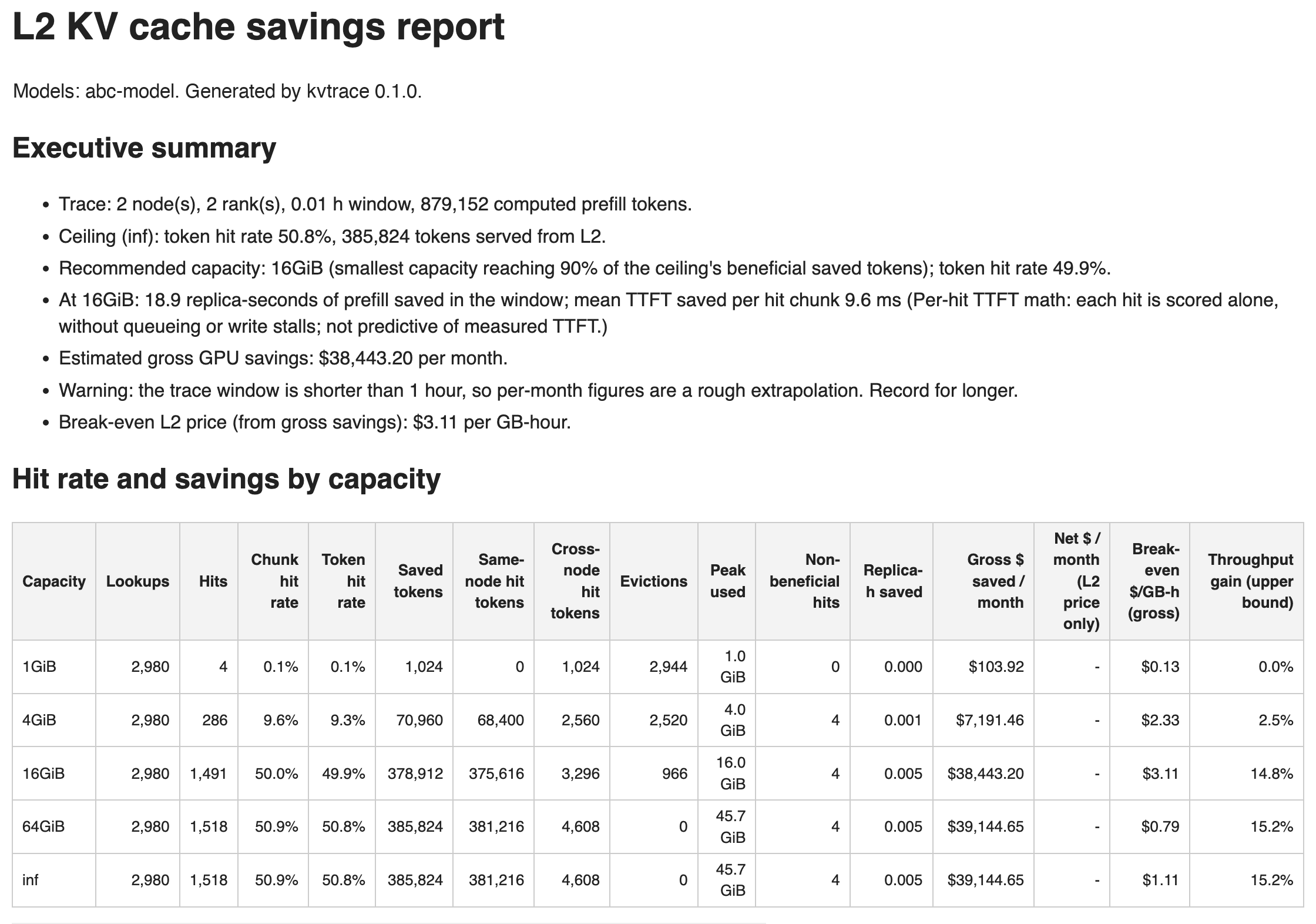
No proporcionamos una tasa de aciertos de caché, que es la proporción de tokens recomputados que la caché serviría. El agente presenta escenarios y recomienda una ejecución de KVTrace para identificar la tasa de aciertos de caché. KVTrace registra los eventos de caché KV desde vLLM o SGLang. Luego, los reproduce sin conexión contra una caché KV compartida de cada tamaño de candidato. El registrador nunca escribe IDs de token o texto de prompt. Las trazas contienen hashes de bloque y recuentos de token. Los hashes de bloque provienen del contenido del token, así que pase --anonymize-key-file cuando sus prompts sean sensibles. La habilidad registra en cada servidor GPU para una ventana representativa, como un día laboral completo. El agente también nota que el tiempo de GPU liberado se convierte en dólares solo si se ejecutan menos servidores o se sirve más tráfico en los mismos.
Figura 3: La parte superior de un informe de KVTrace desde tráfico de demostración sintético. Recomienda la capacidad más pequeña que alcanza el 90% del techo de ahorros.
Flujo 3: Configuración de una caché KV distribuida
Promptamos al agente con: “Configurar una caché L2 KV compartida para inferencia de LLM, desde cero”. Antes de crear nada, el agente solicita su confirmación para configurar el número de nodos de caché sugerido en su zona de disponibilidad, al precio estimado. Una vez confirmado, crea el grupo de seguridad correcto con permisos de EFA y un clúster de Valkey 9.1 que utiliza un grupo de parámetros personalizado con políticas de expulsión de caché. LMCache obtiene su propio usuario de caché, con la contraseña en AWS Secrets Manager. El agente prepara los servidores GPU y inicia un servidor LMCache por cada servidor GPU. Luego verifica el clúster con un objeto de prueba pequeño y confirma que las solicitudes repetidas cargan su estado KV desde la caché a través de Remote Direct Memory Access (RDMA). En una flota de GPU, la habilidad verifica la participación L2 medida contra la predicción de KVTrace. Para la configuración completa con cada comando, consulte Introducción a la caché de KV distribuida en la documentación de Amazon ElastiCache.
Flujo 4: Solución de problemas
Prompt: “Mi servidor LMCache se conecta al clúster de ElastiCache y BLOB.RDMA_HELLO tiene éxito, pero las transferencias de datos reales están fallando. INFO largeobj muestra rdma_write_errors en aumento. ¿Qué está mal?”
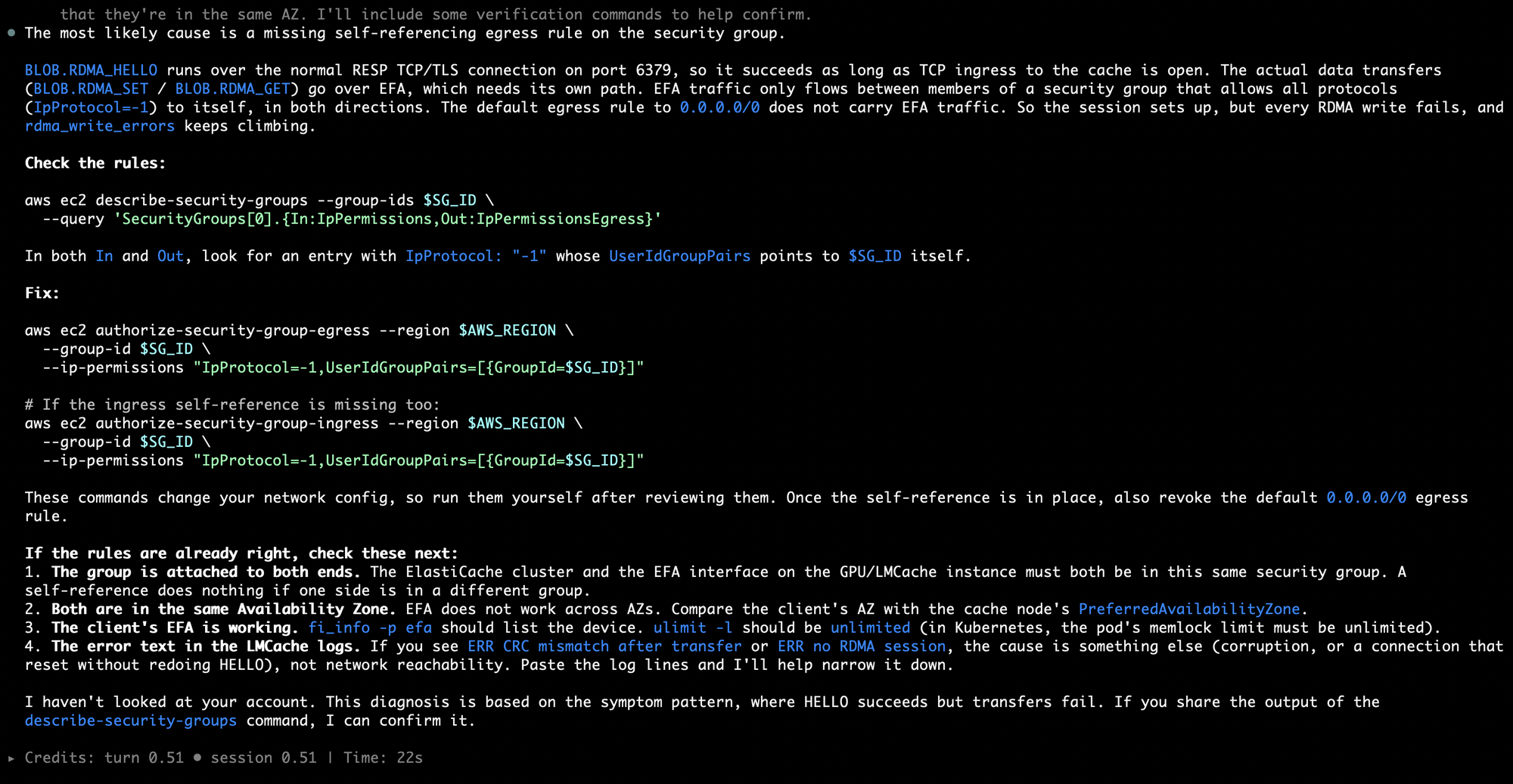
Siguiendo la guía de solución de problemas de la habilidad, el agente razona desde el patrón de síntomas e identifica la causa probable como un grupo de seguridad que bloquea el tráfico de EFA entre sus propios miembros. Proporciona comandos para verificar y corregir la regla.
Figura 4: El agente explica el síntoma, luego proporciona comandos para verificar y corregir el grupo de seguridad
Comenzar
Puede obtener la habilidad de caché de clave-valor distribuida o el servidor AWS MCP desde la Herramienta de agente para AWS. Luego, describa su problema o pida a su agente de IA que reduzca los costos y la latencia en su flota de GPU para comenzar. Para obtener más información sobre la caché de clave-valor distribuida con ElastiCache y las pruebas de rendimiento, consulte el blog de AWS. Puede ver cómo empezar a trabajar con la interfaz de línea de comandos de AWS (AWS CLI) en la documentación de Amazon ElastiCache y obtener más información sobre KVTrace en el repositorio de GitHub.
Acerca de los autores
Customers increasingly self-host large language models (LLMs) on GPUs for control over cost, accuracy, and latency. However, self-hosting often means paying for redundant GPU work because small, isolated caches on each server can’t hold or share the growing context AI agents and chat applications resend. Consider a legal AI assistant that can accumulate hundreds of thousands of tokens of case history in each conversation. When a lawyer returns to a thread after lunch, responses from the LLM can take minutes. The GPU server that picks up the request has none of that history in its memory. So, the GPU recomputes the key-value (KV) attention states for all of those tokens, a step called prefill, before it writes a word. The same pattern slows down resumed coding agents, agentic AI assistants, and document Q&A assistants. Distributed KV caching with Amazon ElastiCache can cut self-hosted LLM inference costs by up to 40% and time to first token (TTFT) by up to 80%. Distributed KV caching extends GPU-local caches with a shared tier beside your GPU fleet so any server can reuse KV state for days across sessions, routing shifts, and server failures. “Announcing distributed KV caching for self-hosted LLMs with Amazon ElastiCache” dives into the technical details and the performance benchmarks.
This post details the distributed KV caching skill in the Agent Toolkit for AWS. With this skill, you can evaluate and set up distributed KV caching from within your coding agent in a few prompts. The skill guides the agent through checking whether your workload benefits from distributed KV caching, setting up a cache cluster for testing or production workload, and troubleshooting your LLM inference caching. The skill works with Kiro, Claude Code, OpenAI Codex, and other coding agents that support Agent Skills. We walk through how the skill works with four conversations: diagnosing a slow first token, sizing and pricing the cache, setting it up, and fixing a failed transfer.
Why a skill for KV caching and what can it do?
The benefits for your workload depend on characteristics such as LLM models used, user traffic patterns, and prompt routing choices, and can be complex to estimate. We created the KVTrace tool to get close estimates of the benefits for your workload, from your own model and traffic before you deploy any infrastructure, at no additional charge. The skill simplifies this evaluation and the setup, and guides your coding agent through the following best practices before changing anything:
A fit check before any spend. The agent reads your GPU fleet with a read-only describe-instances call and counts Elastic Fabric Adapter (EFA) interfaces. It asks only for what it can’t see: engine, model, tensor-parallel (TP) size, KV data type, server price, and how often prompts repeat. It stops and explains when something doesn’t fit.
Numbers from your workload. For short prompts, loading KV state can take longer than computing it again. Above a certain prompt length (the cutover point), the read wins. That cutover and how often your prompts repeat decide whether the cache is worth its price. The agent estimates savings from your own traffic with KVTrace, at no additional charge, and stops if they don’t cover the cache’s cost. Every number says where it came from.
Manage configuration across inference servers with the stack you already run. The agent adds the LMCache connector to your existing vLLM or SGLang engine, including vLLM workers under serving frameworks such as llm-d and Ray Serve. It keeps your routing and the engine’s settings and sets the servers in your inference fleet to one KV ID mechanism (hash and seed) and an explicit KV data type. Matching settings avoid key mismatches, where each server writes KV state the others can’t find.
Implements best practices. Before production traffic, the agent empties the local tiers and checks that two cache-loaded runs give the same output, because a layout mismatch can produce healthy hit counters and wrong answers. The skill guides the agent to seek explicit approval for high-impact operations such as creating, changing, or deleting resources.
Prerequisites
These flows, from estimating benefits to setup, require the following:
A coding agent that supports Agent Skills, such as Kiro or Claude Code.
GPU instances that support EFA RDMA write, such as p5.
LMCache 0.5.8rc1 or later and vLLM 0.11.1 or later (SGLang 0.5.13 or later).
ElastiCache for Valkey 9.1 or later, on cache.i8ge.48xlarge nodes (if setting up the cache).
Flow 1: Can distributed KV caching help?
We gave the agent this prompt: “My vLLM fleet serves a legal assistant with 64K-token contexts on p5 instances. Returning conversations take 13 seconds for the first token because the GPU recomputes the full conversation history every turn. How do I fix this?”
The agent matches the request to the skill and, in Kiro, asks for approval before loading it. The answer identifies that the latency was caused by cold prefill, and three things in the answer matter for a real deployment. First, it checks for fixes that need no new infrastructure. If you turned off prefix caching, turning it back on can speed up back-to-back turns. If the GPU prefix cache hit rate is already above 90% with session affinity, you might not need a shared KV cache. Second, it identifies constraints specific to the legal AI assistant. A shared KV cache can let one tenant tell from response times whether another tenant sent the same text. Cases that must stay isolated get separate caches, and tenants that share a cache add their own ID to the KV hash. Third, it doesn’t guess the size. It asks for the model and TP size, KV data type, replica count and routing, and how long users wait between turns.
Figure 1: The diagnosis and proposed architecture for the legal assistant
Flow 2: Estimating savings
To size the savings, we gave the agent an example fleet of 8 p5 instances that serve 64,000-token prompts for a multi-turn retrieval-augmented generation (RAG) assistant. The agent looked up the GPU and cache node prices and derived the prefill rate and KV size from benchmarks. Finally, the agent recommended two cache.i8ge.48xlarge nodes for distributed KV caching. The following figure shows the agent’s summary and the inputs it used.
Figure 2: The agent’s summary and inputs. It looked up both prices in the AWS price list and explains how it arrived at the recompute figure
We didn’t provide a cache hit rate, which is the share of recomputed tokens the cache would serve. The agent therefore presents scenarios and recommends a KVTrace run to identify the cache hit rate. KVTrace records the KV cache events from vLLM or SGLang. It then replays them offline against a shared KV cache of each candidate size. The recorder never writes token IDs or prompt text. Traces hold block hashes and token counts. Block hashes come from token content, so pass --anonymize-key-file when your prompts are sensitive. The skill records on every GPU server for a representative window, such as a full business day. The agent also notes that freed GPU time turns into dollars only if you run fewer servers or serve more traffic on the same ones.
Figure 3: The top of a KVTrace report from synthetic demo traffic. It recommends the smallest capacity that reaches 90% of the savings ceiling.
Flow 3: Setting up a distributed KV cache
We prompted the agent with: “Set up a shared L2 KV cache for LLM inference, starting from scratch.” Before it creates anything, the agent requests your confirmation to set up the suggested cache node count in your Availability Zone, at the estimated price. Once confirmed, it creates the right security group with EFA permissions, and a Valkey 9.1 cluster that uses a custom parameter group with caching eviction policies. LMCache gets its own cache user, with the password in AWS Secrets Manager. The agent prepares the GPU servers and starts one LMCache server per GPU server. Then it checks the cluster with a small test object and confirms that repeated prompts load their KV state from the cache over Remote Direct Memory Access (RDMA). On a GPU fleet, the skill checks the measured L2 share against the KVTrace prediction. For the full setup with every command, see Getting started with distributed KV caching in the Amazon ElastiCache documentation.
Flow 4: Troubleshooting
Prompt: “My LMCache server connects to the ElastiCache cluster and BLOB.RDMA_HELLO succeeds, but actual data transfers are failing. INFO largeobj shows rdma_write_errors climbing. What’s wrong?”
Following the skill’s troubleshooting guide, the agent reasons from the symptom pattern and identifies the likely cause as a security group that blocks EFA traffic between its own members. It provides you commands to check and fix the rule.
Figure 4: The agent explains the symptom, then gives commands to check and fix the security group
Get started
You can get the distributed KV caching skill or the AWS MCP Server from the Agent Toolkit for AWS. Then describe your problem or ask your AI agent to cut costs and latency on your GPU fleet to get started. To learn more about distributed KV caching with ElastiCache and the performance benchmarks see the AWS blog. You can see getting started with the AWS Command Line Interface (AWS CLI) at Amazon ElastiCache documentation and learn more about KVTrace at the GitHub repo.
About the authors
¿Tiene un proyecto de software o plataforma SaaS en mente?
Hable directamente con nuestros arquitectos de software en SoftAndino. Le brindamos asesoría técnica y cotización inmediata sin compromiso.