Entrenamiento distribuido con Ray Train DLCs y EFA en EKS
Distributed training with Ray Train DLCs and EFA on EKS
Sunita Koppar
Lo que generalmente impide que el entrenamiento de PyTorch se escalable a un cluster es el contenedor, no el código del modelo. Cada contenedor necesita el mismo runtime de CUDA, una versión de PyTorch compilada contra él, NCCL (Biblioteca de Comunicaciones Colectivas de NVIDIA), las bibliotecas de espacio de usuario de Elastic Fabric Adapter (EFA), el plugin AWS OFI NCCL que conecta NCCL con EFA, y una versión de Ray con la que el operador del cluster esté de acuerdo. Construir esa imagen y volver a construirla cada vez que una de esas piezas cambia es un proyecto por sí solo, y no tiene nada que ver con el modelo que se propuso entrenar. El Contenedor de Aprendizaje Profundo de Ray Train (DLC) es esa imagen, construida por AWS. AWS ensambla la pila, la prueba como una unidad, la publica en Amazon Elastic Container Registry (Amazon ECR) Public y la mantiene parcheada.
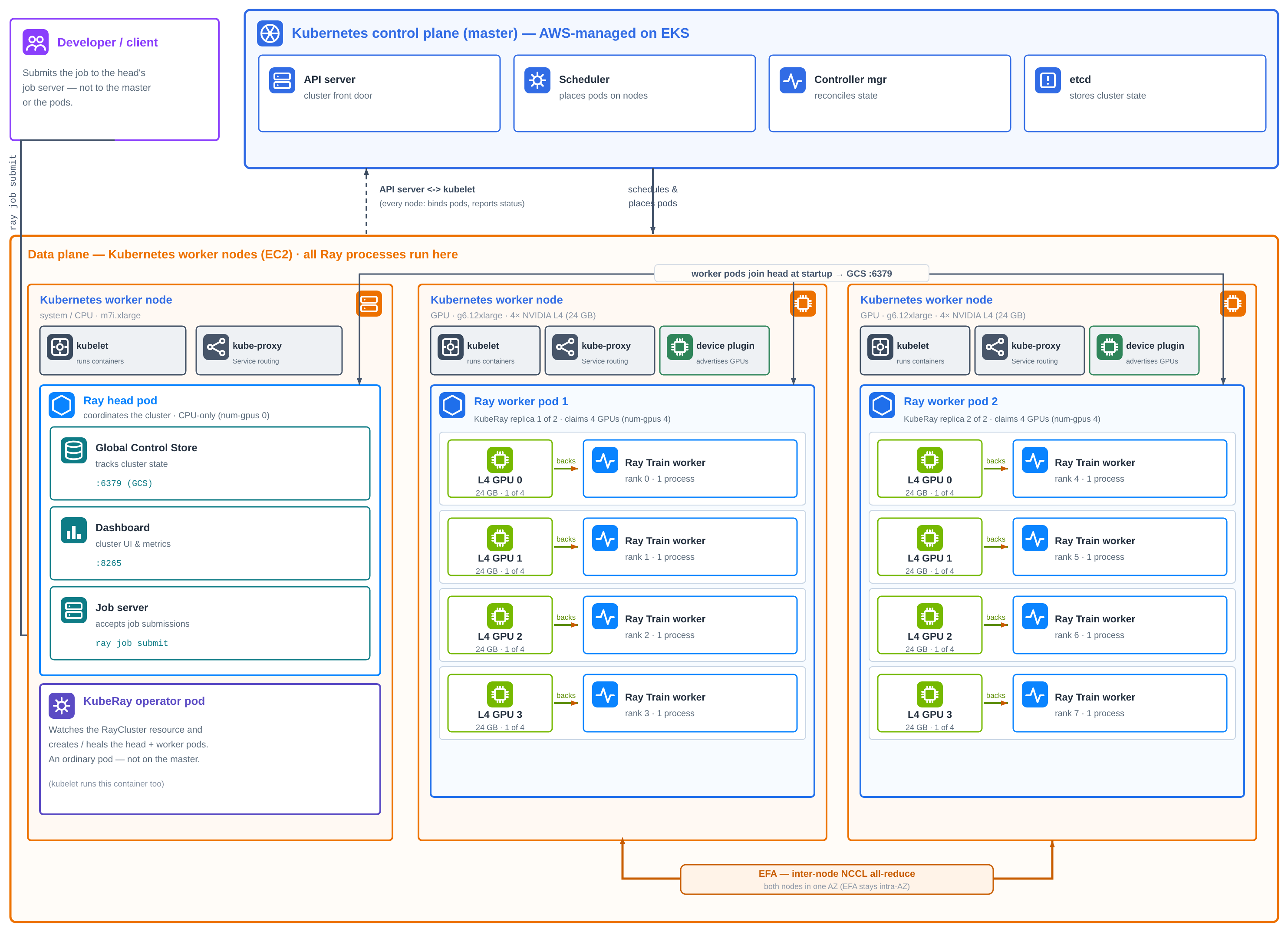
Figura 1: Un cluster de EKS con un plano de control administrado por AWS, un nodo de sistema CPU (m7i.xlarge) que ejecuta el operador KubeRay y el head de Ray, y dos nodos g6.12xlarge habilitados para EFA en una zona de disponibilidad. KubeRay lo construye a partir de un manifiesto de RayCluster, Ray Train coloca ocho workers, uno por GPU, y los colectivos entre nodos se cruzan sobre EFA.
Ray ejecuta un trabajo en varias máquinas como un solo cluster con dos roles. La cabeza de Ray coordina y ejecuta la tienda de control global que rastrea el estado del cluster, el panel y el servidor de trabajos al que se envían los trabajos. Los nodos de trabajador de Ray suministran las GPU y ejecutan los procesos de entrenamiento. Cada trabajador se une al cluster conectándose a la dirección de la cabeza cuando comienza. En Kubernetes, cada uno de estos es un pod. Kubernetes no tiene una idea incorporada de un cluster de Ray, por lo que algo debe crear los pods de cabeza y trabajador, iniciar Ray en el rol correcto en cada uno, apuntar a los trabajadores hacia la cabeza y reemplazar los pods que fallen. KubeRay hace esto. Es un operador de Kubernetes de código abierto que agrega un recurso de RayCluster: describe un grupo de cabeza y un grupo de trabajador en un manifiesto, y KubeRay construye y mantiene el cluster a partir de él.
Una imagen etiquetada ejecuta tanto la cabeza de Ray como los trabajadores de Ray, ya sea que KubeRay la inicie en Amazon Elastic Kubernetes Service (Amazon EKS) o la inicies tú mismo en Amazon Elastic Compute Cloud (Amazon EC2). Lo que agregas es configuración: qué instancias, cuántas GPU obtiene cada pod, qué transporte de red utiliza NCCL y qué paquetes de Python adicionales necesita un trabajo. Todo se establece desde fuera de la imagen.
Esta publicación describe un ejemplo que utiliza el DLC exactamente como se publicó para ajustar Qwen2.5-1.5B con PyTorch Fully Sharded Data Parallel (FSDP) en ocho GPU NVIDIA L4 en dos instancias g6.12xlarge. El código de entrenamiento es una función, el cluster es un manifiesto de RayCluster más un archivo de variables, y no se construye ninguna imagen en ningún momento. Debido a que el DLC ya lleva la pila EFA, los colectivos entre las dos instancias se ejecutan sobre el EFA tan pronto como los pods lo solicitan. La solución completa está en este repositorio de ejemplo, y utiliza la misma base KubeRay-on-EKS que nuestra guía de Ray Serve multi-nodo.
Qué obtienes sin construir nada
El DLC de Ray Train es la imagen de entrenamiento de PyTorch con las bibliotecas de entrenamiento de Ray en la parte superior. La etiqueta que extrae esta muestra, public.ecr.aws/deep-learning-containers/ray:train-ml-cuda-v1.1, reemplaza una compilación que de otra manera se vería así:
Capa
Qué construirías y mantendrías alineado de otra manera
En el DLC de Ray Train
Tiempo de ejecución distribuido
Ray con el panel de control y servidor de trabajos, en una versión compatible con KubeRay
Ray 2.58.0 con Train, Tune y Data
Framework
PyTorch compilado para su versión de CUDA
PyTorch 2.13.0, torchvision 0.28.0
Tiempo de ejecución de GPU
Versiones de CUDA, cuDNN y NCCL que sean compatibles entre sí
CUDA 13.0.2, cuDNN, NCCL 2.29.7
Red
Instalador de EFA, libfabric y aws-ofi-nccl, compilado contra ese NCCL
EFA más reciente, plugin de NCCL de AWS OFI, GDRCopy
Bibliotecas de entrenamiento
DeepSpeed, flash-attn y Transformer Engine compilados para su CUDA
DeepSpeed, flash-attn, Transformer Engine, PyTorch Lightning, bibliotecas de Hugging Face
Diagnósticos
Pruebas de NCCL compiladas desde el código fuente
all_reduce_perf ya en la ruta
La fila de red es la que la mayoría de los equipos menos desearían poseer. Una discrepancia allí no produce un error. NCCL se reduce a sockets TCP y el trabajo se ejecuta hasta su finalización a una fracción de la velocidad. En el DLC, esas bibliotecas se compilan y prueban juntas, y AWS controla cada lanzamiento en pruebas de entrenamiento de EFA multi-nodo y KubeRay multi-nodo, que son exactamente las rutas que utiliza esta muestra.
Unas pocas propiedades más eliminan el trabajo que de otro modo harías por clúster:
No configuración de registro – La imagen es pública, por lo que los nodos la extraen sin credenciales y nada se construye ni se envía en el camino.
No coincidencia de controladores – Al iniciar, el punto de entrada verifica el controlador NVIDIA del host y, si es anterior a la imagen de CUDA, activa automáticamente las bibliotecas de compatibilidad hacia adelante de CUDA empaquetadas.
No imágenes de cabeza versus trabajador – La imagen no tiene un rol fijo. Cualquiera que inicie el contenedor suministra el comando ray start, por lo que una etiqueta sirve para cada pod.
No familia de imagen de inferencia separada – Ray Train comparte el repositorio de ECR ray con los DLC de Ray Serve y DLC de Ray LLM, bajo el prefijo de etiqueta train-ml.
Configúralo, no lo reconstruyas
Todo lo que difiere entre un trabajo de entrenamiento y el siguiente se establece alrededor de la imagen. La muestra utiliza cada uno de estos mecanismos:
Lo que controlas
Cómo lo estableces
En esta muestra
Rol de cabeza o trabajador
KubeRay rayStartParams por grupo de pods
Mismo DLC_IMAGE para ambos. La cabeza se ejecuta con num-gpus: "0"
Cualquier paquete que un trabajo necesite, instalado en el momento de enviar
Versión de la imagen
Etiqueta con versión o con digesto anclado en DLC_IMAGE
train-ml-cuda-v1.1
Forma del clúster
Variables en scripts/env.sh
Tipo de instancia, recuento de nodos, GPU por nodo, Región, AZ
Trabajo de entrenamiento
Argumentos para train.py
Modelo, pasos, longitud de secuencia, tamaño de lote
Paquetería por trabajo. La imagen envía la pila de entrenamiento de HuggingFace, por lo que este ejemplo de trabajo no necesita nada agregado. Cuando un experimento necesita una biblioteca que la imagen no lleva, Ray la instala para ese trabajo en el momento de enviar a través de runtime_env y la imagen no cambia. No hay nueva imagen, no hay nueva etiqueta.
Transporte por trabajo. La imagen predeterminada es FI_PROVIDER=efa, y su configuración de NCCL excluye las interfaces de bucle y puente de Docker. En EKS, se apunta NCCL_SOCKET_IFNAME al eth0 del pod. El ejemplo establece las cuatro variables de red en el manifiesto de todos modos, por lo que el comportamiento es visible en un archivo y no depende de los valores predeterminados de la imagen. Debido a que estas son variables de entorno simples, un solo trabajo puede anularlos a través de su runtime_env.
Versiones que elige. El ejemplo ancla train-ml-cuda-v1.1, la versión menor actual, para que un clúster sea reproducible de una ejecución a la siguiente. Las etiquetas vX.Y se mueven con las reconstrucciones de seguridad. Las etiquetas vX.Y.Z completamente calificadas permanecen congeladas en la compilación de lanzamiento original, por lo que ancle un digesto cuando necesite una ejecución idéntica byte a byte. La misma imagen también está disponible desde URIs de ECR privadas.
Cómo está dispuesto el clúster
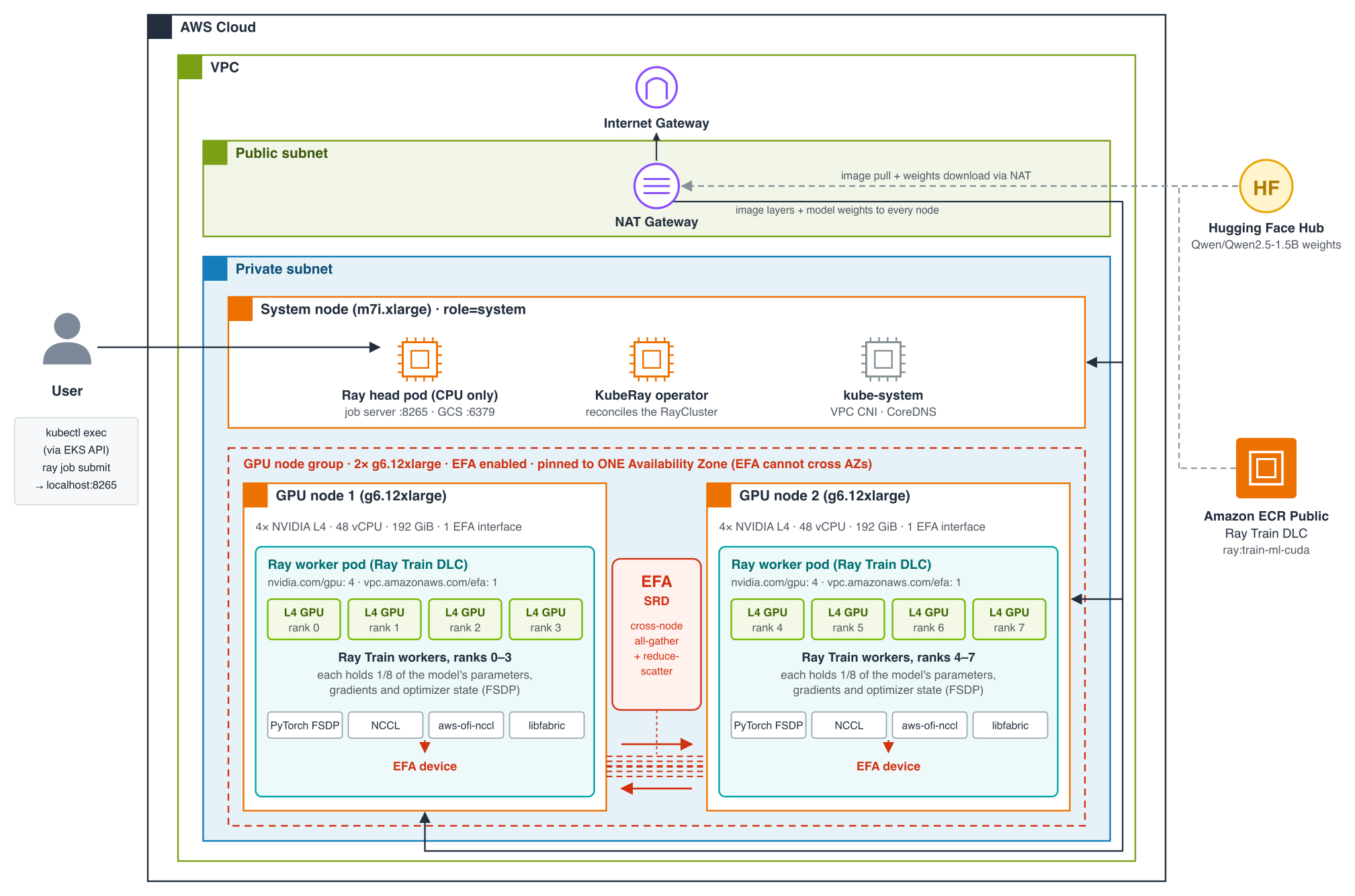
Figura 2: El cluster de ejemplo. Cada pod ejecuta el mismo Ray Train DLC desde Amazon ECR Public. El nodo de sistema CPU ejecuta el operador KubeRay y un Ray head sin GPUs. Cada nodo g6.12xlarge habilitado con EFA, ambos en una zona de disponibilidad, ejecuta un pod de trabajador Ray de cuatro GPUs.
Todos los nodos se encuentran en subredes privadas de una nube privada virtual (VPC) y acceden a Internet solo a través de una puerta de enlace NAT, que es cómo cada nodo extrae el DLC de Amazon ECR Public y cómo los trabajadores descargan pesos de modelo de Hugging Face. Un m7i.xlarge forma el grupo de nodos del sistema, que hospeda complementos de kube-system, el operador KubeRay y el Ray head. El head ejecuta el servidor de trabajos en el puerto 8265 y el almacén de control de Ray en 6379, y no anuncia GPUs, por lo que no se asigna trabajo de capacitación a él. Los trabajos se envían desde dentro del pod del head con kubectl exec, a través de la API de EKS, por lo que el puerto 8265 nunca se expone fuera del cluster.
La capacitación se ejecuta en dos instancias g6.12xlarge, cada una con cuatro GPUs NVIDIA L4, 48 vCPUs, 192 GiB de memoria, 40 Gbps de redes y una interfaz EFA. Cada una ejecuta un pod de trabajador Ray que reclama las cuatro GPUs y la interfaz EFA, y Ray Train coloca cuatro trabajadores en cada pod: rangos 0-3 en una instancia, 4-7 en la otra. Debido a que el tráfico EFA no cruza zonas de disponibilidad, los scripts colocan ambas instancias en una sola zona que se ha verificado que ofrece g6.12xlarge.
Qué hace Ray Train dentro del contenedor
El DLC proporciona la pila. Ray Train proporciona la parte que de otro modo sería código de lanzamiento. PyTorch multi-nodo normalmente significa iniciar un proceso por GPU en cada host y darle a cada uno su rango, el tamaño del mundo y una dirección de rendezvous. Con Ray Train, escribe el bucle de capacitación como una función y pásala a TorchTrainer con un ScalingConfig. Ray inicia un trabajador por GPU dondequiera que el cluster tenga GPUs, forma el grupo de procesos torch.distributed y ejecuta tu función en cada trabajador.
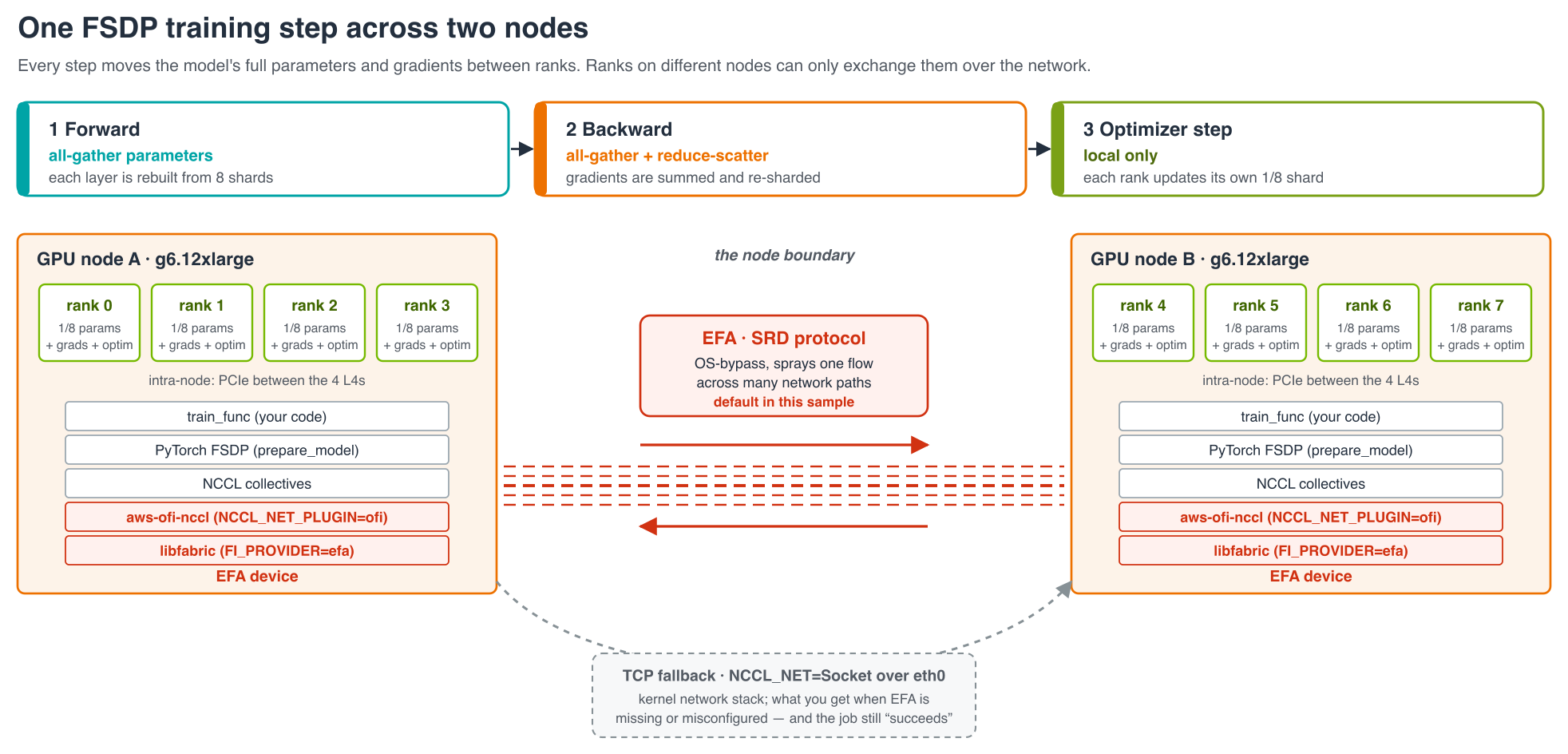
FSDP, que divide los pesos, gradientes y estado del optimizador del modelo en todos los ocho GPUs en lugar de copiarlos en cada uno. Qwen2.5-1.5B en bfloat16 necesita aproximadamente 12 GB para esos cuatro tensores. Dividido de ocho maneras, cada GPU L4 mantiene aproximadamente 1,5 GB. El precio es la comunicación: FSDP recopila los pesos de cada capa antes de usarlos y reduce-scatters los gradientes después, por lo que todo el modelo cruza entre rangos en cada paso. Entre las dos instancias, ese tráfico es lo que lleva la pila EFA del DLC.
Requisitos previos
Debe tener lo siguiente en lugar antes de comenzar:
Herramientas: Interfaz de línea de comandos de AWS (AWS CLI) v2 iniciada en la cuenta objetivo, eksctl, kubectl, Helm, y envsubst de GNU gettext.
Cuota: 96 vCPUs de capacidad On-Demand de la familia G para las dos instancias g6.12xlarge, en una región de AWS donde al menos una zona las ofrece. Si ya tiene una reserva de capacidad On-Demand para las instancias, establezca CAPACITY_RESERVATION_ID en su lugar. Los scripts lanzan el grupo de nodos en ella y omiten la búsqueda de capacidad.
Presupuesto: aproximadamente $9,50 por hora mientras las instancias de GPU estén activas, cubriendo ambas instancias, el plano de control de EKS y la puerta de enlace NAT.
Una forma rápida de confirmar que la CLI apunta a la cuenta que espera:
aws sts get-caller-identity
El código de entrenamiento: Una función y un entrenador
code/train.py es todo el trabajo, y no contiene nada específico del contenedor, el clúster o la red. Ray ejecuta train_func una vez por GPU. Solicita a Ray su rango, carga el modelo, lo pasa a prepare_model para FSDP, y ejecuta un bucle PyTorch ordinario:
code/train.py — la función por GPU (abreviada)
def train_func(config):
    ctx = ray.train.get_context()
    world_size, rank = ctx.get_world_size(), ctx.get_world_rank()
    device = ray.train.torch.get_device()

    model = AutoModelForCausalLM.from_pretrained(config["model_id"], torch_dtype=torch.bfloat16)

    # Any submodule above 10M parameters becomes its own FSDP unit. Wrapping by
    # size, not by a model-specific layer class, keeps the script model-agnostic.
    auto_wrap_policy = partial(size_based_auto_wrap_policy, min_num_params=int(1e7))
    model = ray.train.torch.prepare_model(
        model,
        parallel_strategy="fsdp",
        parallel_strategy_kwargs={"auto_wrap_policy": auto_wrap_policy},
    )
    optimizer = torch.optim.AdamW(model.parameters(), lr=config["learning_rate"])

    for step in range(config["steps"]):
        input_ids = torch.randint(0, model.config.vocab_size,
            (config["batch_size"], config["seq_len"]), device=device)
        optimizer.zero_grad()
        loss = model(input_ids=input_ids, labels=input_ids).loss
        loss.backward()  # parameters gathered again, gradients reduce-scattered
        optimizer.step()  # local: each rank updates only its own slice
        ray.train.report({"step": step, "loss": loss.item()})
El controlador se une al clúster en ejecución, cuenta sus GPUs y comienza el entrenador. Dado que el recuento de trabajadores proviene del clúster, el mismo script se ejecuta sin cambios en un nodo o en muchos:
code/train.py — el controlador (abreviado)
ray.init(address="auto")  # join the RayCluster
num_workers = int(ray.cluster_resources().get("GPU", 0))  # 8 here

trainer = TorchTrainer(
    train_func,
    train_loop_config={...},
    scaling_config=ScalingConfig(num_workers=num_workers, use_gpu=True),
    run_config=RunConfig(name="ray-train-fsdp-llm"),
)
result = trainer.fit()
Los lotes son identificadores de token aleatorios para que la ejecución dependa de nada más que el clúster. La muestra se juzga por si los colectivos FSDP reales cruzaron ambos nodos y el trabajo se completó. Para un ajuste fino real, reemplace el tensor aleatorio con un pipeline de Ray Data o DataLoader. Nada más en la función cambia.
El manifiesto: El único lugar donde se configura el DLC
manifest/raycluster.yaml es donde la imagen se encuentra con el cluster, y es corto porque la imagen necesita muy poco. La única configuración especial de la cabeza es NVIDIA_VISIBLE_DEVICES=void, que evita que el hook de NVIDIA del runtime del contenedor falle en un nodo que no tiene GPU. El grupo de trabajadores contiene todo lo demás:
manifest/raycluster.yaml — grupo de trabajadores (abreviado)
workerGroupSpecs:
  - groupName: gpu-workers
    replicas: 2
    rayStartParams:
      num-gpus: "${GPUS_PER_NODE}"  # keeps Ray's GPU count equal to the pod's
    template:
      spec:
        nodeSelector: { role: gpu-worker }
        containers:
          - name: ray-worker
            image: "${DLC_IMAGE}"  # the DLC as published; same tag as the head
            env:
              - { name: NCCL_DEBUG, value: "INFO" }  # print the chosen transport
              - { name: NCCL_SOCKET_IFNAME, value: "eth0" }  # pod network on EKS
              - { name: FI_PROVIDER, value: "efa" }  # libfabric: EFA, nothing else
              - { name: NCCL_NET_PLUGIN, value: "ofi" }  # load the AWS OFI plugin
            resources:
              limits: { nvidia.com/gpu: "${GPUS_PER_NODE}", vpc.amazonaws.com/efa: "1",
                cpu: "40", memory: 160Gi }
              requests: { nvidia.com/gpu: "${GPUS_PER_NODE}", vpc.amazonaws.com/efa: "1",
                cpu: "40", memory: 160Gi }
Léalo como tres decisiones.
¿Qué imagen:${DLC_IMAGE}, sin modificar, para ambos, la cabeza y los trabajadores.
¿Qué hardware: cuatro GPUs y la interfaz EFA única del nodo por pod. Solicitar vpc.amazonaws.com/efa es lo que hace que el plugin de dispositivo EFA monte la interfaz en el contenedor. Sin ello, NCCL no puede ver EFA y cae en sockets.
¿Qué transporte: cuatro variables de entorno, para que nada se deja a la autodetección.
Dos detalles más pequeños mantienen un trabajo de varios nodos estable. Primero, las solicitudes deben ser iguales a los límites, lo que coloca a los trabajadores en la clase de calidad de servicio (QoS) Garantizada de Kubernetes. Esto importa porque un solo rango acelerado o expulsado detiene a los otros siete. Segundo, num-gpus se deriva de la misma variable que la solicitud de GPU, para que la visión de Ray de la capacidad siempre coincida con la de Kubernetes.
Poniéndolo en marcha: Un comando para la infraestructura, luego el trabajo
La configuración vive en un solo lugar, scripts/env.sh: nombre del cluster, Región, versión de Kubernetes, tipos y cuentas de nodos, la imagen, versiones fijas de KubeRay y ambos plugins de dispositivos, y los parámetros de entrenamiento. Exporte cualquiera de ellos para cambiarlo para una ejecución. Los cinco scripts son idempotentes y seguros para volver a ejecutar. deploy_cluster.sh, deploy_node_group.sh, y deploy_ray_train_job.sh cada uno solicita antes de crear o tocar recursos de cluster. install_gpu_plugins.sh y install_kuberay.sh son reconciliadores y se ejecutan directamente.
cd training/ray-train/scripts
source ./env.sh
./deploy_all.sh – Encuentra dónde está la capacidad actual, luego construye la infraestructura allí.
La capacidad de g6.12xlarge cambia entre Regiones y zonas de disponibilidad día a día, por lo que este es el punto de partida en lugar de una Región adivinada al principio en env.sh. Primero, ejecuta find_gpu_capacity.sh, que verifica, por cada Región candidata: si g6.12xlarge se ofrece en cada zona de disponibilidad, si el límite de vCPU de la familia G/VT-On-Demand de la cuenta tiene espacio para el recuento de nodos solicitado, y la puntuación de colocación de EC2 Spot como señal de capacidad. Con --probe, que deploy_all.sh pasa por defecto, obtiene una respuesta definitiva creando y cancelando inmediatamente una Reserva de Capacidad real en cada zona candidata. Luego muestra el plan y pregunta una vez:
Proceed with the whole chain without further prompts? (y/N):
Al responder y, se ejecutan, en orden, deploy_cluster.sh, deploy_node_group.sh, install_gpu_plugins.sh y install_kuberay.sh en la Región recomendada, cada uno saltando su propia confirmación de repetición porque ya se ha realizado (-y también salta esta solicitud, y --plan muestra el plan sin crear nada). Si el grupo de nodos GPU no puede iniciarse en la mejor zona, el script lo elimina e intenta la siguiente zona que la sonda confirmó. GPU_AZ también se verifica contra las subredes privadas actuales del clúster, no solo donde g6.12xlarge está disponible, por lo que el grupo de nodos GPU no puede quedar fijado a una Zona de disponibilidad que el clúster no tiene subred. La Región y zona elegidas se guardan en scripts/.placement.env, que todos los demás scripts leen, por lo que los comandos posteriores apuntan al mismo lugar sin volver a exportar nada. Juntos, los cuatro pasos tardan de 20 a 30 minutos en una Región nueva. Se detecta y reutiliza un clúster o grupo de nodos existente.
deploy_cluster.sh crea el plano de control de EKS, VPC, proveedor de OpenID Connect (OIDC), complementos básicos y el grupo de nodos del sistema m7i.xlarge, eligiendo subredes en zonas que realmente ofrecen g6.12xlarge. deploy_node_group.sh agrega las dos instancias g6.12xlarge con EFA activado, etiquetadas role=gpu-worker y nvidia.com/gpu.present=true. La segunda etiqueta es una que los equipos a menudo pasan por alto. Sin ella, el DaemonSet del plugin de dispositivo NVIDIA se ejecuta en cero nodos, sin error que apunte a la causa. install_gpu_plugins.sh asegura que ambos plugins de dispositivo estén presentes. Los paquetes de eksctl recientes los incluyen en un grupo de nodos con EFA, por lo que en un clúster nuevo los encuentra y los salta. De lo contrario, los instala en versiones de gráfico fijas. De cualquier manera, verifica que nvidia.com/gpu y vpc.amazonaws.com/efa estén asignables en cada nodo GPU en lugar de confiar en una versión de Helm exitosa. install_kuberay.sh instala el operador KubeRay en el nodo del sistema, manteniéndolo fuera de las instancias GPU.
Lo que deploy_all.sh no hace por defecto es ejecutar el trabajo de entrenamiento. Eso permanece como un paso separado que puede volver a ejecutar tantas veces como desee, porque es un trabajo real en lugar de infraestructura, y un trabajo fallido nunca lo envía de regreso a través de la configuración del clúster. Pase --train para encadenarlo:
./deploy_ray_train_job.sh— el RayCluster, el trabajo y las comprobaciones.
Representa el manifiesto con envsubst y lo aplica. Luego vuelve a leer los recursos asignables de cada nodo GPU antes de esperar cualquier pod: si un plugin de dispositivo no se inició, obtiene un error claro aquí en lugar de un pod que se queda en estado Pendiente hasta un tiempo de espera. Una vez que el head esté listo y ambos workers estén listos, copia code/ en el head y, a través de kubectl exec, envía desde dentro:
La llamada a submit transmite registros de los ocho rangos y devuelve cuando lo hace el trabajo. Luego, el script inspecciona qué transporte utilizó NCCL y sale con un error si el trabajo falló o EFA no estaba en la ruta, lo que también lo hace usable como una puerta de integración continua (CI). ./deploy_ray_train_job.sh status imprime el estado de RayCluster, qué instancia hospeda cada pod y la capacidad de GPU. Un clúster aprovisionado correctamente se ve así:
$ kubectl get nodes -l role=gpu-worker \
-o custom-columns='NAME:.metadata.name,GPU:.status.allocatable.nvidia\.com/gpu,EFA:.status.allocatable.vpc\.amazonaws\.com/efa'
NAME               GPU   EFA
ip-192-168-70-51   4     1
ip-192-168-92-26   4     1
Figura 3: Un paso FSDP en este clúster. Los pesos se recopilan en los pasos hacia adelante y hacia atrás y los gradientes se reducen y dispersan. El tráfico entre las instancias toma la ruta que envía DLC, NCCL → plugin NCCL de AWS OFI → libfabric → EFA, o vuelve a caer en sockets TCP cuando falta esa ruta.
Adaptarlo a su carga de trabajo
Como la imagen se utiliza tal como se publica y el trabajo aprende su escala del clúster, la mayoría de los cambios afectan exactamente un archivo:
Quiere cambiar
Dónde
No se necesitan cambios en
El modelo
MODEL_ID
Código, manifiesto, imagen
Pasos, longitud de secuencia, tamaño de lote
STEPS, SEQ_LEN, BATCH_SIZE
Código, manifiesto, imagen
El bucle de entrenamiento en sí
Cuerpo de train_func
Entrenador, manifiesto, imagen, scripts
Un paquete Python adicional
--runtime-env-json lista de pip
Imagen
Una versión de DLC fijada
DLC_IMAGE a una etiqueta de versión
Todo lo demás
La familia de instancias de GPU
GPU_NODE_TYPE, GPUS_PER_NODE
Código, imagen
Cuantas instancias de GPU
GPU_NODE_COUNT, más replicas, minReplicas y maxReplicas en el manifiesto
Código (cuenta las GPU)
Región o zona
REGION, opcionalmente GPU_AZ
Todo lo demás
Las variables en la tabla viven en env.sh a menos que se especifique lo contrario. Al cambiar las familias de instancias, GPUS_PER_NODE debe coincidir con el hardware y la familia necesita soporte EFA además de un lugar en la lista de tipos de instancias permitidos del plugin del dispositivo EFA. La versión del plugin establecida aquí se sabe que incluye g6.12xlarge. Mover a p5 o a otra familia compatible con GPUDirect no requiere cambios en la imagen o el código de entrenamiento.
Desmontándolo
Las instancias de GPU son la parte costosa, alrededor de $9.50 la hora junto con el plano de control y la puerta de enlace NAT. Elimine las cosas en el orden opuesto al que se crearon:
./delete_ray_train_job.sh        # RayCluster
./install_kuberay.sh cleanup     # KubeRay operator
./install_gpu_plugins.sh cleanup # NVIDIA and EFA device plugins
./delete_node_group.sh           # GPU instances
./delete_cluster.sh              # EKS cluster, VPC and system node
¿Hacia dónde ir a continuación
Dos instancias y ocho GPUs ejecutaron un ajuste fino compartido en EKS con un contenedor que nadie construyó. El DLC de Ray Train suministró una pila probada desde CUDA hasta EFA. KubeRay lo inició como cabeza y trabajadores desde una etiqueta. Ray Train colocó los trabajadores y formó el grupo de procesos. Todo lo que varió, desde el hardware hasta el transporte y los paquetes de Python, se estableció desde fuera de la imagen. La ruta EFA que envía la imagen se comprometió con cuatro variables de entorno y duplicó el rendimiento sobre TCP en código sin cambios.
Movimientos naturales siguientes:
Reemplace los lotes aleatorios con un conjunto de datos real y establezca un punto de control en Amazon Simple Storage Service (Amazon S3) o Amazon FSx para Lustre.
Fije DLC_IMAGE a una etiqueta versionada para ejecuciones reproducibles.
Active FailureConfig para que las ejecuciones largas sobrevivan a una instancia perdida.
Pase a un modelo más grande en una familia GPUDirect RDMA como p5. La imagen y el código permanecen iguales.
Acerca de los autores
What usually stops PyTorch training from scaling out to a cluster is the container, not the model code. Every container needs the same CUDA runtime, a PyTorch build compiled against it, NCCL (NVIDIA Collective Communications Library), the Elastic Fabric Adapter (EFA) userspace libraries, the AWS OFI NCCL plugin that connects NCCL to EFA, and a Ray version the cluster operator agrees with. Building that image and rebuilding it each time one of those pieces moves is a project of its own, and it has nothing to do with the model you set out to train. The Ray Train Deep Learning Container (DLC) is that image, built by AWS. AWS assembles the stack, tests it as one unit, publishes it in Amazon Elastic Container Registry (Amazon ECR) Public and keeps it patched.
Figure 1: One EKS cluster with a control plane managed by AWS, a CPU system node (m7i.xlarge) running the KubeRay operator and Ray head, and two EFA-enabled g6.12xlarge nodes in one Availability Zone. KubeRay builds it from one RayCluster manifest, Ray Train places eight workers, one per GPU, and inter-node collectives cross over EFA.
Ray runs a job across machines as a single cluster with two roles. The Ray head coordinates and runs the global control store that tracks cluster state, the dashboard and job server you submit jobs to. Ray worker nodes supply the GPUs and run the training processes. Each worker joins the cluster by connecting to the head’s address when it starts. On Kubernetes, each of these is a pod. Kubernetes has no built-in idea of a Ray cluster, so something must create the head and worker pods, start Ray in the right role in each, point the workers at the head, and replace pods that fail. KubeRay does this. It’s an open source Kubernetes operator that adds a RayCluster resource: you describe a head group and a worker group in one manifest, and KubeRay builds and maintains the cluster from it.
A single tagged image runs as both the Ray head and the Ray workers, whether KubeRay starts it on Amazon Elastic Kubernetes Service (Amazon EKS) or you start it yourself on Amazon Elastic Compute Cloud (Amazon EC2). What you add is configuration: which instances, how many GPUs each pod gets, which network transport NCCL uses, and which extra Python packages a job needs. All of it is set from outside the image.
This post walks through a sample that uses the DLC exactly as published to fine-tune Qwen2.5-1.5B with PyTorch Fully Sharded Data Parallel (FSDP) across eight NVIDIA L4 GPUs on two g6.12xlarge instances. The training code is one function, the cluster is one RayCluster manifest plus a file of variables, and no image is built at any point. Because the DLC already carries the EFA stack, collectives between the two instances run over the EFA as soon as the pods request it. The entire solution is in this sample repository, and it uses the same KubeRay-on-EKS foundation as our multi-node Ray Serve walkthrough.
What you get without building anything
The Ray Train DLC is the PyTorch training image with Ray’s training libraries on top. The tag this sample pulls, public.ecr.aws/deep-learning-containers/ray:train-ml-cuda-v1.1, replaces a build that would otherwise look like this:
Layer
What you would otherwise build and keep aligned
In the Ray Train DLC
Distributed runtime
Ray with the dashboard and job server, at a version KubeRay supports
Ray 2.58.0 with Train, Tune and Data
Framework
PyTorch compiled for your CUDA version
PyTorch 2.13.0, torchvision 0.28.0
GPU runtime
CUDA, cuDNN and NCCL releases that agree with each other
CUDA 13.0.2, cuDNN, NCCL 2.29.7
Networking
EFA installer, libfabric and aws-ofi-nccl, built against that NCCL
EFA latest, AWS OFI NCCL plugin, GDRCopy
Training libraries
DeepSpeed, flash-attn and Transformer Engine compiled for your CUDA
DeepSpeed, flash-attn, Transformer Engine, PyTorch Lightning, Hugging Face libraries
Diagnostics
NCCL tests built from source
all_reduce_perf already on the path
The networking row is the one most teams would least like to own. A mismatch there doesn’t produce an error. NCCL drops to TCP sockets, and the job runs to completion at a fraction of the speed. In the DLC, those libraries are built and tested together, and AWS gates each release on multi-node EFA and multi-node KubeRay training tests, which are exactly the paths this sample uses.
A few more properties remove work that you would otherwise do per cluster:
No registry setup – The image is public, so nodes pull it without credentials and nothing is built or pushed on the way.
No driver matching – On startup the entrypoint checks the host’s NVIDIA driver and, if it is older than the image’s CUDA, turns on the bundled CUDA forward-compatibility libraries automatically.
No head-versus-worker images – The image has no fixed role. Whatever starts the container supplies the ray start command, so one tag serves every pod.
No separate inference image family – Ray Train shares the ray ECR repository with the Ray Serve DLC and Ray LLM DLCs, under the train-ml tag prefix.
Configure it, don’t rebuild it
Everything that differs between one training job and the next is set around the image. The sample uses each of these mechanisms:
What you control
How you set it
In this sample
Head or worker role
KubeRay rayStartParams per pod group
Same DLC_IMAGE for both. Head runs with num-gpus: "0"
Instance type, node count, GPUs per node, Region, AZ
Training job
Arguments to train.py
Model, steps, sequence length, batch size
Packages per job. The image ships the HuggingFace training stack, so this sample’s job needs nothing added. When an experiment does need a library the image does not carry, Ray installs it for that job at submit time through runtime_env and the image is unchanged. No new image, no new tag.
Transport per job. The image defaults to FI_PROVIDER=efa, and its NCCL configuration excludes the loopback and Docker bridge interfaces. On EKS you point NCCL_SOCKET_IFNAME at the pod’s eth0. The sample sets all four networking variables in the manifest anyway, so the behavior is visible in one file and doesn’t depend on image defaults. Because these are plain environment variables, a single job can override them through its runtime_env.
Versions you choose. The sample pins train-ml-cuda-v1.1, the current minor release, so a cluster is reproducible from one run to the next. The vX.Y tags move with security rebuilds. The fully qualified vX.Y.Z tags stay frozen at the original release build, so pin a digest when you need a byte-identical run. The same image is also available from private ECR URIs.
How the cluster is laid out
Figure 2: The sample’s cluster. Every pod runs the same Ray Train DLC from Amazon ECR Public. The CPU system node runs the KubeRay operator and a Ray head with no GPUs. Each EFA-enabled g6.12xlarge, both in one Availability Zone, runs a single four-GPU Ray worker pod.
All nodes sit in private subnets of one virtual private cloud (VPC) and reach the internet only through a NAT Gateway, which is how every node pulls the DLC from Amazon ECR Public and how workers download model weights from Hugging Face. One m7i.xlarge forms the system node group, hosting kube-system add-ons, the KubeRay operator and the Ray head. The head runs the job server on port 8265 and Ray’s control store on 6379, and it advertises no GPUs, so no training work lands on it. Jobs are submitted from inside the head pod with kubectl exec, through the EKS API, so port 8265 is never exposed outside the cluster.
Training runs on two g6.12xlarge instances, each with four NVIDIA L4 GPUs, 48 vCPUs, 192 GiB of memory, 40 Gbps of networking and one EFA interface. Each runs one Ray worker pod that claims all four GPUs and the EFA interface, and Ray Train places four workers in each pod: ranks 0–3 on one instance, 4–7 on the other. Because EFA traffic doesn’t cross Availability Zones, the scripts place both instances in a single zone that has been checked to offer g6.12xlarge.
What Ray Train does inside the container
The DLC provides the stack. Ray Train provides the part that would otherwise be launcher code. Multi-node PyTorch normally means starting a process per GPU on every host and giving each one its rank, the world size and a rendezvous address. With Ray Train you write the training loop as a function and pass it to TorchTrainer with a ScalingConfig. Ray starts one worker per GPU wherever the cluster has GPUs, forms the torch.distributed process group, and runs your function on each worker.
This sample asks Ray Train for FSDP, which splits the model’s weights, gradients and optimizer state across all eight GPUs rather than copying them to each one. Qwen2.5-1.5B in bfloat16 needs about 12 GB for those four tensors. Sharded eight ways, each L4 GPU holds roughly 1.5 GB. The price is communication: FSDP gathers each layer’s weights before using it and reduce-scatters gradients afterwards, so the whole model crosses between ranks on every step. Between the two instances, that traffic is what the DLC’s EFA stack carries.
Prerequisites
You must have the following in place before you start:
Tools: AWS Command Line Interface (AWS CLI) v2 signed in to the target account, eksctl, kubectl, Helm, and envsubst from GNU gettext.
Quota: 96 vCPUs of G-family On-Demand capacity for the two g6.12xlarge instances, in an AWS Region where at least one zone offers them. If you already hold an On-Demand Capacity Reservation for the instances, set CAPACITY_RESERVATION_ID instead. The scripts launch the node group into it and skip the capacity search.
Budget: about $9.50 an hour while the GPU instances are up, covering both instances, the EKS control plane and the NAT Gateway.
A quick way to confirm that the CLI is pointed at the account that you expect:
aws sts get-caller-identity
The training code: One function and a trainer
code/train.py is the whole job, and it contains nothing specific to the container, the cluster or the network. Ray runs train_func once per GPU. It asks Ray for its rank, loads the model, hands it to prepare_model for FSDP, and runs an ordinary PyTorch loop:
code/train.py — the per-GPU function (abridged)
def train_func(config):
    ctx = ray.train.get_context()
    world_size, rank = ctx.get_world_size(), ctx.get_world_rank()
    device = ray.train.torch.get_device()

    model = AutoModelForCausalLM.from_pretrained(config["model_id"], torch_dtype=torch.bfloat16)

    # Any submodule above 10M parameters becomes its own FSDP unit. Wrapping by
    # size, not by a model-specific layer class, keeps the script model-agnostic.
    auto_wrap_policy = partial(size_based_auto_wrap_policy, min_num_params=int(1e7))
    model = ray.train.torch.prepare_model(
        model,
        parallel_strategy="fsdp",
        parallel_strategy_kwargs={"auto_wrap_policy": auto_wrap_policy},
    )
    optimizer = torch.optim.AdamW(model.parameters(), lr=config["learning_rate"])

    for step in range(config["steps"]):
        input_ids = torch.randint(0, model.config.vocab_size,
            (config["batch_size"], config["seq_len"]), device=device)
        optimizer.zero_grad()
        loss = model(input_ids=input_ids, labels=input_ids).loss
        loss.backward()  # parameters gathered again, gradients reduce-scattered
        optimizer.step()  # local: each rank updates only its own slice
        ray.train.report({"step": step, "loss": loss.item()})
The driver joins the running cluster, counts its GPUs and starts the trainer. Because the worker count comes from the cluster, the same script runs unchanged on one node or many:
code/train.py — the driver (abridged)
ray.init(address="auto")  # join the RayCluster
num_workers = int(ray.cluster_resources().get("GPU", 0))  # 8 here

trainer = TorchTrainer(
    train_func,
    train_loop_config={...},
    scaling_config=ScalingConfig(num_workers=num_workers, use_gpu=True),
    run_config=RunConfig(name="ray-train-fsdp-llm"),
)
result = trainer.fit()
The batches are random token IDs so that the run depends on nothing but the cluster. The sample is judged on whether real FSDP collectives crossed both nodes and the job completed. For a real fine-tune, replace the random tensor with a Ray Data or DataLoader pipeline. Nothing else in the function changes.
The manifest: The only place the DLC is configured
manifest/raycluster.yaml is where the image meets the cluster, and it is short because the image needs so little. The head’s only special setting is NVIDIA_VISIBLE_DEVICES=void, which stops the container runtime’s NVIDIA hook from failing on a node that has no GPU. The worker group holds everything else:
manifest/raycluster.yaml — worker group (abridged)
workerGroupSpecs:
  - groupName: gpu-workers
    replicas: 2
    rayStartParams:
      num-gpus: "${GPUS_PER_NODE}"  # keeps Ray's GPU count equal to the pod's
    template:
      spec:
        nodeSelector: { role: gpu-worker }
        containers:
          - name: ray-worker
            image: "${DLC_IMAGE}"  # the DLC as published; same tag as the head
            env:
              - { name: NCCL_DEBUG, value: "INFO" }  # print the chosen transport
              - { name: NCCL_SOCKET_IFNAME, value: "eth0" }  # pod network on EKS
              - { name: FI_PROVIDER, value: "efa" }  # libfabric: EFA, nothing else
              - { name: NCCL_NET_PLUGIN, value: "ofi" }  # load the AWS OFI plugin
            resources:
              limits: { nvidia.com/gpu: "${GPUS_PER_NODE}", vpc.amazonaws.com/efa: "1",
                cpu: "40", memory: 160Gi }
              requests: { nvidia.com/gpu: "${GPUS_PER_NODE}", vpc.amazonaws.com/efa: "1",
                cpu: "40", memory: 160Gi }
Read it as three decisions.
Which image:${DLC_IMAGE}, unmodified, for both head and workers.
Which hardware: four GPUs and the node’s single EFA interface per pod. Requesting vpc.amazonaws.com/efa is what makes the EFA device plugin mount the interface into the container. Without it, NCCL can’t see EFA and falls back to sockets.
Which transport: four environment variables, so nothing is left to auto-detection.
Two smaller details keep a multi-node job stable. First, requests should equal limits, which places the workers in Kubernetes’ Guaranteed Quality of Service (QoS) class. This matters because a single throttled or evicted rank stalls the other seven. Second, num-gpus is derived from the same variable as the GPU request, so Ray’s view of capacity always matches Kubernetes’.
Bringing it up: One command for the infrastructure, then the job
Configuration lives in one place, scripts/env.sh: cluster name, Region, Kubernetes version, node types and counts, the image, pinned versions of KubeRay and both device plugins, and the training parameters. Export any of them to change it for a run. All five scripts are idempotent and safe to re-run. deploy_cluster.sh, deploy_node_group.sh, and deploy_ray_train_job.sh each prompt before creating or touching cluster resources. install_gpu_plugins.sh and install_kuberay.sh are reconcilers and run straight through.
cd training/ray-train/scripts
source ./env.sh
./deploy_all.sh – Finds where the capacity actually is, then builds the infrastructure there.
g6.12xlarge capacity shifts between Regions and Availability Zones day to day, so this is the starting point rather than a Region guessed up front in env.sh. It first runs find_gpu_capacity.sh, which checks, per candidate Region: whether g6.12xlarge is offered in each Availability Zone, whether the account’s On-Demand G/VT-family vCPU quota has room for the requested node count, and the EC2 Spot placement score as a capacity signal. With --probe, which deploy_all.sh passes by default, it gets a definitive answer by creating and immediately canceling a real Capacity Reservation in each candidate zone. It then shows the plan and asks once:
Proceed with the whole chain without further prompts? (y/N):
Answering y runs, in order, deploy_cluster.sh, deploy_node_group.sh, install_gpu_plugins.sh, and install_kuberay.sh in the recommended Region, each skipping its own repeat confirmation because this one already asked (-y skips this prompt too, and --plan shows the plan without creating anything). If the GPU node group can’t launch in the best zone, the script removes it and tries the next zone the probe confirmed. GPU_AZ is also cross-checked against the cluster’s actual private subnets, not only where g6.12xlarge happens to be offered, so the GPU node group can’t end up pinned to an Availability Zone the cluster has no subnet in. The chosen Region and zone are saved to scripts/.placement.env, which every other script reads, so later commands target the same place without re-exporting anything. Together the four steps take 20 to 30 minutes on a fresh Region. An existing cluster or node group is detected and reused.
deploy_cluster.sh creates the EKS control plane, VPC, OpenID Connect (OIDC) provider, core add-ons, and the m7i.xlarge system node group, choosing subnets in zones that actually offer g6.12xlarge. deploy_node_group.sh adds the two g6.12xlarge instances with EFA turned on, labeled role=gpu-worker and nvidia.com/gpu.present=true. The second label is one that teams often overlook. Without it, the NVIDIA device plugin chart’s DaemonSet runs on zero nodes, with no error pointing at the cause. install_gpu_plugins.sh makes sure both device plugins are present. Recent eksctl bundles them into an EFA-enabled node group, so on a fresh cluster it finds them and skips. Otherwise it installs them at pinned chart versions. Either way it verifies nvidia.com/gpu and vpc.amazonaws.com/efa are allocatable on every GPU node rather than trusting a successful Helm release. install_kuberay.sh installs the KubeRay operator onto the system node, keeping it off the GPU instances.
What deploy_all.sh does not do by default is run the training job. That stays a separate step you can re-run as often as you like, because it is a real job run rather than infrastructure, and a failed job then never sends you back through cluster setup. Pass --train to chain it:
./deploy_ray_train_job.sh— the RayCluster, the job, and the checks.
Renders the manifest with envsubst and applies it. It then re-reads each GPU node’s allocatable resources before waiting on any pod: if a device plugin didn’t come up, you get a clear error here rather than a pod that sits in Pending until a timeout. Once the head is Ready and both workers are Ready, it copies code/ onto the head and, through kubectl exec, submits from inside it:
The submit call streams logs from all eight ranks and returns when the job does. The script then inspects which transport NCCL used and exits with an error if the job failed or EFA wasn’t in the path, which also makes it usable as a continuous integration (CI) gate. ./deploy_ray_train_job.sh status prints the RayCluster state, which instance hosts each pod, and GPU capacity. A correctly provisioned cluster looks like this:
$ kubectl get nodes -l role=gpu-worker \
-o custom-columns='NAME:.metadata.name,GPU:.status.allocatable.nvidia\.com/gpu,EFA:.status.allocatable.vpc\.amazonaws\.com/efa'
NAME               GPU   EFA
ip-192-168-70-51   4     1
ip-192-168-92-26   4     1
Figure 3: One FSDP step on this cluster. Weights are gathered in the forward and backward passes and gradients are reduce-scattered. Traffic between the instances takes the path the DLC ships, NCCL → AWS OFI NCCL plugin → libfabric → EFA, or falls back to TCP sockets when that path is missing.
Adapting it to your workload
Because the image is used as published and the job learns its scale from the cluster, most changes touch exactly one file:
You want to change
Where
No changes needed to
The model
MODEL_ID
Code, manifest, image
Steps, sequence length, batch size
STEPS, SEQ_LEN, BATCH_SIZE
Code, manifest, image
The training loop itself
Body of train_func
Trainer, manifest, image, scripts
An additional Python package
--runtime-env-json pip list
Image
A pinned DLC release
DLC_IMAGE to a versioned tag
Everything else
The GPU instance family
GPU_NODE_TYPE, GPUS_PER_NODE
Code, image
How many GPU instances
GPU_NODE_COUNT, plus replicas, minReplicas and maxReplicas in the manifest
Code (it counts the GPUs)
Region or zone
REGION, optionally GPU_AZ
Everything else
Variables in the table live in env.sh unless stated otherwise. When switching instance families, GPUS_PER_NODE has to match the hardware, and the family needs EFA support plus a place on the EFA device plugin’s list of allowed instance types. The plugin version pinned here is known to include g6.12xlarge. Moving to p5 or another GPUDirect-capable family needs no change to the image or the training code.
Tearing it down
The GPU instances are the expensive part, at around $9.50 an hour together with the control plane and NAT Gateway. Remove things in the opposite order to how they were created:
./delete_ray_train_job.sh        # RayCluster
./install_kuberay.sh cleanup     # KubeRay operator
./install_gpu_plugins.sh cleanup # NVIDIA and EFA device plugins
./delete_node_group.sh           # GPU instances
./delete_cluster.sh              # EKS cluster, VPC and system node
Where to go next
Two instances and eight GPUs ran a sharded fine-tune on EKS with a container nobody built. The Ray Train DLC supplied a tested stack from CUDA through EFA. KubeRay started it as head and workers from one tag. Ray Train placed the workers and formed the process group. Everything that varied, from hardware to transport to Python packages, was set from outside the image. The EFA path the image ships engaged with four environment variables and doubled throughput over TCP on unchanged code.
Natural next moves:
Replace the random batches with a real dataset, and checkpoint to Amazon Simple Storage Service (Amazon S3) or Amazon FSx for Lustre.
Pin DLC_IMAGE to a versioned tag for reproducible runs.
Turn on FailureConfig so long runs survive a lost instance.
Move to a larger model on a GPUDirect RDMA family such as p5. The image and code stay the same.
About the authors
¿Tiene un proyecto de software o plataforma SaaS en mente?
Hable directamente con nuestros arquitectos de software en SoftAndino. Le brindamos asesoría técnica y cotización inmediata sin compromiso.