Comenzar con Web Answer en Amazon Bedrock AgentCore
Getting started with Web Answer on Amazon Bedrock AgentCore
Adrianna Chudy
Hoy, estamos anunciando la disponibilidad general de Web Answer en Amazon Bedrock AgentCore. Con Web Answer, los constructores de agentes obtienen una respuesta sintetizada y con citas de fuentes a una pregunta en lenguaje natural con una sola llamada a una herramienta. Ya no necesitan construir una búsqueda, recuperar, sintetizar y pipeline de citación ellos mismos.
Si ha construido agentes que necesitan responder preguntas desde fuentes web actuales, conoce el patrón: llamar a una API de búsqueda, decidir qué resultados confiar, recuperar y limpiar el contenido de la página, solicitar a un modelo que sintetice y diseñar la extracción de citación para que la salida se remonte a una fuente. Cada paso es código que mantiene, y cada paso es otro lugar donde las cosas pueden salir mal: alucinación cuando la evidencia es insuficiente, contenido obsoleto cuando el índice cambia y atribución rota cuando una afirmación y su fuente se separan.
Web Answer colapsa toda la pipeline en una sola solicitud. Envías una pregunta. Recibes una respuesta citada en segundos. En esta publicación, explicamos qué hace Web Answer, lo comparamos con Web Search en AgentCore, mostramos cómo funciona y qué devuelve, y pasamos por agregar Web Answer a una puerta de enlace y llamarlo desde un agente.
Qué hace Web Answer
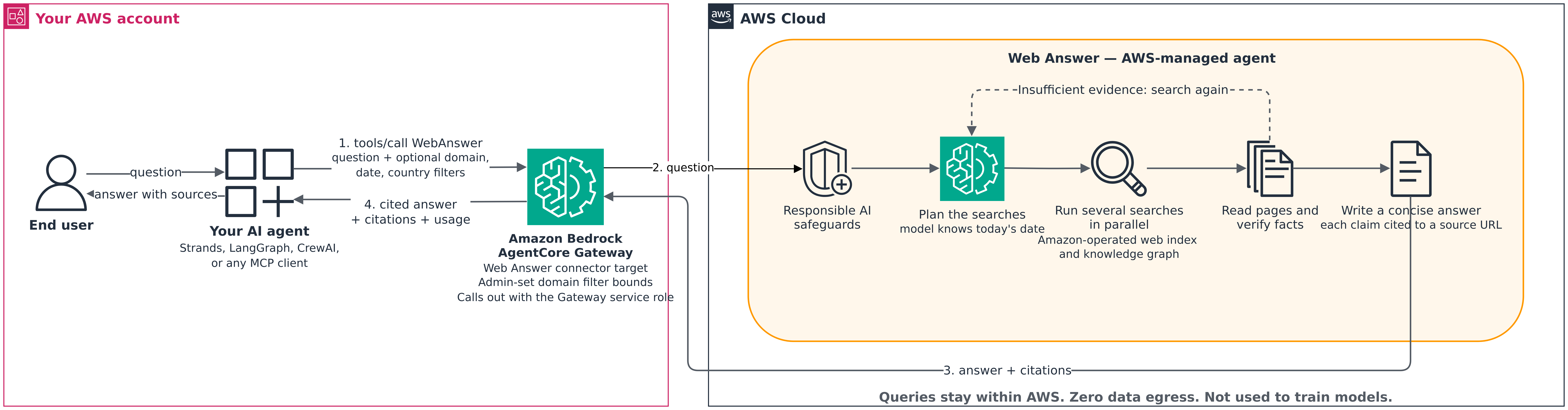
Figura 1: Flujo de solicitud desde un agente a través de la Puerta de enlace a Web Answer y de regreso
Su agente envía una pregunta a su Puerta de enlace de AgentCore, una capacidad de Amazon Bedrock AgentCore. La Puerta de enlace autentica la llamada con AWS Identity and Access Management (AWS IAM) o un Token Web JSON (JWT). La Puerta de enlace llama a Web Answer, un conector administrado que AWS posee, utilizando su propio rol de servicio. Web Answer planifica sus búsquedas, ejecuta varias en paralelo y lee páginas clave para verificar los hechos. Cuando la evidencia es insuficiente, vuelve a buscar. Luego escribe una respuesta que vincula cada afirmación a su URL de fuente. La Puerta de enlace devuelve la respuesta y sus citaciones a su agente como un resultado de herramienta del Protocolo de Contexto de Modelo (MCP).
Web Answer es una herramienta de puerta de enlace de AgentCore administrada que toma una pregunta en lenguaje natural y devuelve una respuesta sintetizada en segundos basada en fuentes web actuales. Aquí está lo que obtiene:
Una respuesta fundamentada y citada, donde cada afirmación fundamentada se relaciona con una cita, con una URL de fuente donde esté disponible.
Fuentes actuales. Web Answer realiza nuevas búsquedas para cada pregunta, y su modelo se le proporciona la fecha de hoy para que pueda buscar información actualizada.
Búsqueda agente: Web Answer planifica sus propias búsquedas, ejecuta varias en paralelo, lee páginas para verificar hechos y decide cuándo tiene suficientes pruebas para responder.
Salvaguardas de IA responsables: Web Answer está diseñado y probado con salvaguardas de IA responsables.
Figura 2: Video de demostración que muestra cómo agregar Web Answer a un Gateway de AgentCore, desde la configuración hasta una respuesta citada y terminada
Cómo difiere de la Búsqueda en la Web
Web Answer y las herramientas de Búsqueda en la Web admiten casos de uso de recuperación, con diferentes niveles de complejidad de integración. La línea divisoria es quién ejecuta el modelo:
Búsqueda en la Web: Devuelve URLs clasificadas, títulos, fragmentos y metadatos. Usted mantiene su propio modelo y controla la síntesis. Utilice la Búsqueda en la Web cuando desee tener el control total sobre cómo se procesan los resultados.
Web Answer: Ejecuta el modelo, el bucle de recuperación agente, la síntesis y la atribución por usted. Obtiene una respuesta citada y terminada. Utilice Web Answer cuando la pregunta sea una sub-tarea dentro de un agente más grande y no desee poseer una canalización de recuperación para ella.
Muchos clientes utilizarán ambos. Un agente puede utilizar la Búsqueda en la Web para tareas de investigación amplias donde necesite resultados brutos, y Web Answer para preguntas fácticas específicas donde necesite una respuesta rápida y citada.
Configurar e invocar Web Answer
Web Answer es un conector que AWS posee. Usted lo referencia por ID, y el Gateway maneja el esquema de herramientas, la gobernanza de parámetros, la resolución de puntos finales y la autenticación al backend. En este recorrido, usted da permiso al rol de servicio de su Gateway para llamar a Web Answer, agrega un objetivo de Web Answer y lo llama desde un agente de Strands.
Empezar
Empezar lleva minutos. Un administrador de Gateway agrega Web Answer como objetivo en un Gateway de AgentCore existente, y la herramienta aparece a cualquier agente conectado a través de MCP mediante tools/list y tools/call.
Credenciales de AWS para una identidad que tiene bedrock-agentcore:InvokeGateway en la puerta de enlace, y acceso a Amazon Bedrock al modelo que utiliza su agente.
Python 3.10 o posterior, con los paquetes requeridos:
Tenga en cuenta: Seguir estos pasos crea recursos de AWS que generan cargos. La puerta de enlace y las invocaciones de Web Answer son susceptibles de cargo. Consulte la sección de precios que sigue para obtener más detalles, y cuando termine, elimine los recursos que creó (consulte “Limpiar recursos”).
Paso 1: Otorgar al rol de servicio de la puerta de enlace acceso a Web Answer
La puerta de enlace utiliza su rol de servicio para actuar en su nombre. La política de confianza del rol permite bedrock-agentcore.amazonaws.com asumirlo, con el alcance de su cuenta. Para Web Answer, el rol necesita:
bedrock-agentcore:InvokeWebAnswer, para llamar a Web Answer. La puerta de enlace verifica este permiso en cada solicitud contra el ARN que AWS posee, arn:aws:bedrock-agentcore:us-east-1:aws:tool/web-answer.v1.
Adjunte la política al rol de servicio como una política en línea:
El rol controla solo las llamadas salientes de la puerta de enlace. Quién puede llamar a su puerta de enlace lo establece su autorizador de entrada. El rol también no necesita bedrock:InvokeModel: el modelo de su agente se ejecuta bajo su propia identidad.
Paso 2: Crear el objetivo de Web Answer
Agregue Web Answer como objetivo de conector. La connectorId indica a la puerta de enlace qué integración administrada provisionar: en este caso, un agente que busca en la web y escribe una respuesta citada.
La autenticación saliente es automática para los conectores. Con GATEWAY_IAM_ROLE, la puerta de enlace llama al backend de Web Answer con el rol de servicio del Paso 1, por lo que no crea ni almacena credenciales para la herramienta. Espere hasta que get_gateway_target informe el estado del objetivo como READY antes de llamarlo.
Como administrador de la puerta de enlace, también puede establecer un filtro de dominio en el objetivo. El filtro se aplica a cada llamada que pasa por el objetivo. Para limitar el objetivo a un conjunto de dominios, establezca parameterValues en {"domainFilter": {"include": ["bis.org"], "exclude": ["unreliable-source.net"]}}.
Paso 3: Invocar Web Answer desde un agente de Strands
Su agente descubre Web Answer a través del tools/list del Gateway y lo llama con tools/call, como cualquier otra herramienta de MCP. Esto funciona con Strands Agents, LangChain, LangGraph, CrewAI o cualquier otro cliente compatible con MCP.
from strands import Agent
from strands.models.bedrock import BedrockModel
from strands.tools.mcp import MCPClient
from mcp_proxy_for_aws.client import aws_iam_streamablehttp_client

gateway_url = "https://gateway-<id>.gateway.bedrock-agentcore.us-east-1.amazonaws.com/mcp"

mcp_client = MCPClient(lambda: aws_iam_streamablehttp_client(
    endpoint=gateway_url,
    aws_region="us-east-1",
    aws_service="bedrock-agentcore",
    aws_profile="<aws-profile-id>",  # identity with bedrock-agentcore:InvokeGateway on the Gateway
))

model = BedrockModel(model_id="us.anthropic.claude-sonnet-5", max_tokens=1024)

with mcp_client:
    tools = mcp_client.list_tools_sync()  # Web Answer tool discovered from the Gateway
    agent = Agent(model=model, tools=tools)

    result = agent("What are the Basel III minimum requirements for Tier 1 capital?")
    print(result.message)
Cuando una pregunta necesita información actual, su agente llama a la herramienta Web Answer (web-answer-tool___WebAnswer). Web Answer ejecuta la búsqueda agente y devuelve una respuesta finalizada con citas.
Además de la pregunta, la herramienta Web Answer acepta argumentos opcionales que su agente puede establecer en cada llamada: un filtro de dominio para incluir o excluir sitios, un rango de fechas de publicación y un país para localizar los resultados. El filtro de dominio del agente se combina con el filtro del objetivo. El agente puede excluir más dominios o limitar los resultados a algunos de los dominios incluidos en el objetivo, pero no puede agregar un dominio que el filtro del objetivo bloquee.
Formato de respuesta
Web Answer devuelve un resultado de herramienta de MCP con campos de contenido y contenido estructurado. La respuesta es texto en markdown con marcadores de cita en línea como [1], y structuredContent.answer lleva el mismo texto junto con una lista de citas estructuradas:
{
  "content": [
    {
      "type": "text",
      "text": "Under Basel III, banks must hold Common Equity Tier 1 capital of at least 4.5% of risk-weighted assets [[1](https://www.bis.org/...)]..."
    }
  ],
  "structuredContent": {
    "answer": [
      {
        "text": "Under Basel III, banks must hold Common Equity Tier 1 capital of at least 4.5% of risk-weighted assets [[1](https://www.bis.org/...)]...",
        "citations": [
          { "domain": "bis.org", "url": "https://www.bis.org/..." }
        ]
      }
    ]
  },
  "isError": false,
  "_meta": {
    "latencyMs": 5210
  }
}
structuredContent.answer normalmente contiene un solo bloque. Cada cita lleva la url de la fuente y, cuando esté disponible, el dominio.
Limpieza de recursos
Elimine el objetivo de Web Answer cuando ya no lo necesite:
Si creó el Gateway solo para este tutorial, elimine sus objetivos primero, luego el Gateway (delete_gateway) y luego el rol de servicio y su política. No hay infraestructura persistente en el lado de AWS más allá de estos recursos. Después de que se eliminen, deja de incurrir en cargos.
Controles empresariales integrados
Web Answer hereda los mismos controles empresariales que las otras herramientas de AgentCore:
Autenticación de gateway. No es necesario un clave de API separada para aprovisionar, rotar o administrar para Web Answer. Los llamadores se autenticican en el gateway con el método de entrada que configure, como AWS IAM (SigV4) o un token de Web JSON desde su proveedor de identidad. El gateway luego llama a Web Answer con su propio rol de servicio, que necesita el bedrock-agentcore:InvokeWebAnswer permiso.
VPC y AWS PrivateLink. Sus agentes pueden llamar al gateway a través de un punto final de interfaz virtual privada de nube (VPC) (com.amazonaws.us-east-1.bedrock-agentcore.gateway), por lo que el tráfico permanece fuera de internet público.
Cero datos de salida. Sus consultas y resultados permanecen dentro de su entorno de AWS.
Métricas de Amazon CloudWatch. Las métricas operativas se publican en CloudWatch desde la primera llamada.
Límites de velocidad por cuenta. Se aplican desde el lanzamiento, con 10 transacciones por segundo por cuenta en US East (N. Virginia) (us-east-1). Para solicitar un aumento, comuníquese con el soporte de AWS.
Límites de política de tiempo de administrador. El administrador de Gateway establece los límites de filtro de dominio en la configuración del objetivo. Los agentes pueden reducir los límites de filtro en cada llamada, pero no pueden ampliarlos.
Las consultas permanecen dentro de AWS. Web Answer busca en un índice web operado por Amazon y en el gráfico de conocimiento de Amazon, y no envía su pregunta a motores de búsqueda de terceros o sitios web externos.
Casos de uso
Web Answer ayuda a los agentes a recuperar información actual y citada para respaldar una serie de flujos de trabajo intensivos en conocimiento. Los escenarios de ejemplo incluyen:
Servicios financieros. Agentes de preguntas y respuestas regulatorias que responden preguntas sobre requisitos de cumplimiento, regulaciones del mercado y cambios en las políticas, donde cada respuesta debe rastrearse hasta una fuente autorizada.
Atención médica. Agentes de soporte clínico que basan sus respuestas en la literatura médica actual y las pautas de tratamiento publicadas en la web.
Servicio al cliente. Agentes de soporte que responden preguntas sobre productos y políticas en tiempo real, donde diez enlaces clasificados no son útiles y una respuesta citada sí lo es.
Legal y cumplimiento. Asistentes de investigación que responden preguntas sobre la ley de casos, presentaciones regulatorias y interpretaciones de políticas con citas auditables.
Trabajadores del conocimiento empresarial. Copilotos internos que responden preguntas desde la información pública actual sin requerir que los empleados creen su propio flujo de trabajo de búsqueda y síntesis.
Disponibilidad
Web Answer está disponible en US East (N. Virginia) (us-east-1), con más regiones de AWS próximamente.
Precios
Web Answer en Amazon Bedrock AgentCore tiene un precio de $10 por 1,000 llamadas de herramienta.
Conclusión
En esta publicación, mostramos cómo Web Answer brinda a sus agentes respuestas actuales y citadas a través de la búsqueda agente, sin necesidad de que usted construya o mantenga una canalización de búsqueda. Otorgamos acceso a un rol de servicio de Gateway a Web Answer, agregamos un objetivo de Web Answer, lo llamamos desde un agente de Strands y leímos la respuesta y sus citas desde la respuesta. Utilice Web Search en AgentCore cuando su propio modelo deba razonar sobre resultados brutos, y Web Answer cuando su agente necesite una respuesta terminada y citada.
Today, we are announcing the general availability of Web Answer on Amazon Bedrock AgentCore. With Web Answer, agent builders get a synthesized, source-cited answer to a natural-language question with a single tool call. They no longer build a search, retrieve, synthesize, and citation pipeline themselves.
If you have built agents that need to answer questions from current web sources, you know the pattern: call a search API, decide which results to trust, retrieve and clean page content, prompt a model to synthesize, and engineer citation extraction so the output traces back to a source. Every step is code you maintain, and every step is another place things can go wrong: hallucination when evidence is insufficient, stale content when the index moves, and broken attribution when a claim and its source drift apart.
The Web Answer collapses that entire pipeline into one request. You send a question. You get back a cited answer in seconds. In this post, we explain what Web Answer does, compare it with Web Search on AgentCore, show how it works and what it returns, and walk through adding Web Answer to a gateway and calling it from an agent.
What Web Answer does
Figure 1: Request flow from an agent through the Gateway to Web Answer and back
Your agent sends a question to your AgentCore Gateway, a capability of Amazon Bedrock AgentCore. The Gateway authenticates the call with AWS Identity and Access Management (AWS IAM) or a JSON Web Token (JWT). The Gateway calls Web Answer, a managed connector that AWS owns, using its own service role. Web Answer plans its searches, runs several in parallel, and reads key pages to check the facts. When the evidence is insufficient, it searches again. It then writes an answer that ties each claim to its source URL. The Gateway returns the answer and its citations to your agent as a Model Context Protocol (MCP) tool result.
Web Answer is a managed AgentCore Gateway tool that takes a natural-language question and returns a synthesized answer in seconds grounded in current web sources. Here is what you get back:
A grounded, cited answer, where each grounded claim maps to a citation, with a source URL where one is available.
Current sources. Web Answer runs new searches for every question, and its model is given today’s date so it can search for up-to-date information.
Agentic search: Web Answer plans its own searches, runs several in parallel, reads pages to verify facts, and decides when it has enough evidence to answer.
Responsible AI safeguards: Web Answer is designed and tested with responsible AI safeguards.
Figure 2: Demo video showing how to add Web Answer to an AgentCore Gateway, from setup to a finished, cited answer
How it differs from Web Search
Web Answer and the Web Search tools both support retrieval use cases, with different levels of integration complexity. The dividing line is who runs the model:
Web Search: Returns ranked URLs, titles, snippets, and metadata. You keep your own model and control the synthesis. Use Web Search when you want full control over how results are processed.
Web Answer: Runs the model, the agentic retrieval loop, synthesis, and attribution for you. You get a finished, cited answer. Use Web Answer when the question is a sub-task inside a larger agent and you do not want to own a retrieval pipeline for it.
Many customers will use both. An agent might use Web Search for broad research tasks where it needs raw results, and Web Answer for specific factual questions where it needs a quick, cited answer.
Set up and invoke Web Answer
Web Answer is a connector that AWS owns. You reference it by ID, and the Gateway handles the tool schema, parameter governance, endpoint resolution, and authentication to the backend. In this walkthrough, you give your Gateway’s service role permission to call Web Answer, add a Web Answer target, and call it from a Strands agent.
Getting started
Getting started takes minutes. A Gateway administrator adds Web Answer as a target on an existing AgentCore Gateway, and the tool appears to any attached agent over MCP through tools/list and tools/call.
Note: Following these steps creates AWS resources that incur charges. The Gateway and Web Answer invocations are billable. See the Pricing section that follows for details, and when you finish, delete the resources you created (see “Clean up resources”).
Step 1: Grant the Gateway service role access to Web Answer
The Gateway uses its service role to act on your behalf. The role’s trust policy allows bedrock-agentcore.amazonaws.com to assume it, scoped to your account. For Web Answer, the role needs:
bedrock-agentcore:InvokeWebAnswer, to call Web Answer. The Gateway checks this permission on every request against the ARN that AWS owns, arn:aws:bedrock-agentcore:us-east-1:aws:tool/web-answer.v1.
Attach the policy to the service role as an inline policy:
The role controls only the Gateway’s outbound calls. Who can call your Gateway is set by its inbound authorizer. The role also doesn’t need bedrock:InvokeModel: your agent’s model runs under your agent’s own identity.
Step 2: Create the Web Answer target
Add Web Answer as a connector target. The connectorId tells the Gateway which managed integration to provision: in this case, an agent that searches the web and writes a cited answer.
Outbound authentication is automatic for connectors. With GATEWAY_IAM_ROLE, the Gateway calls the Web Answer backend with the service role from Step 1, so you don’t create or store any credentials for the tool. Wait until get_gateway_target reports the target status as READY before you call it.
As the Gateway administrator, you can also set a domain filter on the target. The filter applies to every call that goes through the target. To limit the target to a set of domains, set parameterValues to {"domainFilter": {"include": ["bis.org"], "exclude": ["unreliable-source.net"]}}.
Step 3: Invoke Web Answer from a Strands agent
Your agent discovers Web Answer through the Gateway’s tools/list and calls it with tools/call, like any other MCP tool. This works with Strands Agents, LangChain, LangGraph, CrewAI, or any other MCP-compatible client.
from strands import Agent
from strands.models.bedrock import BedrockModel
from strands.tools.mcp import MCPClient
from mcp_proxy_for_aws.client import aws_iam_streamablehttp_client

gateway_url = "https://gateway-<id>.gateway.bedrock-agentcore.us-east-1.amazonaws.com/mcp"

mcp_client = MCPClient(lambda: aws_iam_streamablehttp_client(
    endpoint=gateway_url,
    aws_region="us-east-1",
    aws_service="bedrock-agentcore",
    aws_profile="<aws-profile-id>",  # identity with bedrock-agentcore:InvokeGateway on the Gateway
))

model = BedrockModel(model_id="us.anthropic.claude-sonnet-5", max_tokens=1024)

with mcp_client:
    tools = mcp_client.list_tools_sync()  # Web Answer tool discovered from the Gateway
    agent = Agent(model=model, tools=tools)

    result = agent("What are the Basel III minimum requirements for Tier 1 capital?")
    print(result.message)
When a question needs current information, your agent calls the Web Answer tool (web-answer-tool___WebAnswer). Web Answer runs the agentic search and returns a finished answer with citations.
Besides the question, the Web Answer tool takes optional arguments that your agent can set on each call: a domain filter to include or exclude sites, a published-date range, and a country to localize results. The agent’s domain filter is combined with the target’s filter. The agent can exclude more domains, or limit results to some of the target’s included domains, but it can’t add a domain that the target’s filter blocks.
Response format
Web Answer returns an MCP tool result with both content and structuredContent fields. The answer is markdown text with inline citation markers like [1], and structuredContent.answer carries the same text alongside a structured citations list:
{
  "content": [
    {
      "type": "text",
      "text": "Under Basel III, banks must hold Common Equity Tier 1 capital of at least 4.5% of risk-weighted assets [[1](https://www.bis.org/...)]..."
    }
  ],
  "structuredContent": {
    "answer": [
      {
        "text": "Under Basel III, banks must hold Common Equity Tier 1 capital of at least 4.5% of risk-weighted assets [[1](https://www.bis.org/...)]...",
        "citations": [
          { "domain": "bis.org", "url": "https://www.bis.org/..." }
        ]
      }
    ]
  },
  "isError": false,
  "_meta": {
    "latencyMs": 5210
  }
}
structuredContent.answer normally holds a single block. Each citation carries the source url and, when available, the domain.
Clean up resources
Delete the Web Answer target when you no longer need it:
If you created the Gateway only for this walkthrough, delete its targets first, then the Gateway (delete_gateway), and then the service role and its policy. There is no persistent infrastructure on the AWS side beyond these resources. After they are removed, you stop incurring charges.
Enterprise controls, built in
Web Answer inherits the same enterprise controls as other AgentCore tools:
Gateway authentication. No separate API key to provision, rotate, or manage for Web Answer. Callers authenticate to the gateway with the inbound method you configure, such as AWS IAM (SigV4) or a JSON Web Token from your identity provider. The gateway then calls Web Answer with its own service role, which needs the bedrock-agentcore:InvokeWebAnswer permission.
VPC and AWS PrivateLink. Your agents can call the gateway through an interface virtual private cloud (VPC) endpoint (com.amazonaws.us-east-1.bedrock-agentcore.gateway), so traffic stays off the public internet.
Zero data egress. Your queries and results stay within your AWS environment.
Amazon CloudWatch metrics. Operational metrics publish to CloudWatch from the first call.
Per-account rate limits. Enforced from launch, with 10 transactions per second per account in US East (N. Virginia) (us-east-1). To request an increase, contact AWS Support.
Admin-time policy bounds. The Gateway administrator sets domain filter bounds at target setup. Agents can narrow the filter bounds on each call but can’t widen them.
Queries stay within AWS. Web Answer searches an Amazon-operated web index and Amazon’s knowledge graph, and doesn’t send your question to third-party search engines or external websites.
Use cases
Web Answer helps agents retrieve current, cited information to support a range of knowledge-intensive workflows. Example scenarios include:
Financial services. Regulatory Q&A agents answering questions about compliance requirements, market regulations, and policy changes, where every answer must trace to an authoritative source.
Healthcare. Clinical support agents grounding responses in current medical literature and treatment guidelines published on the web.
Customer service. Support agents answering product and policy questions in real time, where ten ranked links are not useful and a cited answer is.
Legal and compliance. Research assistants answering questions about case law, regulatory filings, and policy interpretations with auditable citations.
Enterprise knowledge workers. Internal copilots that answer questions from current public information without requiring employees to build their own search and synthesis workflow.
Availability
Web Answer is available in US East (N. Virginia) (us-east-1), with more AWS Regions coming soon.
Pricing
Web Answer on Amazon Bedrock AgentCore is priced at $10 per 1,000 tool calls.
Conclusion
In this post, we showed how Web Answer gives your agents current, cited answers through agentic search, with no search pipeline for you to build or maintain. We granted a Gateway service role access to Web Answer, added a Web Answer target, called it from a Strands agent, and read the answer and its citations from the response. Use Web Search on AgentCore when your own model should reason over raw results, and Web Answer when your agent needs a finished, cited answer.