Cada vez que se inicia su agente, debe volver a leer toda su historia de vida antes de realizar una acción. Aquí se explica cómo hacer que recuerde sin tener que proporcionarle el mismo contexto nuevamente.
En la película Groundhog Day, el personaje de Bill Murray revive el mismo 2 de febrero todos los días. Se despierta con la misma canción sonando en la radio, en la misma posada y en el mismo pueblo pequeño, una y otra vez durante lo que algunos fanáticos de la película estiman que son 34 años.
Nada de lo que logra el día anterior se lleva sobre a menos que lo vuelva a trabajar desde cero. Los agentes de inteligencia artificial viven en una versión de Groundhog Day. Cada vez que un agente da un paso (llama a una herramienta, lee el resultado, decide qué hacer a continuación), debe enviar al modelo toda su historia hasta el momento para mantener la continuidad: las definiciones de herramientas, las instrucciones, cada llamada a herramienta anterior y cada resultado. El modelo solo predice el siguiente token en función de la entrada que se proporciona. No tiene memoria interna entre solicitudes, por lo que debe volver a leer todo. En el turno 20 de una sesión de codificación, el modelo vuelve a leer los turnos 1-19, y es usted quien paga por cada uno de esos tokens, una y otra vez.
La caché de solicitudes rompe el ciclo. El servicio almacena la solicitud de entrada (instrucciones, herramientas y contenido) y la reutiliza en la siguiente solicitud, a una fracción del precio de entrada.
En este artículo, lo guío a través de la vida de un agente, desde su primer turno hasta que obtiene nuevas herramientas y genera ayudantes. En el camino, le muestro cómo la caché de solicitudes mantiene los costos bajos y mantiene a los agentes responsivos y coherentes.
Qué envía un agente a su LLM
Antes de hablar sobre la caché, ayuda mirar qué contiene la primera invocación típica de un agente al modelo de lenguaje grande (LLM):
- Lista de herramientas – Las definiciones de cada función que el agente puede llamar. Cambia cuando se envía una nueva versión.
- Instrucciones – La solicitud del desarrollador: reglas, personalidad, políticas, ejemplos. También cambia por versión.
- Historial – Todo lo que ha sucedido en esta sesión hasta el momento: la tarea, las llamadas a herramientas del modelo y los resultados de las herramientas (que crece cada turno).
- Nuevo turno – El resultado de la herramienta más reciente o el mensaje del usuario (que puede ser diferente cada vez).
Qué envía un agente al modelo, turno tras turno si no configura la caché:
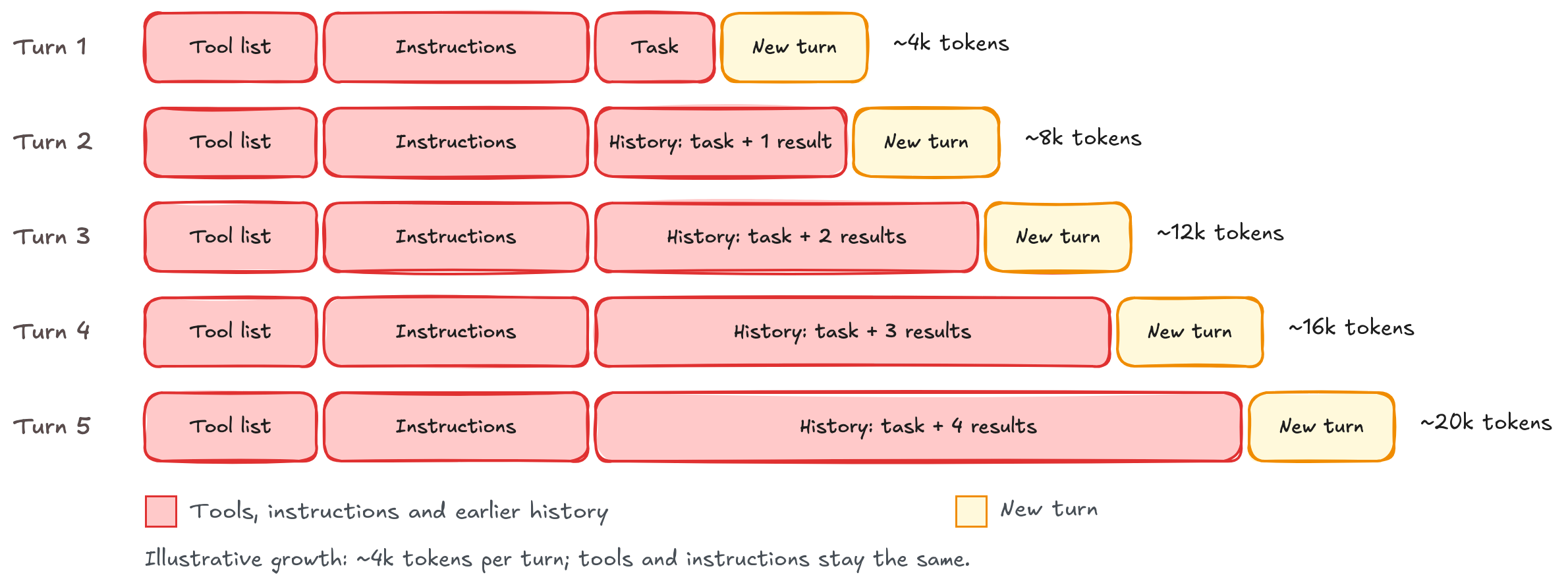
Figura 1: Qué envía un agente al modelo en cada turno
Cuando un modelo lee un prompt, primero realiza una escritura llamada prefill. Durante prefill, procesa cada token de entrada y construye sus vectores de clave y valor (también conocidos como clave-valor o KV), que forman el estado de trabajo del modelo. Esto sucede antes de que el modelo escriba su primer token.
La memoria intermedia de prompt guarda ese estado, que contiene el prompt del sistema, las herramientas, el contenido, el historial, etc. Cuando una solicitud posterior comienza con los mismos tokens de entrada (es decir, el mismo texto), el servicio de memoria intermedia de prompt carga el estado guardado en lugar de volver a calcularlo. Luego, procesa solo lo que es nuevo en la siguiente carga útil al modelo. La memoria intermedia de prompt puede ser implícita, donde Amazon Bedrock selecciona dónde termina el prefijo reutilizable, o explícita, donde su código marca ese endpoint utilizando prompt_cache_breakpoint. Puede utilizar ambos enfoques juntos, y recomendamos hacerlo.
Turno 1 en comparación con el turno 2
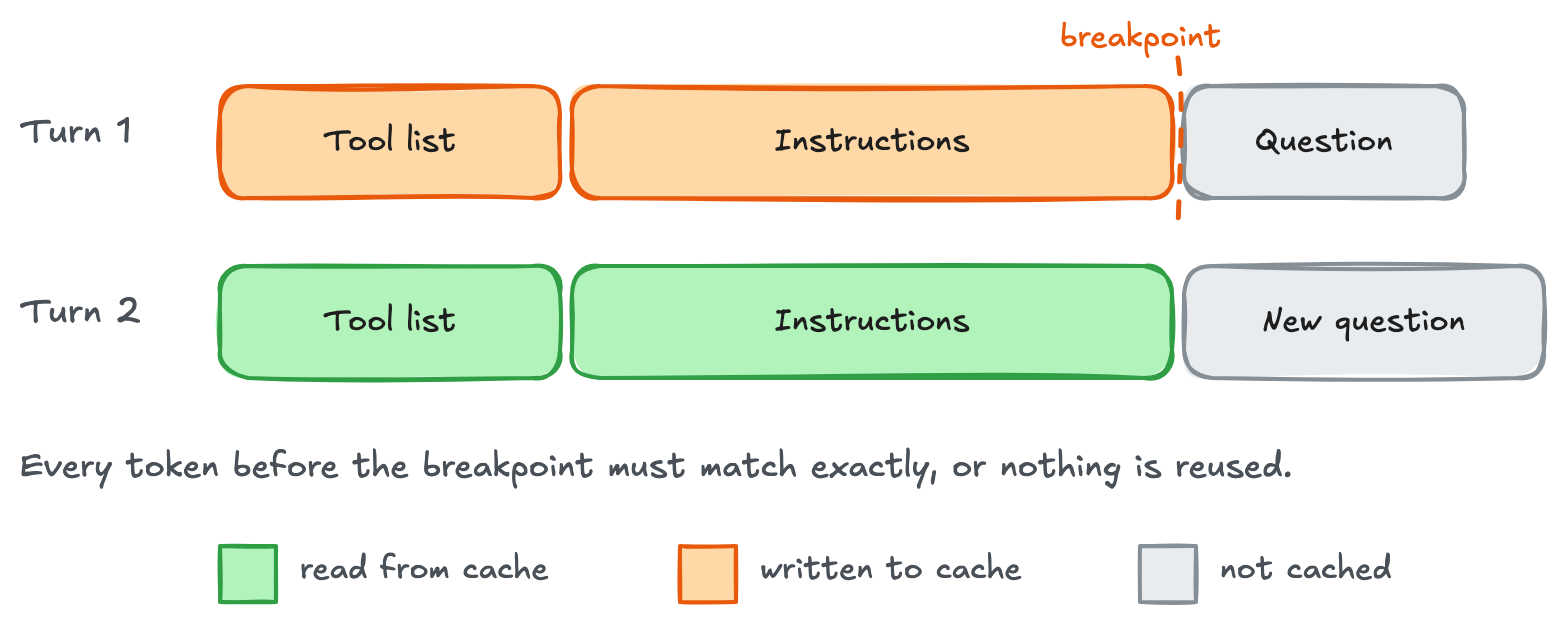
Figura 2: Turno 1 guarda el prefijo de prompt hasta el punto de interrupción, y el turno 2 lo reutiliza y paga el precio completo solo por la nueva pregunta
Implícito o explícito, y ¿por qué necesitamos ambos?
Para cargas de trabajo de agentes, la memoria intermedia implícita permite que Bedrock elija qué cachear a medida que crece la conversación. Con la memoria intermedia explícita, puede marcar contenido compartido, como herramientas e instrucciones, para su reutilización en sesiones y al iniciar agentes auxiliares. No siempre necesita ambas formas de memoria intermedia, pero combinarlas le da un punto de partida reutilizable mientras Bedrock gestiona la conversación en crecimiento de forma automática.
Las nuevas sesiones también pueden reutilizar ese punto de partida compartido mientras cada conversación construye su propio historial en caché. En esta publicación, comenzamos con el primer turno, luego mostramos cómo transportar contenido en caché a través de turnos posteriores, nuevas herramientas y a través de subagentes.
Hola mundo en caché
La primera victoria es cachear la parte estática del prompt: las herramientas y las instrucciones que permanecen iguales en las solicitudes. Estos ejemplos utilizan su cliente de Amazon Bedrock existente, TOOLS, y task. Reemplace la cadena INSTRUCTIONS abreviada con sus políticas y ejemplos reales. El prefijo reutilizable debe alcanzar 1,024 tokens para calificar.
Al cachear contenido estático, use el modo explícito: elija dónde termina el prefijo guardado.
KEY = "support-agent:v7:gpt-6-astra"
INSTRUCTIONS = "Your full support policies and examples..."

# Rendered context: [provider context][TOOLS][INSTRUCTIONS] | [task]
# Cache starts at the beginning; the marker below chooses its end.
resp = client.responses.create(
    model="us.openai.gpt-6-astra",
    store=False,  # Response storage; prompt caching still works.
    include=["reasoning.encrypted_content"],
    prompt_cache_key=KEY,
    prompt_cache_options={"mode": "explicit", "ttl": "30m"},
    tools=TOOLS,  # Rendered before instructions; keep order stable.
    input=[
        {
            "role": "developer",
            "content": [{
                "type": "input_text",
                "text": INSTRUCTIONS,
                # Save through this whole block, including TOOLS.
                "prompt_cache_breakpoint": {"mode": "explicit"},
            }],
        },
        # User message is processed but not cached.
        {"role": "user", "content": task},
    ],
)
El prompt_cache_key indica al servicio qué solicitudes deben compartir una caché. Regresamos a cómo usarlo cuando lleguemos a leer la caché en nuevas sesiones. En una de nuestras pruebas que utilizan la caché explícita, el prefijo de herramientas e instrucciones de aproximadamente 4,000 tokens escribió 4,120 tokens en la primera solicitud y leyó esos 4,120 tokens en solicitudes posteriores. El task (o solicitud del usuario) viene después del límite de la caché, por lo que esto no desencadena una escritura en la caché.
Tenga en cuenta que la caché de prompt solo funciona cuando pasa exactamente el mismo texto. Asegúrese de que las instrucciones del agente y las listas de herramientas estén serializadas de la misma manera cada vez. Los servidores de Protocolo de Contexto de Modelo (MCP) y otras formas de entrega de herramientas necesitan estar indexados para asegurarse de que permanezcan consistentes. Mantenga cualquier cosa que varíe, como la fecha, el nombre del usuario o un ID de solicitud, después de las instrucciones en caché.
A medida que el contenido crece y varía (diferentes herramientas y contenido), use el modo implícito para permitir que el servicio siga la conversación. Aquí, la primera solicitud no tiene un marcador explícito. Su último mensaje elegible es la tarea del usuario, por lo que el punto de interrupción automático viene después de esa tarea y cubre las herramientas, instrucciones y tarea juntas. El modo se muestra explícitamente en el siguiente ejemplo para claridad, aunque implícito es el valor predeterminado. Establecer store=False deja el historial de conversación en su aplicación. No deshabilita la caché.
def ask_with_implicit_cache(history):
    return client.responses.create(
        model="us.openai.gpt-6-astra",
        store=False,
        include=["reasoning.encrypted_content"],
        prompt_cache_key=KEY,
        prompt_cache_options={"mode": "implicit", "ttl": "30m"},
        tools=TOOLS,
        input=history,  # Everything gets cached
    )

history = [
    {"role": "developer", "content": INSTRUCTIONS},
    {"role": "user", "content": task},
]
# Automatic endpoint: the end of the user message.
resp = ask_with_implicit_cache(history)
Esto es útil cuando el próximo turno continúa la misma tarea. Una tarea diferente no coincide con el prefijo a través de la tarea antigua, y la escritura implícita no necesariamente crea una entrada separada solo para las herramientas y las instrucciones. Use un marcador explícito allí cuando necesite ese prefijo compartido más corto para ser reutilizable en tareas.
Use ambos cuando el agente necesita un punto de partida compartido y un historial en crecimiento. Comience con el bloque de desarrollador marcado en el siguiente ejemplo de código y llame a la función ask_with_implicit_cache. El modo de nivel de solicitud permanece implícito. El marcador de nivel de bloque agrega un punto de guardado explícito después de las instrucciones. El servicio también puede guardar a través del último mensaje elegible. Esto mantiene el prefijo compartido disponible mientras la conversación crece.
history = [
    {
        "role": "developer",
        "content": [{
            "type": "input_text",
            "text": INSTRUCTIONS,
            "prompt_cache_breakpoint": {"mode": "explicit"},
        }],
    },
    {"role": "user", "content": task},
]
# Still implicit mode, now with an explicit startup save point in the history.
resp = ask_with_implicit_cache(history)
Caché de historial de conversación y resultados de herramientas
El modelo solicita herramientas por nombre y proporciona sus argumentos. Su aplicación debe ejecutarlos. execute_function es un ayudante que usted construye para enrutar esas solicitudes a las funciones de Python coincidentes y devolver sus resultados. El siguiente bucle utiliza este ayudante para ejecutar cada herramienta solicitada. Agrega la salida del modelo y todos los resultados de las herramientas a la lista history, y luego envía esa lista nuevamente hasta que el modelo devuelva una respuesta final. En modo implícito, Amazon Bedrock puede reutilizar el prefijo sin cambios y almacenar en caché el contenido agregado a través del último resultado de la herramienta. Mantenga los mensajes anteriores y el TOOLS inicial sin cambios.
import json

# Map tool names to their Python implementations.
TOOL_HANDLERS = {
    "get_owner": get_owner,
    # Register your other initial tools here.
}

def execute_function(name, arguments):
    """Run the requested tool and return its result."""
    handler = TOOL_HANDLERS.get(name)
    if handler is None:
        return {"error": f"Unknown tool: {name}"}
    return handler(**arguments)

while True:
    # Preserve all output items, including encrypted reasoning.
    history.extend(resp.output)
    calls = [x for x in resp.output if x.type == "function_call"]
    if not calls:
        break
    for call in calls:
        result = execute_function(call.name, json.loads(call.arguments))
        history.append({
            "type": "function_call_output",
            "call_id": call.call_id,
            "output": json.dumps(result),
        })
    # The last result in this group supplies the automatic endpoint.
    resp = ask_with_implicit_cache(history)
Para seguimientos, agregue un nuevo mensaje de usuario y llame al ayudante nuevamente. Mantenga los mensajes anteriores sin cambios para que sus puntos finales en caché sigan estando disponibles.
Puntos de interrupción en movimiento: Cada turno lee todo lo anterior
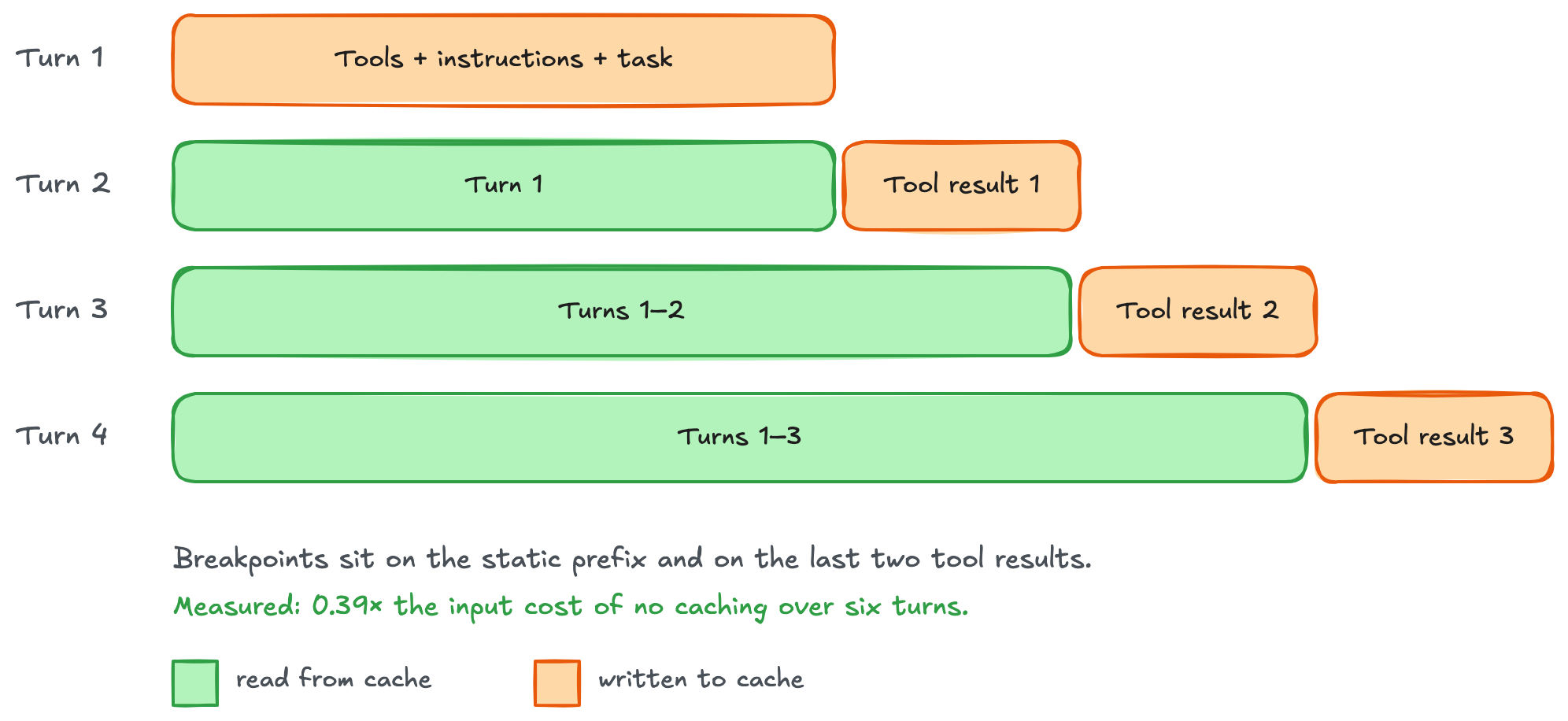
Figura 3: Puntos de interrupción en movimiento, donde cada turno lee todo lo anterior y escribe solo su propio resultado de herramienta
Para una ejecución explícita separada, recreé la historia de dos mensajes del ejemplo de mundo en caché combinado Hello. Este bucle envuelve los resultados de las herramientas en bloques input_text y marca el resultado final en cada lote. Los marcadores anteriores permanecen en history. Consulte las reglas de búsqueda actuales para conversaciones largas.
import json

while True:
    resp = client.responses.create(
        model="us.openai.gpt-6-astra", store=False,
        include=["reasoning.encrypted_content"],
        tools=TOOLS, prompt_cache_key=KEY, input=history,
        prompt_cache_options={"mode": "explicit", "ttl": "30m"},
    )
    d = resp.usage.input_tokens_details
    print("read", d.cached_tokens, "write", d.cache_write_tokens)
    history.extend(resp.output)  # Includes encrypted reasoning.
    calls = [x for x in resp.output if x.type == "function_call"]
    if not calls:
        break
    batch = []
    for call in calls:
        result = execute_function(call.name, json.loads(call.arguments))
        batch.append({
            "type": "function_call_output", "call_id": call.call_id,
            "output": [{"type": "input_text", "text": json.dumps(result)}],
        })
    # Add the newest boundary; retain every earlier marker.
    batch[-1]["output"][-1]["prompt_cache_breakpoint"] = {"mode": "explicit"}
    history.extend(batch)
GPT-6 Astra empató con el mejor resultado implícito en esta carga de trabajo de seis turnos: un costo de entrada aproximadamente un 62 por ciento menor que al ejecutar sin caché. Los puntos de interrupción en movimiento explícitos ahorraron aproximadamente un 61 por ciento en el mismo modelo. Ambos reutilizaron más historia a medida que crecía la conversación. Estos son resultados de carga de trabajo. Mida los ahorros de su propio agente.
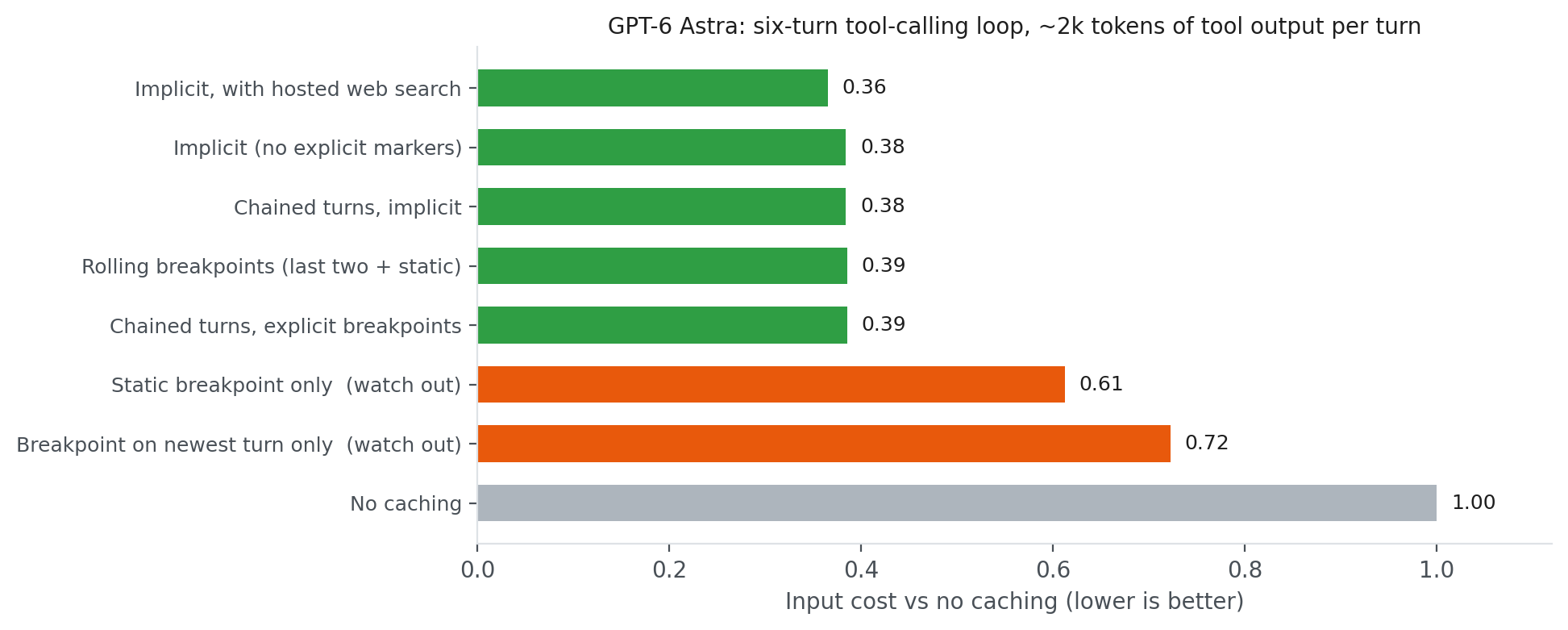
Figura 4: Costo de entrada de cada configuración de caché en GPT-6 Astra, relativo a sin caché
Tenga cuidado con:
- Solo un punto de interrupción estático en modo explícito solo – Las herramientas y las instrucciones se almacenan en caché, pero la historia en crecimiento se procesa nuevamente en cada turno (0.61). Esta limitación no se aplica al ejemplo combinado, que también guarda a través de finales de conversación elegibles.
- Mover un solo punto de interrupción puede evitar la reutilización de la caché y causar escrituras repetidas en modo explícito solo. Mantenga también el punto de interrupción del turno anterior.
- Solo una escritura implícita a través de una tarea cambiante – Una nueva tarea puede compartir las herramientas y las instrucciones, pero no el endpoint previamente guardado. Agregue un marcador explícito después de las instrucciones compartidas si diferentes tareas necesitan reutilizar ese prefijo más corto.
A veces, la lista de herramientas de un agente cambia o se agregan nuevas herramientas. Mantenga la lista inicial estable: agregar, eliminar o reordenar definiciones puede invalidar el prefijo en caché. Elija el enfoque que se adapte a cómo la herramienta se vuelve disponible.
Cuando se invocan herramientas conocidas en diferentes pasos del flujo del agente: Envíe el mismo TOOLS ordenado y use allowed_tools para limitar lo que el modelo puede llamar. Con allowed_tools, "mode": "auto" permite que el modelo decida si llama a una herramienta permitida, y "mode": "required" requiere al menos una llamada a una herramienta permitida. Pase esto como tool_choice. La restricción no cambia el catálogo en caché:
tool_choice={"type": "allowed_tools", "mode": "auto",
             "tools": [{"type": "function", "name": "get_owner"}]}
Nuevas herramientas durante una sesión. Tanto Amazon Bedrock Runtime como Amazon Bedrock Mantle aceptan un tipo de elemento de entrada llamado additional_tools para GPT-6 Astra, GPT-6.1 Sol y GPT-5.6 Luna. Para la disponibilidad del modelo por región de AWS, consulte Modelos compatibles por región de AWS en Amazon Bedrock. Registre la nueva herramienta get_due_date en la función de ayuda execute_function, luego agregue su esquema a la historia completada desde el bucle del agente. Mantenga el TOOLS inicial sin cambios:
TOOL_HANDLERS["get_due_date"] = get_due_date
NEW_TOOL = {
    "type": "function", "name": "get_due_date",
    "description": "Return the due date for a support case.",
    "strict": True,
    "parameters": {
        "type": "object",
        "properties": {"case_id": {"type": "string"}},
        "required": ["case_id"], "additionalProperties": False,
    },
}
history.append({
    "type": "additional_tools", "role": "developer",
    "tools": [NEW_TOOL],
})
history.append({
    "role": "user", "content": "Find the due date for case C-123.",
})
# Implicit mode saves through this new user message, including NEW_TOOL.
resp = ask_with_implicit_cache(history)
d = resp.usage.input_tokens_details
print("old prefix read", d.cached_tokens, "new write", d.cache_write_tokens)

# Example output:
# old prefix read 2048 new write 256
Una nueva herramienta llega a mitad de sesión
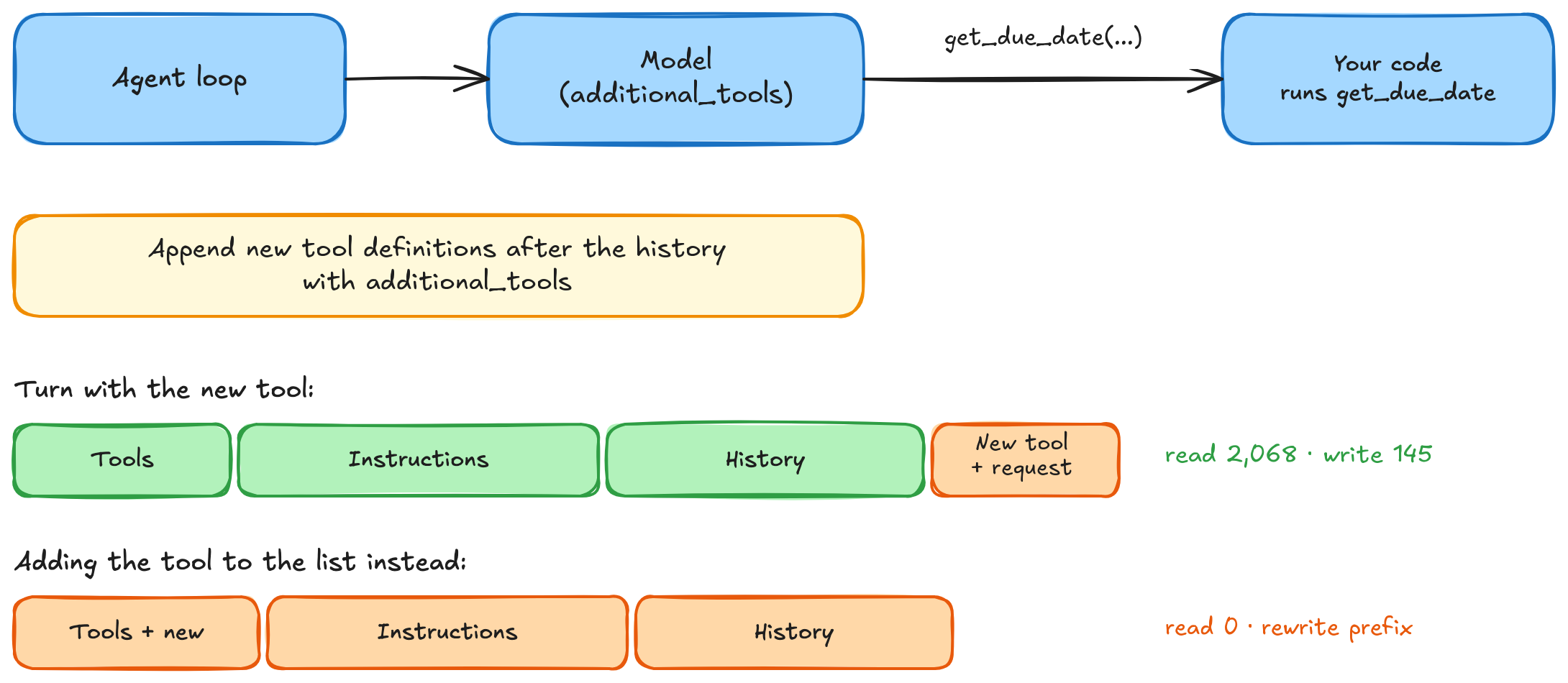
Figura 5: Agregar una herramienta mantiene el prefijo anterior reutilizable, con recuentos de ejemplo de GPT-6 Astra en Amazon Bedrock Runtime
Continúe el bucle de ejecución de herramientas con la nueva respuesta. El bucle agrega la salida del modelo a history, ejecuta las herramientas solicitadas y agrega sus resultados. Mantenga el elemento additional_tools en solicitudes posteriores para que la nueva herramienta siga estando disponible. En modo implícito, Amazon Bedrock puede almacenar en caché a través del nuevo mensaje del usuario, incluidas las definiciones de herramientas que lo preceden. En modo explícito solo, conserve los puntos de interrupción anteriores y agregue uno a un bloque input_text en ese mensaje del usuario. El elemento additional_tools en sí no puede contener un punto de interrupción.
Diferentes roles, diferentes catálogos. Cuando diferentes roles de agente necesitan diferentes herramientas, elija un perfil de herramienta estable, como soporte o facturación, al comienzo de cada sesión. Cada perfil obtiene su propio prefijo en caché. Marque las instrucciones compartidas para que las tareas posteriores con ese perfil puedan reutilizarlas, luego use cualquier modo a medida que crece la conversación.
Perfiles de herramientas en caché
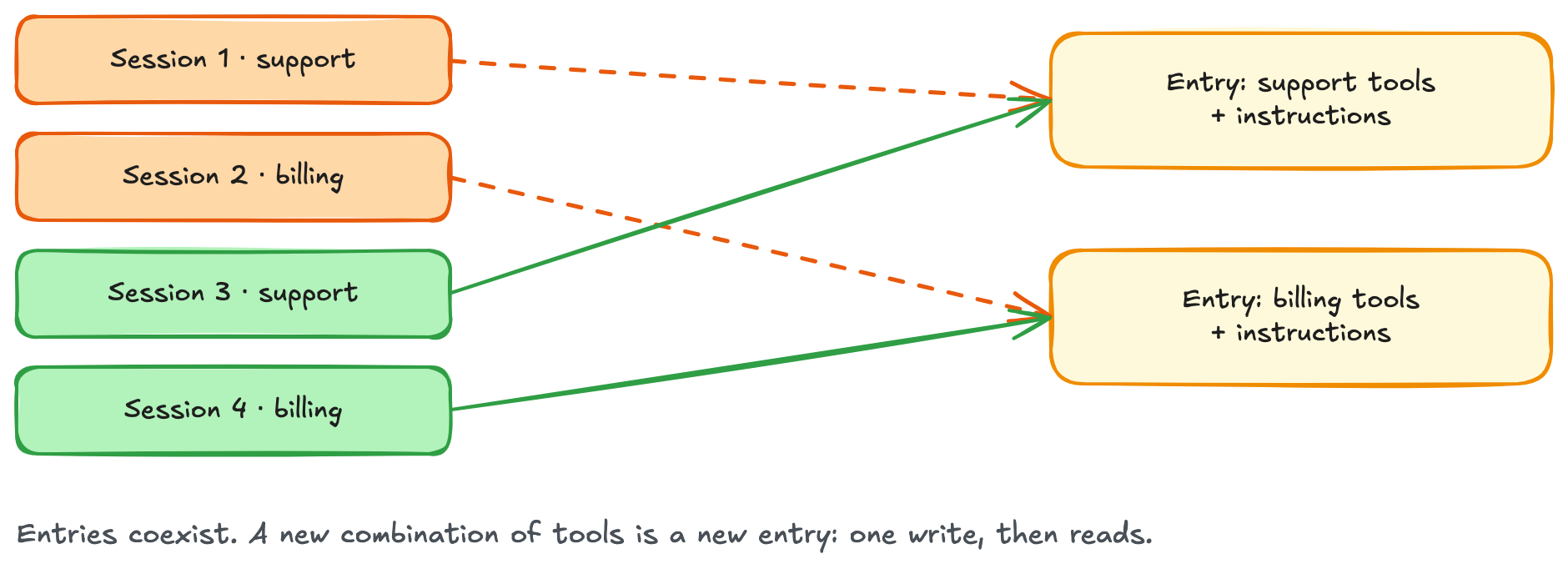
Figura 6: Cada perfil de herramienta tiene su propio prefijo en caché, reutilizable por sesiones coincidentes
Subagentes y llamadas laterales
La delegación no debe hacer que cada ayudante vuelva a leer el mismo contexto de fondo. Comparta el prefijo, luego agregue la tarea de cada ayudante al final. Tenga en cuenta que cuando utiliza la caché con agentes de inteligencia artificial, las herramientas y las solicitudes del sistema pueden filtrarse o explotarse. Establezca prácticas de inteligencia artificial responsables que incluyan la implementación de caché de solicitudes como parte de esa gobernanza.
Calentar una vez, luego expandirse. Envíe una solicitud ordinaria primero y espere a que termine antes de lanzar ayudantes. Marque el contexto compartido explícitamente en cada solicitud, incluso cuando el modo es implícito:
shared = {"role": "developer", "content": [{
    "type": "input_text", "text": INSTRUCTIONS,
    "prompt_cache_breakpoint": {"mode": "explicit"},
}]}
warm = client.responses.create(
    model="us.openai.gpt-6-astra", store=False,
    tools=TOOLS, prompt_cache_key=KEY,
    prompt_cache_options={"mode": "implicit", "ttl": "30m"},
    max_output_tokens=16,
    input=[shared, {"role": "user", "content": "Reply READY."}],
)
d = warm.usage.input_tokens_details
if not (d.cache_write_tokens or d.cached_tokens):
    raise RuntimeError("Shared prefix was not cached.")
from concurrent.futures import ThreadPoolExecutor

# helper_tasks contains the task text for each helper.
helper_inputs = [
    [shared, {"role": "user", "content": task}]
    for task in helper_tasks
]
with ThreadPoolExecutor(max_workers=4) as pool:
    helpers = list(pool.map(ask_with_implicit_cache, helper_inputs))
Los ayudantes utilizan el mismo TOOLS, modelo y KEY que el calentamiento. Un calentamiento que termina en el límite de salida aún puede poblar la caché. La verificación de uso confirma la actividad de la caché antes de que comiencen los ayudantes.
Subagentes: Calentar el prefijo compartido una vez, luego divergir
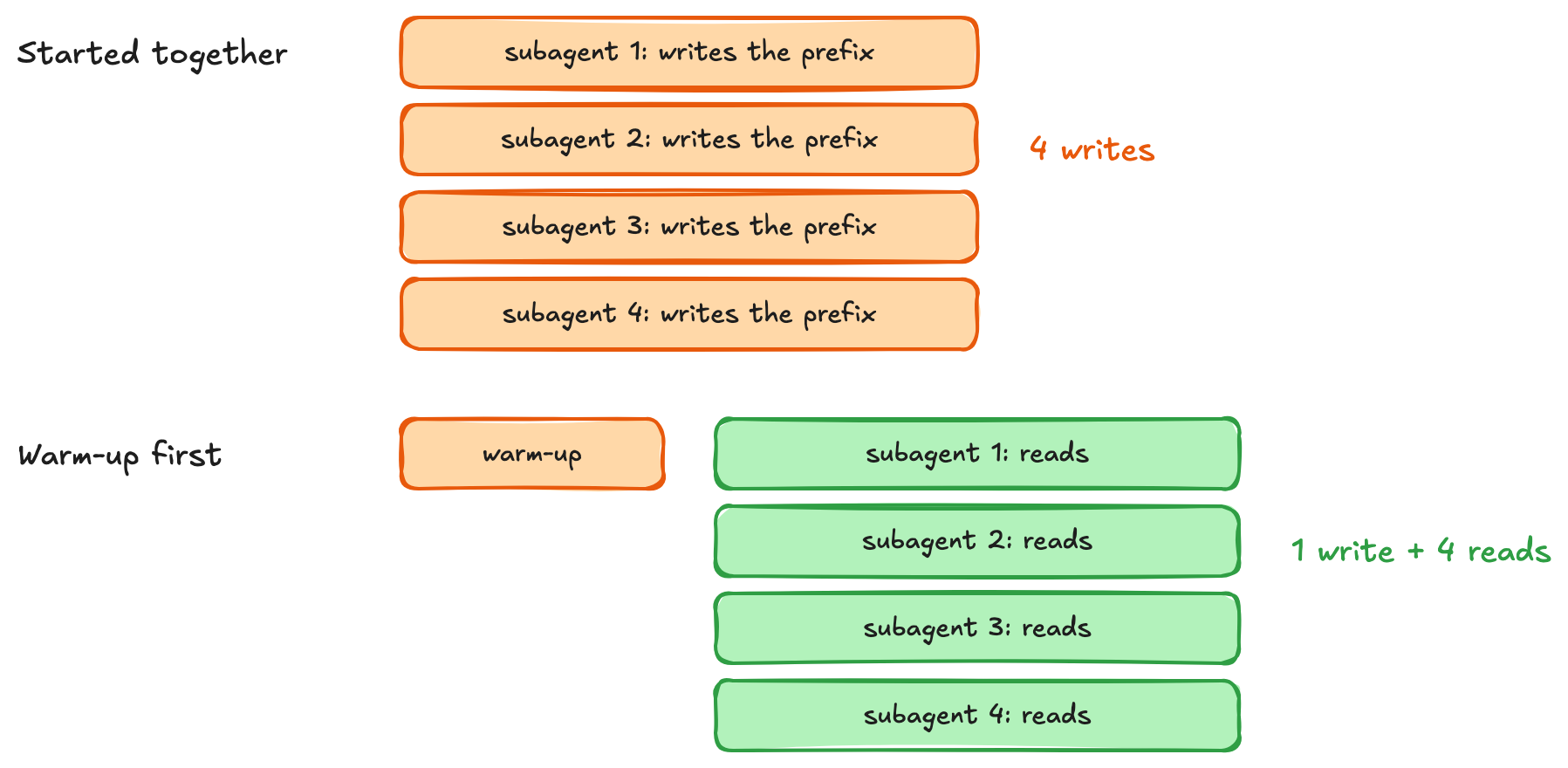
Figura 7: Calentar el prefijo compartido antes de lanzar ayudantes, y cada ayudante agrega su propia tarea
Dar a las llamadas laterales el mismo comienzo. El bucle del agente construye history al agregar cada resp.output y sus resultados de herramienta coincidentes, incluida la razonamiento cifrada. Después de que el padre termina, copie esa lista completa para un resumen o juez. El mismo ayudante mantiene las herramientas, el modelo y la clave sin cambios:
from copy import deepcopy

# history is the completed history built by the agent loop above.
# Copy it so the helper can add instructions without changing the parent.
helper_history = deepcopy(history)
helper_history.append({
    "role": "developer",
    "content": "Summarize this conversation in one sentence. Do not call tools.",
})
summary = ask_with_implicit_cache(helper_history)
d = summary.usage.input_tokens_details
print("history read", d.cached_tokens, "write", d.cache_write_tokens)
print(summary.output_text)

# Example output (assumed values and conversation):
# history read 4096 write 32
# Case C-123 is due on October 31, 2026.
El ayudante puede reutilizar la porción en caché de history, pero el mensaje del desarrollador agregado no extiende automáticamente la caché para incluir la instrucción de resumen. Si las solicitudes posteriores reutilizan la misma historia y la instrucción, coloque la instrucción en un bloque input_text con prompt_cache_breakpoint. Para un resumen de un solo uso, no se necesita un marcador adicional.
Pausas, reinicios y la clave de caché
Pausas. Los prefijos en caché tienen un tiempo de vida mínimo de 30 minutos (TTL), actualizado por reutilización exitosa, y pueden permanecer más tiempo. Si una sesión se reanuda pronto, un calentamiento ordinario puede actualizar el prefijo antes de que expire. Compare el costo de esa solicitud con dejar que la caché expire. Para las reglas de TTL, consulte la documentación de Amazon Bedrock.
Nuevas sesiones. Mantenga prompt_cache_key estable para las solicitudes que están destinadas a compartir un prefijo. Una clave específica de sesión aísla las sesiones incluso cuando sus prompts coinciden. En el siguiente ejemplo, cambiar a una clave compartida permitió que las sesiones reutilizaran el prefijo.
Las nuevas sesiones reutilizan la caché solo si comparten la clave
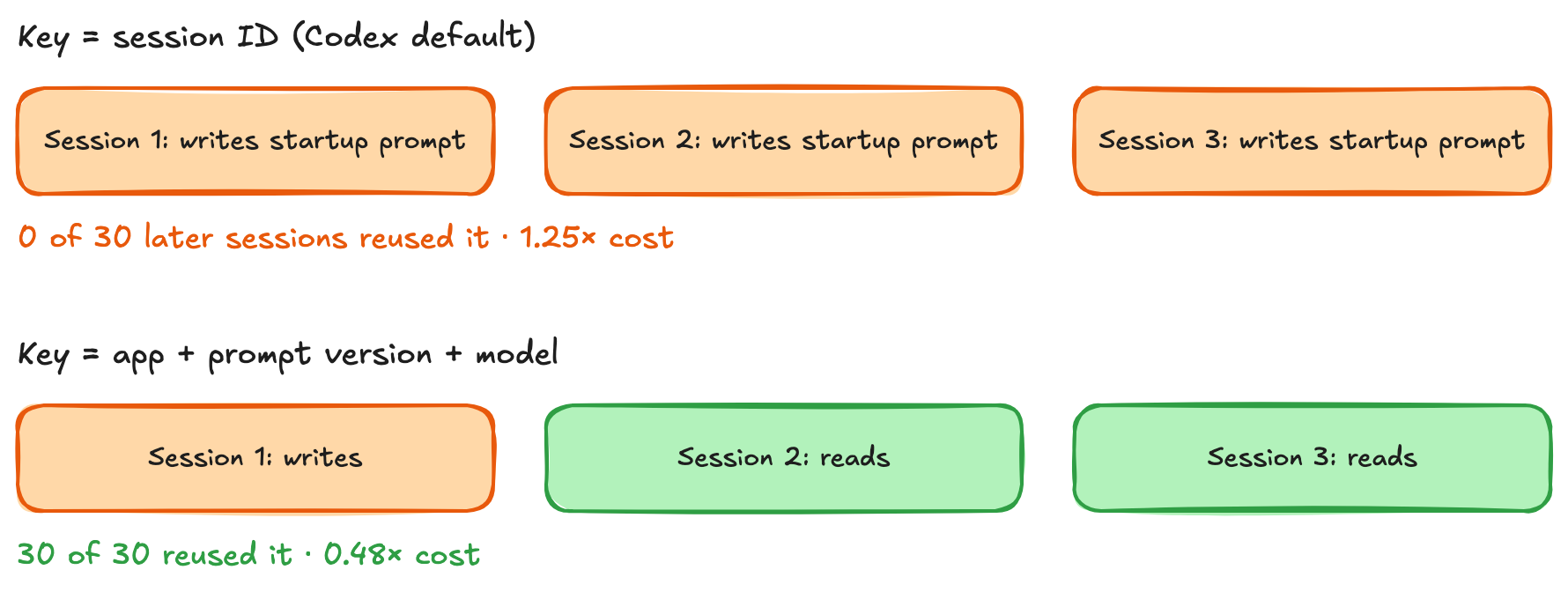
Figura 8: Una clave específica de sesión separa las entradas de caché, y una clave compartida permite que las sesiones coincidentes las reutilicen
La reutilización de contenido de caché existente requiere el mismo modelo, cuenta de AWS y región, y un prefijo coincidente disponible. El siguiente ejemplo combina un marcador de inicio explícito con modo implícito. Cada sesión comienza con las mismas instrucciones y su propia tarea. Ambas utilizan la misma clave computada:
import hashlib

def cache_key(app, model, prompt_version, instructions):
    digest = hashlib.sha256(instructions.encode()).hexdigest()[:12]
    return f"{app}:{prompt_version}:{model}:{digest}"

KEY = cache_key("support-agent", "us.openai.gpt-6-astra", "v7", INSTRUCTIONS)
prefix = {"role": "developer", "content": [{
    "type": "input_text", "text": INSTRUCTIONS,
    "prompt_cache_breakpoint": {"mode": "explicit"},
}]}
for label, question in [
    ("session A", "Explain the refund policy without calling tools."),
    ("session B", "Explain the escalation policy without calling tools."),
]:
    # A fresh conversation for each session; the startup prefix matches.
    session_history = [prefix, {"role": "user", "content": question}]
    result = ask_with_implicit_cache(session_history)
    d = result.usage.input_tokens_details
    print(label, "read", d.cached_tokens, "write", d.cache_write_tokens)
En un inicio en frío, la sesión 1 escribe el prefijo compartido. La sesión 2 puede leerlo incluso si su tarea puede ser diferente. Cada tarea también se puede cachear implícitamente. Verifique los contadores de uso: las claves y marcadores coincidentes hacen que la reutilización sea posible, pero todavía debe haber una entrada de caché disponible.
Qué entrega la caché de prompts
Costo. Para un agente GPT-6 Astra con un prefijo de inicio de 8,000 tokens y seis turnos que agregan 2,000 tokens cada uno, la caché estática de una sola vez redujo el costo a $0.50, y los puntos de interrupción en curso redujeron el costo de entrada modelada en un 64 por ciento: de $0.87 a $0.32 por sesión.
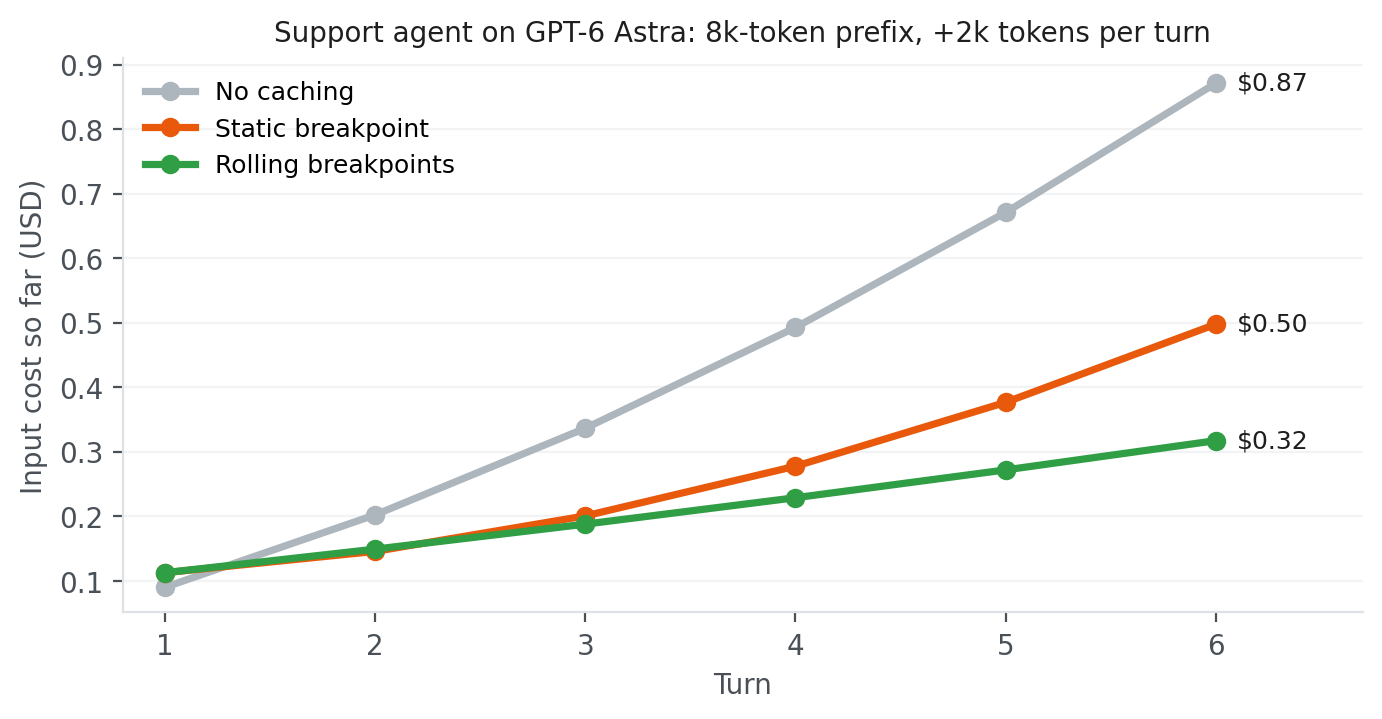
Figura 9: Costo de entrada acumulado por sesión para el ejemplo de agente de soporte, utilizando precios de Amazon Bedrock bajo demanda para GPT-6 Astra
Cómo saber si la caché está funcionando
Comience con el uso de respuestas. cached_tokens informa la entrada leída desde la caché, y cache_write_tokens informa la entrada escrita en ella. A medida que crece la conversación, verifique que los turnos posteriores reutilicen el historial anterior y que las nuevas escrituras reflejen el contenido que se está agregando.
Para la supervisión de producción en el punto de conexión de tiempo de ejecución de Amazon Bedrock, utilice las métricas CacheReadInputTokenCount y CacheWriteInputTokenCount en Amazon CloudWatch. Active la registrazione de invocaciones de modelo cuando necesite registros de solicitudes individuales, luego consulte con Amazon CloudWatch Logs Insights. Para el punto de conexión de Amazon Bedrock Mantle, registre los campos de uso de respuestas en los registros de su aplicación. Su espacio de nombres de Amazon CloudWatch actualmente no tiene contadores de caché separados.
Para verificar los costos, filtre AWS Cost Explorer a Amazon Bedrock y agrupe por tipo de uso. Las lecturas de caché, las escrituras de caché y las entradas no almacenadas en caché aparecen como entradas separadas por modelo. Excluya las entradas de token de salida al calcular sus participaciones en el costo de entrada.
Una lista de verificación breve
- Mantenga el prefijo reutilizable estable. Coloque las herramientas y las instrucciones compartidas primero, luego agregue el historial de conversación y los nuevos giros. Cambiar una marca de tiempo, un mensaje o una definición de herramienta evita la reutilización más allá de ese cambio. Un prefijo más corto aún puede reutilizarse si tiene su propio punto final guardado.
- Elige límites alrededor del contenido que deseas reutilizar. Utilice la caché implícita para el historial en crecimiento, marcadores explícitos para prefijos compartidos o ambos. El modo explícito solo evita escribir sufijos desechables. Al extender una conversación de solo modo explícito, conserve los marcadores anteriores para que las solicitudes posteriores puedan encontrar los prefijos guardados.
- Mantenga el catálogo de herramientas inicial sin cambios. Utilice
allowed_tools para restringir qué herramientas se pueden llamar. Agregue definiciones conocidas con additional_tools o descúbralas a través de tool_search con nombre de espacio de cliente. Elija un perfil de herramienta estable cuando diferentes roles de agente necesitan catálogos diferentes.
- Verifique el tamaño y la duración del prefijo. Un prefijo que se puede cachear debe contener al menos 1,024 tokens. Los prefijos en caché permanecen elegibles para reutilización durante al menos 30 minutos después de su última escritura o reutilización exitosa.
- Caliente el contenido compartido antes de lanzar los ayudantes. Marque el prefijo compartido en ambas solicitudes de calentamiento y de ayudante, incluyendo cuando se utiliza el modo implícito. Termine la solicitud de calentamiento antes de iniciar las llamadas paralelas.
- Mantenga las claves de caché estables dentro de cada grupo de intercambio. Las solicitudes destinadas a reutilizar un prefijo deben utilizar la misma clave. Las claves separadas pueden mantener la contabilidad de caché distintas entre clientes o usuarios.
- Mida los ahorros en todo el flujo de trabajo. Las escrituras de caché cuestan 1,25 veces la tasa de entrada normal. Los precios de lectura dependen del modelo. Registre los costos de escritura junto con los ahorros de lectura, utilizando el uso de respuesta durante el desarrollo y los datos de monitoreo y facturación en producción.
Despertar el 3 de febrero
Bill Murray solo escapa de Groundhog Day una vez que deja de repetir los mismos errores y comienza a llevar lo que aprendió de un día a otro. Los agentes llegan allí de una manera similar, aunque menos romántica: manteniendo el inicio de su prompt byte a byte estable y utilizando límites de caché automáticos o explícitos a medida que crece el historial.
En esta publicación, cubrimos cómo almacenar en caché herramientas e instrucciones compartidas, hacer crecer la caché a lo largo de las vueltas del agente y preservar la reutilización al agregar herramientas, lanzar ayudantes o iniciar nuevas sesiones. Mantenga el prefijo compartido estable y agregue nueva información a medida que avanza el flujo de trabajo. Utilice la caché implícita para conversaciones en crecimiento y puntos de interrupción explícitos para contenido compartido. Combínelos cuando necesite ambos, o elija el modo explícito solo cuando un sufijo cambiante es poco probable que se reutilice. Compare las lecturas de caché, escrituras, costo de entrada total y latencia para encontrar lo que mejor funciona para su agente. Para aplicar estos patrones, siga la documentación de caché de prompts de Amazon Bedrock para modelos de OpenAI y verifique la disponibilidad de modelos por región y endpoint de AWS. Comience con un flujo de trabajo y mida los ahorros a medida que crecen sus conversaciones.
Acerca del autor
Every time you spin off your agent, it has to re-read its whole life story before performing an action. Here’s how to make it remember without having to feed it the same context again.
In the movie Groundhog Day, Bill Murray’s character re-lives the same February 2 every day. He wakes up to the same song playing on the radio, in the same inn, and the same small town, again and again for what some movie fans estimate to be 34 years.
Nothing he accomplished the day before carries over unless he works it out again from scratch. AI agents live in a version of Groundhog Day. Every time an agent takes a step (calls a tool, reads the result, decides what to do next), it has to send the model its entire story so far to maintain continuity: the tool definitions, the instructions, every previous tool call, and every result. The model only predicts the next token based on the input you provide. It has no internal memory between requests, so it must read all of it again. By turn 20 of a coding session, the model re-reads turns 1–19, and it’s you who pays for every one of those tokens, again and again.
Prompt caching breaks the cycle. The service stores your input prompt (instructions, tools, and content) and reuses it on the next request, at a fraction of the input price.
In this post, I walk you through an agent’s life, from its first turn to when it gets new tools and spawns helpers. Along the way, I show you how prompt caching keeps costs down and keeps agents responsive and consistent.
What an agent sends to its LLM
Before talking about caching, it helps to look at what a typical agent’s first invocation to the large language model (LLM) contains:
- Tool list – The definitions of every function the agent can call. Changes when you ship a new release.
- Instructions – The developer prompt: rules, persona, policies, examples. Also changes per release.
- History – Everything that happened in this session so far: the task, the model’s tool calls, and the tool results (which grows every turn).
- New turn – The latest tool result or user message (which might be different every time).
What an agent sends to the model, turn after turn if you don’t set up caching:
Figure 1: What an agent sends to the model on every turn
How prompt caching works under the hood
When a model reads a prompt, it first does a write called prefill. During prefill, it processes every input token and builds its key and value vectors (also known as key-value, or KV), which form the model’s working state. This happens before the model writes its first token.
Prompt caching saves that state, which contains the system prompt, tools, content, history, and so on. When a later request starts with the same input tokens (that is, the same text), the prompt caching service loads the saved state instead of computing it again. It then processes only what is new in the next payload to the model. Prompt caching can be implicit, where Amazon Bedrock selects where the reusable prefix ends, or explicit, where your code marks that endpoint using prompt_cache_breakpoint. You can use both approaches together, and we recommend doing so.
Turn 1 compared to turn 2
Figure 2: Turn 1 saves the prompt prefix up to the breakpoint, and turn 2 reuses it and pays full price only for the new question
Implicit or explicit, and why do we need both?
For agentic workloads, implicit caching lets Bedrock choose what to cache as the conversation grows. With explicit caching, you can mark shared content, such as tools and instructions, for reuse across sessions and when spinning up helper agents. You don’t always need both forms of caching, but combining them gives you a reusable starting point while Bedrock manages the growing conversation automatically.
New sessions can also reuse that shared starting point while each conversation builds on its own cached history. In this post, we start with the first turn, then show how to carry cached content through later turns, new tools, and across subagents.
Hello cached world
The first win is to cache the static part of the prompt: the tools and instructions that stay the same across requests. These examples use your existing Amazon Bedrock client, TOOLS, and task. Replace the shortened INSTRUCTIONS string with your real policies and examples. The reusable prefix must reach 1,024 tokens to qualify.
When caching static content, use explicit mode: choose where the saved prefix ends.
KEY = "support-agent:v7:gpt-6-astra"
INSTRUCTIONS = "Your full support policies and examples..."

# Rendered context: [provider context][TOOLS][INSTRUCTIONS] | [task]
# Cache starts at the beginning; the marker below chooses its end.
resp = client.responses.create(
    model="us.openai.gpt-6-astra",
    store=False,  # Response storage; prompt caching still works.
    include=["reasoning.encrypted_content"],
    prompt_cache_key=KEY,
    prompt_cache_options={"mode": "explicit", "ttl": "30m"},
    tools=TOOLS,  # Rendered before instructions; keep order stable.
    input=[
        {
            "role": "developer",
            "content": [{
                "type": "input_text",
                "text": INSTRUCTIONS,
                # Save through this whole block, including TOOLS.
                "prompt_cache_breakpoint": {"mode": "explicit"},
            }],
        },
        # User message is processed but not cached.
        {"role": "user", "content": task},
    ],
)
The prompt_cache_key tells the service which requests are meant to share a cache. We come back to how to use it when we get to reading the cache in new sessions. In one of our tests using explicit caching, the roughly 4,000-token tools-and-instructions prefix wrote 4,120 tokens on the first request and read those 4,120 tokens on later requests. The task (or user request) comes after the cache boundary, so this doesn’t trigger a write to the cache.
Keep in mind that prompt caching works only when you pass exactly the same text. Make sure that the agent’s instructions and tool lists are serialized the same way every time. Model Context Protocol (MCP) servers and other forms of tool delivery need to be indexed to make sure they stay consistent. Keep anything that varies, such as the date, the user’s name, or a request ID, after the cached instructions.
As the content grows and varies (different tools and content), use implicit mode to let the service follow the conversation. Here, the first request has no explicit marker. Its latest eligible message is the user’s task, so the automatic breakpoint comes after that task and covers the tools, instructions, and task together. The mode is shown explicitly in the following example for clarity, even though implicit is the default. Setting store=False leaves conversation history in your application. It doesn’t disable caching.
def ask_with_implicit_cache(history):
    return client.responses.create(
        model="us.openai.gpt-6-astra",
        store=False,
        include=["reasoning.encrypted_content"],
        prompt_cache_key=KEY,
        prompt_cache_options={"mode": "implicit", "ttl": "30m"},
        tools=TOOLS,
        input=history,  # Everything gets cached
    )

history = [
    {"role": "developer", "content": INSTRUCTIONS},
    {"role": "user", "content": task},
]
# Automatic endpoint: the end of the user message.
resp = ask_with_implicit_cache(history)
This is useful when the next turn continues the same task. A different task doesn’t match the prefix through the old task, and the implicit write doesn’t necessarily create a separate entry for only the tools and instructions. Use an explicit marker there when you need that shorter shared prefix to be reusable across tasks.
Use both when the agent needs a shared starting point and a growing history. Start with the marked developer block in the following code example and call the function ask_with_implicit_cache. The request-level mode stays implicit. The block-level marker adds an explicit save point after the instructions. The service can also save through the latest eligible message. This keeps the shared prefix available while the conversation grows.
history = [
    {
        "role": "developer",
        "content": [{
            "type": "input_text",
            "text": INSTRUCTIONS,
            "prompt_cache_breakpoint": {"mode": "explicit"},
        }],
    },
    {"role": "user", "content": task},
]
# Still implicit mode, now with an explicit startup save point in the history.
resp = ask_with_implicit_cache(history)
Caching conversation history and tool results
The model requests tools by name and supplies their arguments. Your application must execute them. execute_function is a helper you build to route those requests to the matching Python functions and return their results. The following loop uses this helper to run each requested tool. It appends the model’s output and all tool results to the history list, then sends that list again until the model returns a final answer. In implicit mode, Amazon Bedrock can reuse the unchanged prefix and cache the added content through the last tool result. Keep earlier messages and the initial TOOLS unchanged.
import json

# Map tool names to their Python implementations.
TOOL_HANDLERS = {
    "get_owner": get_owner,
    # Register your other initial tools here.
}

def execute_function(name, arguments):
    """Run the requested tool and return its result."""
    handler = TOOL_HANDLERS.get(name)
    if handler is None:
        return {"error": f"Unknown tool: {name}"}
    return handler(**arguments)

while True:
    # Preserve all output items, including encrypted reasoning.
    history.extend(resp.output)
    calls = [x for x in resp.output if x.type == "function_call"]
    if not calls:
        break
    for call in calls:
        result = execute_function(call.name, json.loads(call.arguments))
        history.append({
            "type": "function_call_output",
            "call_id": call.call_id,
            "output": json.dumps(result),
        })
    # The last result in this group supplies the automatic endpoint.
    resp = ask_with_implicit_cache(history)
For follow-ups, append a new user message and call the helper again. Keep earlier messages unchanged so their cached endpoints remain available.
Rolling breakpoints: Each turn reads everything before it
Figure 3: Rolling breakpoints, where each turn reads everything before it and writes only its own tool result
For a separate explicit-only run, recreate the two-message history from the combined Hello cached world example. This loop wraps tool results in input_text blocks and marks the final result in each batch. Earlier markers stay in history. See the current lookup rules for long conversations.
import json

while True:
    resp = client.responses.create(
        model="us.openai.gpt-6-astra", store=False,
        include=["reasoning.encrypted_content"],
        tools=TOOLS, prompt_cache_key=KEY, input=history,
        prompt_cache_options={"mode": "explicit", "ttl": "30m"},
    )
    d = resp.usage.input_tokens_details
    print("read", d.cached_tokens, "write", d.cache_write_tokens)
    history.extend(resp.output)  # Includes encrypted reasoning.
    calls = [x for x in resp.output if x.type == "function_call"]
    if not calls:
        break
    batch = []
    for call in calls:
        result = execute_function(call.name, json.loads(call.arguments))
        batch.append({
            "type": "function_call_output", "call_id": call.call_id,
            "output": [{"type": "input_text", "text": json.dumps(result)}],
        })
    # Add the newest boundary; retain every earlier marker.
    batch[-1]["output"][-1]["prompt_cache_breakpoint"] = {"mode": "explicit"}
    history.extend(batch)
GPT-6 Astra tied for the best implicit result in this six-turn workload: about 62 percent lower input cost than running without caching. Explicit rolling breakpoints saved about 61 percent on the same model. Both reused more history as the conversation grew. These are workload results. Measure your own agent’s savings.
Figure 4: Input cost of every caching setup on GPT-6 Astra, relative to no caching
Watch out for:
- Only a static breakpoint in explicit-only mode – The tools and instructions are cached, but the growing history is processed again on every turn (0.61). This limitation doesn’t apply to the combined example, which also saves through eligible conversation endings.
- Moving a single breakpoint can prevent cache reuse and cause repeated writes in explicit-only mode. Keep the previous turn’s breakpoint too.
- Only an implicit write through a changing task – A new task might share the tools and instructions but not the previously saved endpoint. Add an explicit marker after the shared instructions if different tasks need to reuse that shorter prefix.
Sometimes an agent’s tool list changes, or new tools get added. Keep the initial list stable: adding, removing, or reordering definitions can invalidate the cached prefix. Choose the approach that fits how the tool becomes available.
When known tools are invoked in different steps of the agent’s flow: Send the same sorted TOOLS and use allowed_tools to limit what the model can call. With allowed_tools, "mode": "auto" lets the model decide whether to call an allowed tool, and "mode": "required" requires at least one allowed tool call. Pass this as tool_choice. The restriction doesn’t change the cached catalog:
tool_choice={"type": "allowed_tools", "mode": "auto",
             "tools": [{"type": "function", "name": "get_owner"}]}
New tools during a session. Both Amazon Bedrock Runtime and Amazon Bedrock Mantle endpoints accept an input item type called additional_tools for GPT-6 Astra, GPT-6.1 Sol, and GPT-5.6 Luna. For model availability by AWS Region, see Supported models by AWS Region in Amazon Bedrock. Register the new tool get_due_date in the helper function execute_function, then append its schema to the completed history from the agent loop. Keep the initial TOOLS unchanged:
TOOL_HANDLERS["get_due_date"] = get_due_date
NEW_TOOL = {
    "type": "function", "name": "get_due_date",
    "description": "Return the due date for a support case.",
    "strict": True,
    "parameters": {
        "type": "object",
        "properties": {"case_id": {"type": "string"}},
        "required": ["case_id"], "additionalProperties": False,
    },
}
history.append({
    "type": "additional_tools", "role": "developer",
    "tools": [NEW_TOOL],
})
history.append({
    "role": "user", "content": "Find the due date for case C-123.",
})
# Implicit mode saves through this new user message, including NEW_TOOL.
resp = ask_with_implicit_cache(history)
d = resp.usage.input_tokens_details
print("old prefix read", d.cached_tokens, "new write", d.cache_write_tokens)

# Example output:
# old prefix read 2048 new write 256
A new tool arrives mid-session
Figure 5: Appending a tool keeps the earlier prefix reusable, with example counts from GPT-6 Astra on Amazon Bedrock Runtime
Continue the tool-execution loop with the new response. The loop adds the model’s output to history, runs any requested tools, and appends their results. Keep the additional_tools item in later requests so the new tool remains available. In implicit mode, Amazon Bedrock can cache through the new user message, including the tool definitions that precede it. In explicit-only mode, retain earlier breakpoints and add one to an input_text block in that user message. The additional_tools item itself can’t hold a breakpoint.
Different roles, different catalogs. When different agent roles need different tools, choose a stable tool profile, such as support or billing, at the start of each session. Each profile gets its own cached prefix. Mark the shared instructions so later tasks with that profile can reuse them, then use either mode as the conversation grows.
Cached tool profiles
Figure 6: Each tool profile has its own cached prefix, reusable by matching sessions
Subagents and side calls
Delegating shouldn’t make every helper reread the same background. Share the prefix, then add each helper’s task at the end. Be aware that when you use caching with AI agents, tools and system prompts can be leaked or exploited. Establish responsible AI practices that include your prompt caching implementation as part of that governance.
Warm once, then fan out. Send an ordinary request first and wait for it to finish before launching helpers. Mark the shared context explicitly in every request, even when the mode is implicit:
shared = {"role": "developer", "content": [{
    "type": "input_text", "text": INSTRUCTIONS,
    "prompt_cache_breakpoint": {"mode": "explicit"},
}]}
warm = client.responses.create(
    model="us.openai.gpt-6-astra", store=False,
    tools=TOOLS, prompt_cache_key=KEY,
    prompt_cache_options={"mode": "implicit", "ttl": "30m"},
    max_output_tokens=16,
    input=[shared, {"role": "user", "content": "Reply READY."}],
)
d = warm.usage.input_tokens_details
if not (d.cache_write_tokens or d.cached_tokens):
    raise RuntimeError("Shared prefix was not cached.")
from concurrent.futures import ThreadPoolExecutor

# helper_tasks contains the task text for each helper.
helper_inputs = [
    [shared, {"role": "user", "content": task}]
    for task in helper_tasks
]
with ThreadPoolExecutor(max_workers=4) as pool:
    helpers = list(pool.map(ask_with_implicit_cache, helper_inputs))
The helpers use the same TOOLS, model, and KEY as the warm-up. A warm-up that ends at the output cap can still populate the cache. The usage check confirms cache activity before the helpers start.
Subagents: Warm the shared prefix once, then fan out
Figure 7: Warm the shared prefix before launching helpers, and each helper then adds its own task
Give side calls the same beginning. The agent loop builds history by appending every resp.output and its matching tool results, including encrypted reasoning. After the parent finishes, copy that complete list for a summarizer or judge. The same helper keeps the tools, model, and key unchanged:
from copy import deepcopy

# history is the completed history built by the agent loop above.
# Copy it so the helper can add instructions without changing the parent.
helper_history = deepcopy(history)
helper_history.append({
    "role": "developer",
    "content": "Summarize this conversation in one sentence. Do not call tools.",
})
summary = ask_with_implicit_cache(helper_history)
d = summary.usage.input_tokens_details
print("history read", d.cached_tokens, "write", d.cache_write_tokens)
print(summary.output_text)

# Example output (assumed values and conversation):
# history read 4096 write 32
# Case C-123 is due on October 31, 2026.
The helper can reuse the cached portion of history, but the appended developer message doesn’t automatically extend the cache to include the summary instruction. If later requests reuse the same history and instruction, place the instruction in an input_text block with prompt_cache_breakpoint. For a one-time summary, no additional marker is needed.
Pauses, restarts, and the cache key
Pauses. Cached prefixes have a minimum 30-minute time to live (TTL), refreshed by successful reuse, and might remain longer. If a session resumes soon, an ordinary warm-up can refresh the prefix before it expires. Compare that request’s cost with letting the cache expire. For the TTL rules, see the Amazon Bedrock documentation.
New sessions. Keep prompt_cache_key stable for requests that are meant to share a prefix. A session-specific key isolates sessions even when their prompts match. In the following example, switching to a shared key let sessions reuse the prefix.
New sessions reuse the cache only if they share the key
Figure 8: A session-specific key separates cache entries, and a shared key lets matching sessions reuse them
Reuse of existing cache content requires the same model, AWS account, and Region, and an available matching prefix. The following example combines an explicit startup marker with implicit mode. Each session starts with the same instructions and its own task. Both use the same computed key:
import hashlib

def cache_key(app, model, prompt_version, instructions):
    digest = hashlib.sha256(instructions.encode()).hexdigest()[:12]
    return f"{app}:{prompt_version}:{model}:{digest}"

KEY = cache_key("support-agent", "us.openai.gpt-6-astra", "v7", INSTRUCTIONS)
prefix = {"role": "developer", "content": [{
    "type": "input_text", "text": INSTRUCTIONS,
    "prompt_cache_breakpoint": {"mode": "explicit"},
}]}
for label, question in [
    ("session A", "Explain the refund policy without calling tools."),
    ("session B", "Explain the escalation policy without calling tools."),
]:
    # A fresh conversation for each session; the startup prefix matches.
    session_history = [prefix, {"role": "user", "content": question}]
    result = ask_with_implicit_cache(session_history)
    d = result.usage.input_tokens_details
    print(label, "read", d.cached_tokens, "write", d.cache_write_tokens)
On a cold start, session 1 writes the shared prefix. Session 2 can read it even though its task can be different. Each task can also be cached implicitly. Check the usage counters: matching keys and markers make reuse possible, but a cache entry still has to be available.
What prompt caching delivers
Cost. For a GPT-6 Astra powered agent with an 8,000-token startup prefix and six turns adding 2,000 tokens each, one-time static caching reduced cost to $0.50, and rolling breakpoints reduced modeled input cost by 64 percent: from $0.87 to $0.32 per session.
Figure 9: Cumulative input cost per session for the support-agent example, using Amazon Bedrock on-demand prices for GPT-6 Astra
How to tell caching is working
Start with response usage. cached_tokens reports input read from the cache, and cache_write_tokens reports input written to it. As the conversation grows, check that later turns reuse earlier history and that new writes reflect the content being added.
For production monitoring on the Amazon Bedrock Runtime endpoint, use the CacheReadInputTokenCount and CacheWriteInputTokenCount metrics in Amazon CloudWatch. Enable model invocation logging when you need individual request records, then query them with Amazon CloudWatch Logs Insights. For the Amazon Bedrock Mantle endpoint, record the response usage fields in your application logs. Its Amazon CloudWatch namespace currently has no separate cache counters.
To check costs, filter AWS Cost Explorer to Amazon Bedrock and group by Usage type. Cache reads, cache writes, and uncached input appear as separate entries per model. Exclude output-token entries when calculating their shares of input cost.
A short checklist
- Keep the reusable prefix stable. Put shared tools and instructions first, then append conversation history and new turns. Changing a timestamp, message, or tool definition prevents reuse beyond that change. A shorter prefix can still be reused if it has its own saved endpoint.
- Choose boundaries around content you want to reuse. Use implicit caching for growing history, explicit markers for shared prefixes, or both. Explicit-only mode avoids writing disposable suffixes. When extending an explicit-only conversation, retain earlier markers so later requests can find the saved prefixes.
- Keep the initial tool catalog unchanged. Use
allowed_tools to restrict which tools are callable. Append known definitions with additional_tools, or discover them through namespaced client-side tool_search. Choose a stable tool profile when different agent roles need different catalogs.
- Check prefix size and lifetime. A cacheable prefix must contain at least 1,024 tokens. Cached prefixes remain eligible for reuse for at least 30 minutes after their latest write or successful reuse.
- Warm shared content before launching helpers. Mark the shared prefix in both the warm-up and helper requests, including when using implicit mode. Finish the warm-up request before starting parallel calls.
- Keep cache keys stable within each sharing group. Requests intended to reuse a prefix must use the same key. Separate keys can keep cache accounting distinct between customers or users.
- Measure savings across the workflow. Cache writes cost 1.25 times the normal input rate. Read prices depend on the model. Track write costs alongside read savings, using response usage during development and monitoring and billing data in production.
Waking up on February 3rd
Bill Murray only escapes Groundhog Day once he stops repeating the same mistakes and starts carrying what he learned from one day to the next. Agents get there in a similar, if less romantic, way: by keeping the start of their prompt byte-for-byte stable and using automatic or explicit cache boundaries as the history grows.
In this post, we covered how to cache shared tools and instructions, grow the cache across agent turns, and preserve reuse when adding tools, launching helpers, or starting new sessions. Keep the shared prefix stable and append new information as the workflow progresses. Use implicit caching for growing conversations and explicit breakpoints for shared content. Combine them when you need both, or choose explicit-only mode when a changing suffix is unlikely to be reused. Compare cache reads, writes, total input cost, and latency to find what works best for your agent. To apply these patterns, follow the Amazon Bedrock prompt caching documentation for OpenAI models and check model availability by AWS Region and endpoint. Start with one workflow and measure the savings as your conversations grow.
About the author
