Muse Spark Open de Meta ya está disponible en Amazon SageMaker JumpStart
Meta’s Muse Spark Open now available in Amazon SageMaker JumpStart
Aris Tsakpinis
Muse Spark Open, el modelo de peso abierto optimizado para la codificación de Meta, ya está disponible en Amazon SageMaker JumpStart, el centro de aprendizaje automático (ML) de Amazon SageMaker AI. El modelo se basó en flujos de trabajo reales de desarrolladores, como la refactorización de varios archivos y las largas sesiones de depuración, y admite una ventana contextual de 1 millón de tokens. Puede implementarlo en un punto de enlace de IA de SageMaker en su propia cuenta de AWS en unos pocos pasos, sin tener que administrar la infraestructura de servicio usted mismo.
SageMaker JumpStart ofrece dos variantes: BF16 (Muse-Spark-Open-816B-A42B) y NVFP4 cuantizado (Muse-Spark-Open-816B-A42B-NVFP4).
Meta describe Muse Spark Open como un modelo optimizado para la codificación diseñado para flujos de trabajo de codificación mediante agencias, que se centra en la precisión en el primer intento, la utilización de herramientas y la comprensión de grandes bases de código. Es un modelo de razonamiento que acepta texto, imágenes, documentos, audio y
audio-vídeo como entrada y devuelve texto.
Muse Spark Open utiliza una arquitectura compuesta por expertos (MoE) con un total de 816 000 millones de parámetros, de los cuales 42 000 millones están activos para cada token. El modelo tiene la capacidad de una red muy grande, mientras que el cálculo que dedica a cada token es más parecido al de un modelo denso mucho más pequeño. Meta publica las ponderaciones incluidas en la licencia modelo de Muse, que incluye la política de uso de Muse Spark
.
En la siguiente tabla se resume el modelo.
Atributo
Muse Spark Open
Proveedor
Meta
Arquitectura
Mezcla de expertos (MoE), modelo de razonamiento
Parámetros
816 B en total, 42 B activos
Longitud del contexto
1 millón de fichas
Modalidades de entrada
Texto, imagen, documento, audio, audio-vídeo
Modalidades de producción
Texto
Variantes en SageMaker JumpStart
BF16 y NVFP4
Licencia
Licencia modelo de Muse, incluida la política de uso de Muse Spark
Creado para agentes de codificación de larga duración
Meta capacitó a Muse Spark Open sobre la forma en que los desarrolladores trabajan en repositorios reales: generación de código, depuración, refactorización de varios archivos y tareas que se ejecutan durante mucho tiempo. Con la ventana de contexto de 1 millón de fichas, el modelo puede abarcar un proyecto completo, incluidas sus dependencias, el código heredado y miles de archivos. No es necesario dividir una tarea en partes más pequeñas para que se ajusten al contexto.
Meta también diseñó Muse Spark Open como un modelo de agencia desde el principio. Meta afirma que el modelo planifica, actúa, observa el resultado y se corrige a sí mismo a largo plazo, en lugar de recurrir a una sola herramienta. Como modelo de razonamiento, analiza una tarea antes de actuar, y el punto final de IA de SageMaker devuelve ese razonamiento junto con la respuesta, para que pueda seguir lo que hace un agente y por qué. Meta entrenó el modelo para navegar por la web, coordinar los subagentes para que el trabajo pudiera dividirse y utilizar ordenadores en entornos de escritorio, dispositivos móviles y navegadores. Estas son las capacidades del modelo. En SageMaker AI, el marco de aplicación o agente proporciona las herramientas, el navegador y el entorno de uso del ordenador a los que recurre el modelo. Más allá del código, Meta informa que Muse Spark Open utiliza imágenes, documentos, audio y vídeo
.
Dos propiedades del modelo determinan la forma en que lo sirves. En primer lugar, la activación dispersa reduce la capacidad de procesamiento por token, pero el servicio sigue necesitando suficiente memoria de la GPU para almacenar los 816 mil millones de parámetros, por lo que la instancia a elegir depende de la capacidad de memoria. En segundo lugar, la variante NVFP4 almacena los pesos en el formato de punto flotante de 4 bits de NVIDIA, que necesita aproximadamente una cuarta parte de la memoria del BF16
Muse Spark Open, Meta’s coding-optimized open-weight model, is now available in Amazon SageMaker JumpStart, the machine learning (ML) hub of Amazon SageMaker AI. The model was trained on real developer workflows, such as multi-file refactors and long debugging sessions, and it supports a context window of 1 million tokens. You can deploy it to a SageMaker AI endpoint in your own AWS account in a few steps, without managing the serving infrastructure yourself. SageMaker JumpStart offers two variants: BF16 (Muse-Spark-Open-816B-A42B) and NVFP4 quantized (Muse-Spark-Open-816B-A42B-NVFP4).
In this post, we introduce Muse Spark Open and show you how to deploy the model with Amazon SageMaker Studio and the SageMaker Python SDK, send it a first inference request, and clean up.
Overview of Muse Spark Open
Meta describes Muse Spark Open as a coding-optimized model trained for agentic coding workflows, with a focus on first-attempt accuracy, tool calling, and understanding of large codebases. It’s a reasoning model, and it accepts text, images, documents, audio, and audio-video as input and returns text.
Muse Spark Open uses a mixture-of-experts (MoE) architecture with 816 billion total parameters, of which 42 billion are active for each token. The model holds the capacity of a very large network, while the compute it spends on each token is closer to that of a much smaller dense model. Meta releases the weights under the Muse Model License, which includes the Muse Spark Usage Policy.
The following table summarizes the model.
Attribute
Muse Spark Open
Provider
Meta
Architecture
Mixture of experts (MoE), reasoning model
Parameters
816B total, 42B active
Context length
1M tokens
Input modalities
Text, image, document, audio, audio-video
Output modalities
Text
Variants in SageMaker JumpStart
BF16 and NVFP4
License
Muse Model License, including the Muse Spark Usage Policy
Built for long-running coding agents
Meta trained Muse Spark Open on the way developers work in real repositories: code generation, debugging, multi-file refactors, and tasks that run for a long time. With the 1 million-token context window, the model can take in a whole project, including its dependencies, legacy code, and thousands of files. You don’t need to split a task into smaller pieces to fit the context.
Meta also designed Muse Spark Open as an agentic model from the start. Meta says the model plans, acts, observes the result, and corrects itself over long horizons, rather than making single tool calls. As a reasoning model, it works through a task before it acts, and the SageMaker AI endpoint returns that reasoning alongside the answer, so you can follow what an agent is doing and why. Meta trained the model to browse the web, coordinate subagents for work that can be split up, and operate computers across desktop, mobile, and browser environments. These are capabilities of the model. On SageMaker AI, your application or agent framework provides the tools, browser, and computer-use environment that the model calls. Beyond code, Meta reports that Muse Spark Open reasons across images, documents, audio, and video.
Two properties of the model shape how you serve it. First, sparse activation keeps per-token compute low, but serving still requires enough GPU memory to hold all 816 billion parameters, so the instance choice comes down to memory capacity. Second, the NVFP4 variant stores weights in NVIDIA’s 4-bit floating point format, which needs roughly a quarter of the memory of the BF16 weights. On SageMaker AI, that difference decides the instance: the NVFP4 variant runs on ml.p5e.48xlarge, and the BF16 variant runs on ml.p6-b300.48xlarge. That makes NVFP4 the variant to try first when you size for cost. Evaluate it on your own workloads to confirm the quality fits your use case.
With open weights on SageMaker AI, you also control the deployment. The endpoint runs in your AWS account, so your source code and prompts are processed on infrastructure that you configure and control. You can attach the endpoint to your own Amazon Virtual Private Cloud (Amazon VPC), encrypt its storage volume with a key from AWS Key Management Service (AWS KMS), and turn on network isolation for the container. You also choose the instance type and scaling limits, and you pin the model version, so the model only changes when you redeploy.
Use cases
You can use Muse Spark Open for a wide range of applications. Meta’s focus on coding and agentic workflows suits it to the following use cases:
Coding assistants over private repositories: Answer questions about large codebases, refactor them, and debug them with the full project in context, while the code is processed on an endpoint in your account.
Long-running coding agents: Run agents that plan a change, edit across multiple files, run tests in your own sandbox, and correct course based on the results.
Multimodal engineering workflows: Turn screenshots, design documents, or a recorded bug report with audio and video into a reproduction plan or a draft fix.
Getting started with SageMaker JumpStart
You can deploy Muse Spark Open from SageMaker Studio or with the SageMaker Python SDK. Each path creates a real-time SageMaker AI endpoint in your account.
Prerequisites
Before you start, make sure that you have the following:
An AWS account with permissions to create SageMaker AI models and endpoints.
Service quota for the endpoint instance type: ml.p5e.48xlarge for endpoint usage for the NVFP4 variant, or ml.p6-b300.48xlarge for endpoint usage for the BF16 variant. To raise a quota, refer to Requesting a quota increase.
For the SDK path: Python 3.10 or later and SageMaker Python SDK v3 (pip install --upgrade sagemaker).
An AWS Region where Muse Spark Open is available in SageMaker JumpStart. At launch, Muse Spark Open is available in US East (N. Virginia) and US East (Ohio). To check availability in other Regions, open SageMaker JumpStart in your Region.
The instances that host Muse Spark Open are multi-GPU instances, and you pay for an endpoint for as long as it runs, whether or not it serves requests. Delete the endpoint when you finish, as described in the clean-up section of this post. For rates, refer to Amazon SageMaker AI pricing.
Deploy using SageMaker Studio
The SageMaker Studio path suits a first evaluation: you find the model, review its license, and deploy it from one model detail card.
To find Muse Spark Open in SageMaker JumpStart
Open SageMaker Studio.
In the navigation pane, choose JumpStart.
In the search box, enter Muse Spark Open.
Choose Muse-Spark-Open-816B-A42B for the BF16 variant or Muse-Spark-Open-816B-A42B-NVFP4 for the NVFP4 variant to open its model detail card.
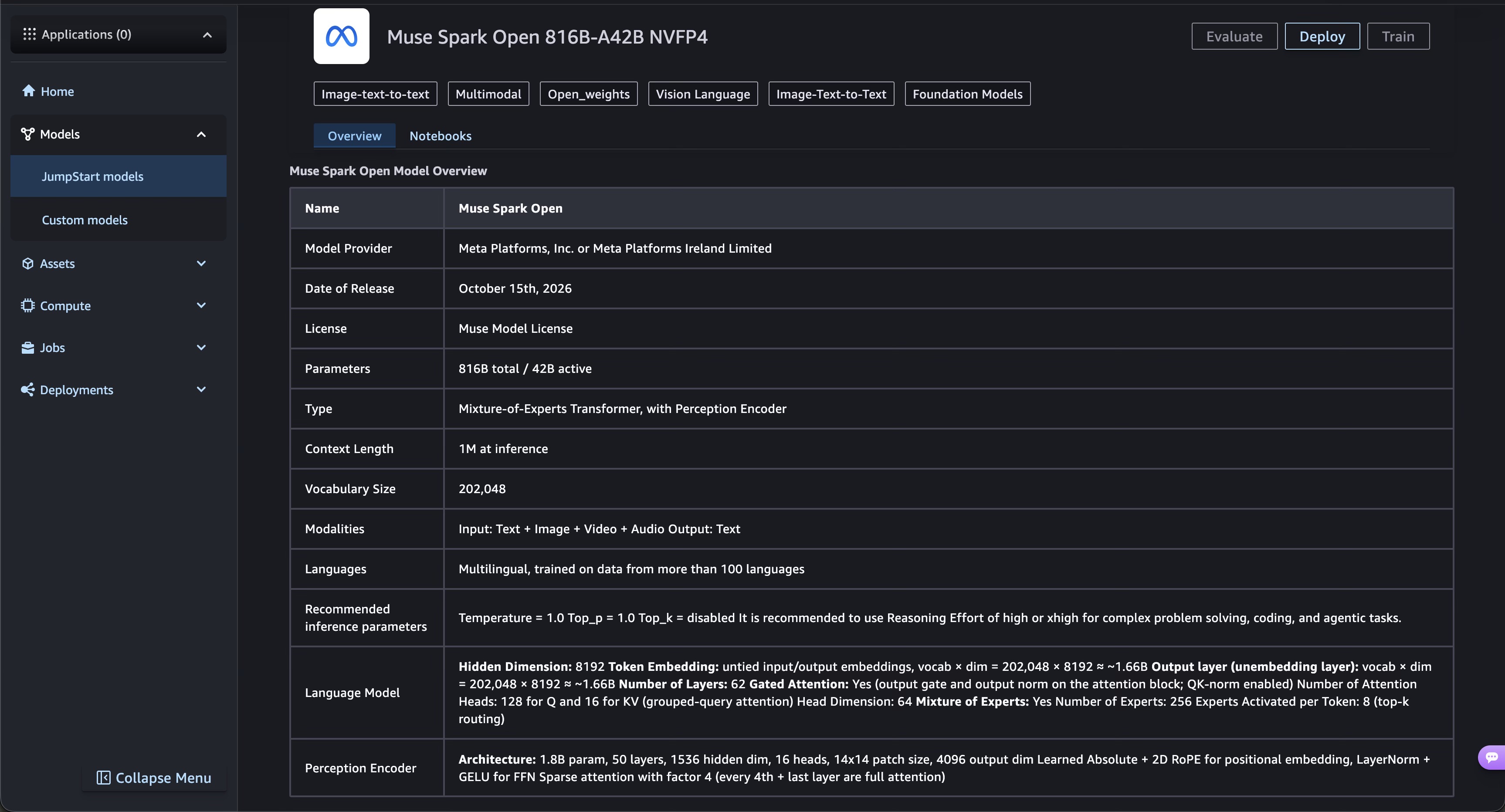
Figure 1 shows the model detail card, which lists the model description, license, and the Deploy option.
Figure 1: The Muse Spark Open model detail card in SageMaker JumpStart
To deploy the model
On the model detail card, choose Deploy.
Muse Spark Open is a gated model, so SageMaker Studio shows its end-user license agreement (EULA). Review the agreement and accept it to continue.
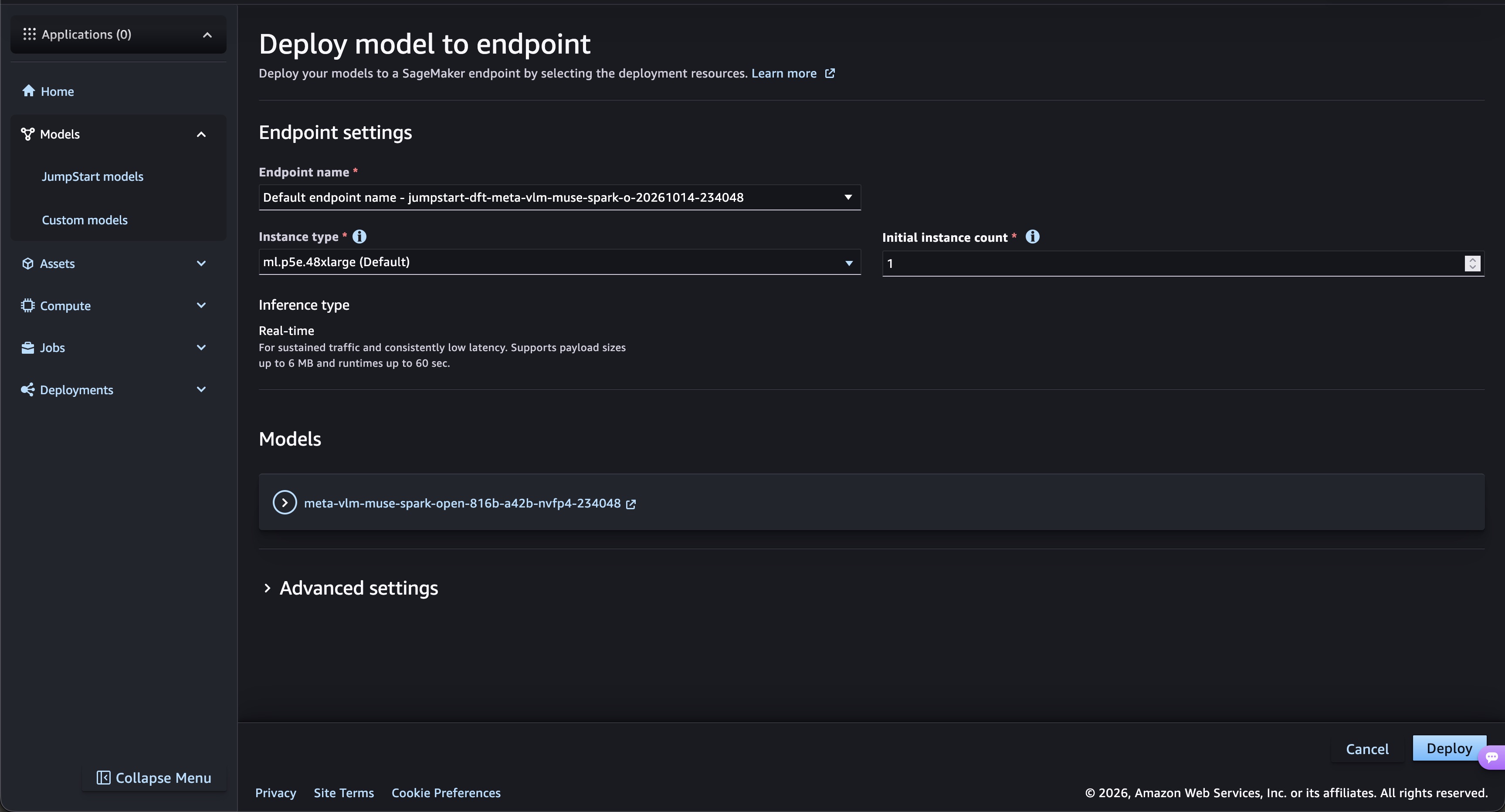
For Endpoint name, keep the generated name or enter your own.
For Instance type, select ml.p5e.48xlarge for NVFP4 or ml.p6-b300.48xlarge for BF16. SageMaker Studio lists only the instance types that the model supports.
For Initial instance count, enter 1.
(Optional) Under Advanced options, select a VPC and an AWS KMS key, or turn on network isolation.
Choose Deploy.
Figure 2 shows the deployment settings for the NVFP4 variant.
Figure 2: Deployment settings for Muse Spark Open
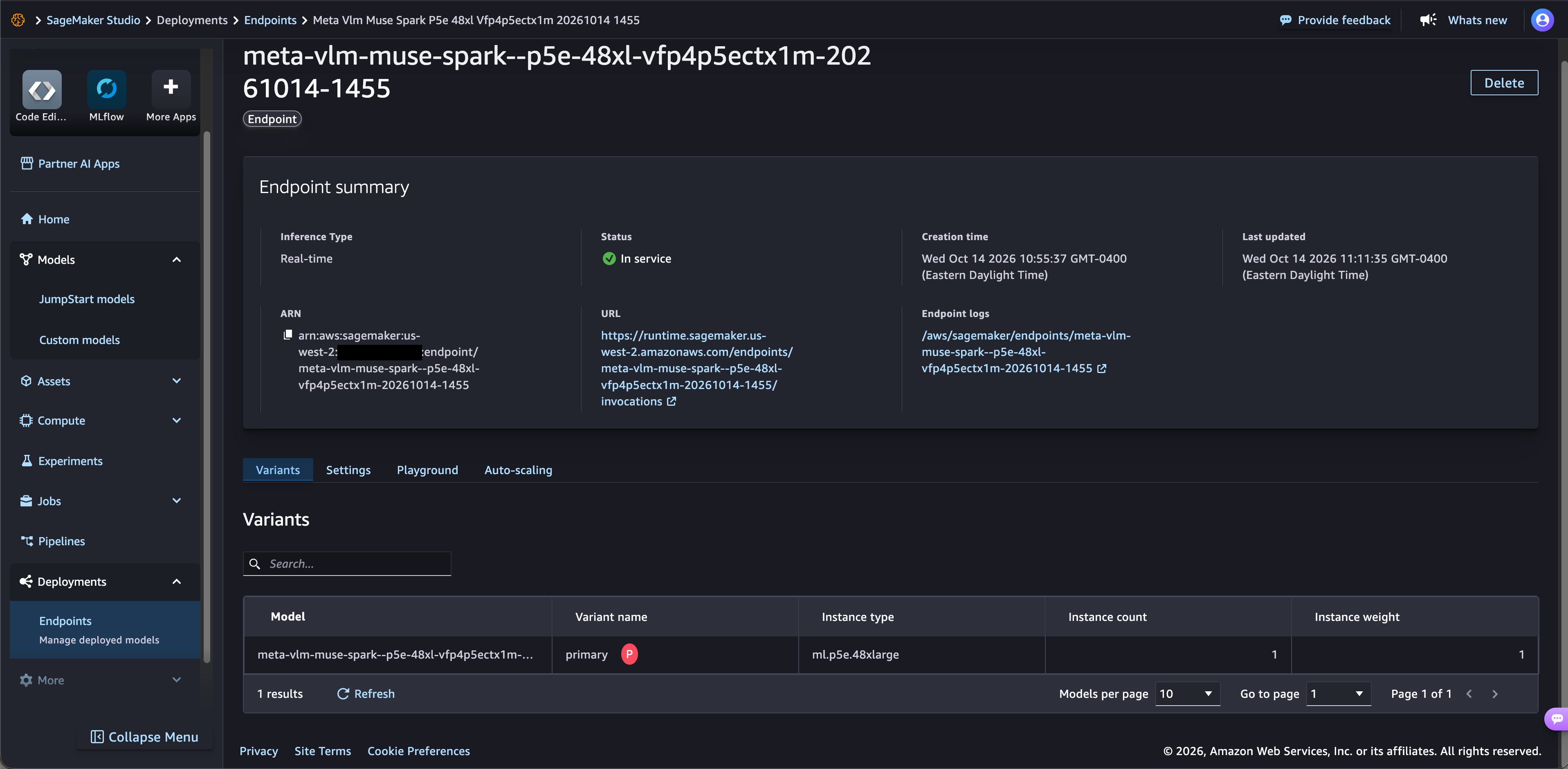
Deployment typically takes 15–20 minutes while SageMaker AI provisions the instance and loads the weights. When the endpoint status changes to InService, the endpoint is ready for requests, as shown in Figure 3.
Figure 3: The Muse Spark Open endpoint in service
Deploy using the SageMaker Python SDK
SageMaker JumpStart identifies each variant by a model ID:
BF16: meta-vlm-muse-spark-open-816b-a42b.
NVFP4: meta-vlm-muse-spark-open-816b-a42b-nvfp4.
The following code deploys the NVFP4 variant with SageMaker Python SDK v3. You can run it in a SageMaker Studio notebook, which uses your domain’s execution role. In any other Python environment with AWS credentials, pass your SageMaker AI execution role with the role_arn parameter. Muse Spark Open is a gated model, so you must set accept_eula=True to deploy it. To pin a specific model version, add model_version to JumpStartConfig.
from sagemaker.core.jumpstart.configs import JumpStartConfig
from sagemaker.serve import ModelBuilder
from sagemaker.train.configs import Compute

# NVFP4 variant; for BF16, use "meta-vlm-muse-spark-open-816b-a42b" with ml.p6-b300.48xlarge
model_id = "meta-vlm-muse-spark-open-816b-a42b-nvfp4"

jumpstart_config = JumpStartConfig(
    model_id=model_id,
    accept_eula=True,  # Confirms that you accept Meta's license terms
)

model_builder = ModelBuilder.from_jumpstart_config(
    jumpstart_config=jumpstart_config,
    compute=Compute(instance_type="ml.p5e.48xlarge"),
    # role_arn="<your-sagemaker-execution-role-arn>",  # Required outside SageMaker Studio
)

model = model_builder.build(model_name="muse-spark-open-nvfp4")
endpoint = model_builder.deploy(endpoint_name="muse-spark-open-nvfp4")
Run inference
When the endpoint is in service, send it a request with the invoke method. The endpoint accepts an OpenAI-compatible chat payload with a messages list and returns a chat completion. The final answer is in message.content, the model’s reasoning is in message.reasoning_content, and usage.reasoning_tokens reports how many tokens the reasoning used. Because Muse Spark Open is a reasoning model, leave enough room in max_tokens for its reasoning and the final answer.
import json

payload = {
    "messages": [
        {
            "role": "user",
            "content": "Write a Python function that validates ISO 8601 dates, and add pytest unit tests for it.",
        }
    ],
    "max_tokens": 4096,
}

response = endpoint.invoke(
    body=json.dumps(payload),
    content_type="application/json",
)

result = json.loads(response.body.read().decode("utf-8"))
message = result["choices"][0]["message"]
print("Reasoning:", message.get("reasoning_content"))
print("Answer:", message["content"])
The endpoint also supports streaming. To receive tokens as they’re generated, add "stream": true to the request body and call endpoint.invoke_with_response_stream instead of invoke.
Clean up
To stop incurring charges, delete the endpoint when you no longer need it. If you deployed with the SDK, delete the model, the endpoint, and the endpoint configuration:
from sagemaker.core.resources import EndpointConfig

endpoint_config = EndpointConfig.get(endpoint_config_name=endpoint.endpoint_name)
model.delete()
endpoint.delete()
endpoint_config.delete()
If you deployed from SageMaker Studio, delete the endpoint in the SageMaker AI console: choose Inference, then Endpoints, select the endpoint, and choose Actions, Delete.
Conclusion
In this post, we showed how to deploy Muse Spark Open, Meta’s coding-optimized open-weight model, from SageMaker JumpStart to an endpoint in your own AWS account. You used SageMaker Studio or the SageMaker Python SDK and sent the model a first inference request. Benchmark both variants on your own repositories before you choose an instance for production.
To get started, search for Muse Spark Open in SageMaker JumpStart in SageMaker Studio. For more deployment options, such as inference components and optimized deployment configurations, refer to JumpStart foundation model usage in the Amazon SageMaker AI Developer Guide. Before you deploy, review the Muse Model License, which SageMaker JumpStart shows when you deploy the model. For help planning a production deployment, contact AWS.
About the authors
¿Tiene un proyecto de software o plataforma SaaS en mente?
Hable directamente con nuestros arquitectos de software en SoftAndino. Le brindamos asesoría técnica y cotización inmediata sin compromiso.